IT Support Specialist Resume Examples & Free Template (PDF, Word)

Paloma’s Carvana help desk resume is already in this free IT support specialist template, ready for your own tickets and tools. Further down you’ll find 3 resume examples (junior, senior, lead) and 6 writing steps based on what I saw recruiting at Google.

4.9 5.0
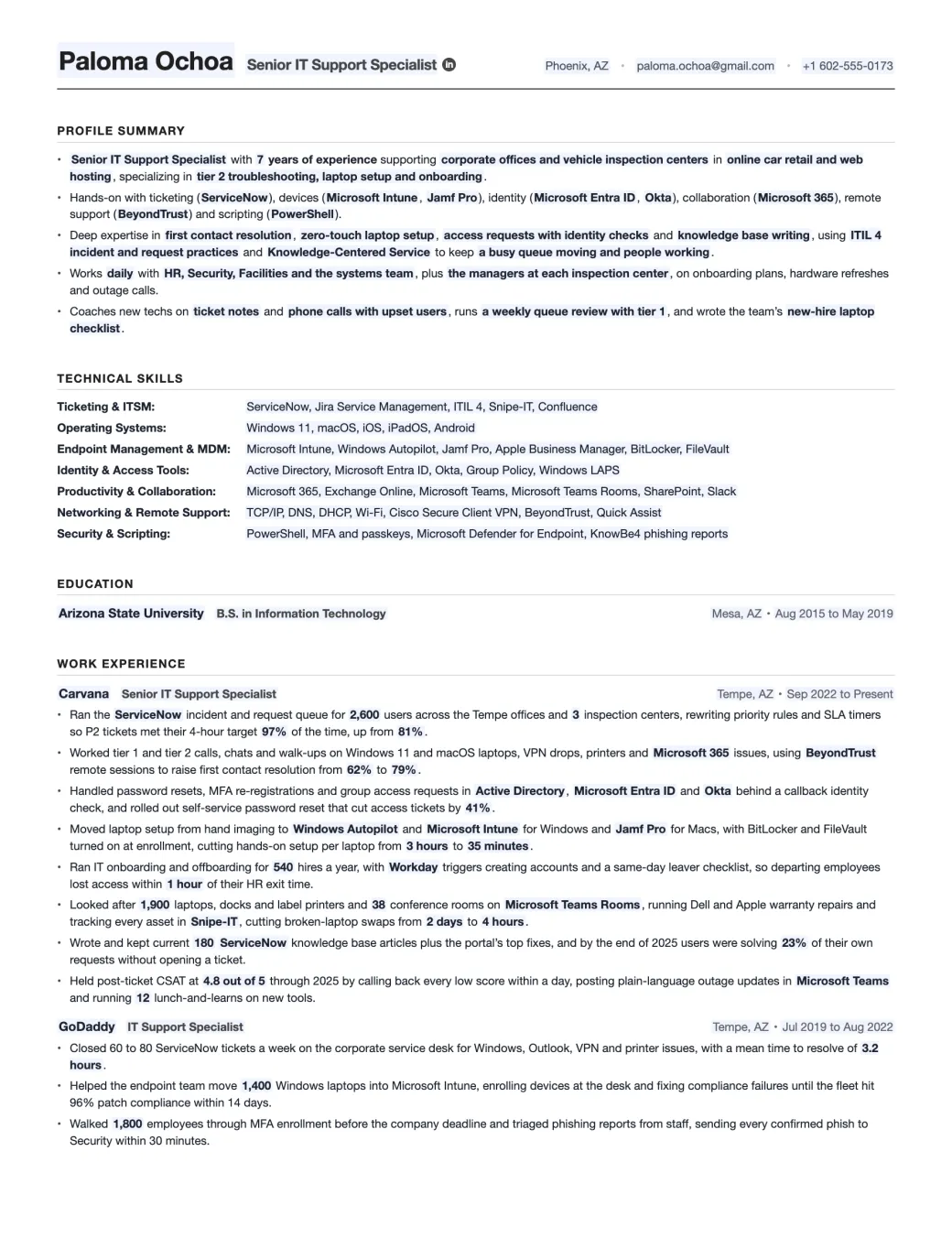
The IT Support Specialist resume template filled in for Paloma Ochoa: profile summary, technical skills, education and Carvana bullets on tickets, laptops, access requests and CSAT
Emmanuel Gendre Ex-Google recruiter / Tech resume writer Updated Free, ATS-friendly, no signup

Interactive resume template generator

Interactive IT Support Specialist Resume Template

Fill in the side panel, then download your resume as a PDF or a Word file.

Edits update live as you type. Toggle Edit to rewrite paper text directly.

Edit mode is on. Click anywhere on the resume to rewrite text. Side-panel placeholders still update live.

Paloma Ochoa Senior IT Support Specialist

Phoenix, AZ • paloma.ochoa@gmail.com • +1 602-555-0173

Profile Summary

  • Senior IT Support Specialist with 7 years of experience supporting corporate offices and vehicle inspection centers in online car retail and web hosting, specializing in tier 2 troubleshooting, laptop setup and onboarding.
  • Hands-on with ticketing (ServiceNow), devices (Microsoft Intune, Jamf Pro), identity (Microsoft Entra ID, Okta), collaboration (Microsoft 365), remote support (BeyondTrust) and scripting (PowerShell).
  • Deep expertise in first contact resolution, zero-touch laptop setup, access requests with identity checks and knowledge base writing, using ITIL 4 incident and request practices and Knowledge-Centered Service to keep a busy queue moving and people working.
  • Works daily with HR, Security, Facilities and the systems team, plus the managers at each inspection center, on onboarding plans, hardware refreshes and outage calls.
  • Coaches new techs on ticket notes and phone calls with upset users, runs a weekly queue review with tier 1, and wrote the team’s new-hire laptop checklist.

Technical Skills

Ticketing & ITSM:
ServiceNow, Jira Service Management, ITIL 4, Snipe-IT, Confluence
Operating Systems:
Windows 11, macOS, iOS, iPadOS, Android
Endpoint Management & MDM:
Microsoft Intune, Windows Autopilot, Jamf Pro, Apple Business Manager, BitLocker, FileVault
Identity & Access Tools:
Active Directory, Microsoft Entra ID, Okta, Group Policy, Windows LAPS
Productivity & Collaboration:
Microsoft 365, Exchange Online, Microsoft Teams, Microsoft Teams Rooms, SharePoint, Slack
Networking & Remote Support:
TCP/IP, DNS, DHCP, Wi-Fi, Cisco Secure Client VPN, BeyondTrust, Quick Assist
Security & Scripting:
PowerShell, MFA and passkeys, Microsoft Defender for Endpoint, KnowBe4 phishing reports

Education

Arizona State University B.S. in Information Technology
Mesa, AZ • Aug 2015 to May 2019

Work Experience

Carvana Senior IT Support Specialist
Tempe, AZ • Sep 2022 to Present
  • Ran the ServiceNow incident and request queue for 2,600 users across the Tempe offices and 3 inspection centers, rewriting priority rules and SLA timers so P2 tickets met their 4-hour target 97% of the time, up from 81%.
  • Worked tier 1 and tier 2 calls, chats and walk-ups on Windows 11 and macOS laptops, VPN drops, printers and Microsoft 365 issues, using BeyondTrust remote sessions to raise first contact resolution from 62% to 79%.
  • Handled password resets, MFA re-registrations and group access requests in Active Directory, Microsoft Entra ID and Okta behind a callback identity check, and rolled out self-service password reset that cut access tickets by 41%.
  • Moved laptop setup from hand imaging to Windows Autopilot and Microsoft Intune for Windows and Jamf Pro for Macs, with BitLocker and FileVault turned on at enrollment, cutting hands-on setup per laptop from 3 hours to 35 minutes.
  • Ran IT onboarding and offboarding for 540 hires a year, with Workday triggers creating accounts and a same-day leaver checklist, so departing employees lost access within 1 hour of their HR exit time.
  • Looked after 1,900 laptops, docks and label printers and 38 conference rooms on Microsoft Teams Rooms, running Dell and Apple warranty repairs and tracking every asset in Snipe-IT, cutting broken-laptop swaps from 2 days to 4 hours.
  • Wrote and kept current 180 ServiceNow knowledge base articles plus the portal’s top fixes, and by the end of 2025 users were solving 23% of their own requests without opening a ticket.
  • Held post-ticket CSAT at 4.8 out of 5 through 2025 by calling back every low score within a day, posting plain-language outage updates in Microsoft Teams and running 12 lunch-and-learns on new tools.
GoDaddy IT Support Specialist
Tempe, AZ • Jul 2019 to Aug 2022
  • Closed 60 to 80 ServiceNow tickets a week on the corporate service desk for Windows, Outlook, VPN and printer issues, with a mean time to resolve of 3.2 hours.
  • Helped the endpoint team move 1,400 Windows laptops into Microsoft Intune, enrolling devices at the desk and fixing compliance failures until the fleet hit 96% patch compliance within 14 days.
  • Walked 1,800 employees through MFA enrollment before the company deadline and triaged phishing reports from staff, sending every confirmed phish to Security within 30 minutes.


Done editing? Download a real PDF (selectable text, ATS-friendly, US Letter) or an editable Word file if a recruiter asks for one.

About this template

An IT Support Specialist resume template, built by a tech recruiter.

As an IT support specialist, your job is to get people working again. You run the help desk queue, fix laptop, Microsoft 365 and VPN problems by phone, chat or at the desk, and reset passwords and MFA. You also set up laptops for new hires and take access away from leavers. The job ad might say help desk technician, service desk analyst or desktop support instead. Whatever the title, you’re the first person employees call when their tech stops working.

Most help desk resumes I read could be swapped with each other. “Provided technical support to end users” plus a list of Windows, Active Directory and ServiceNow doesn’t say how good you are at it. An IT manager hiring for the desk wants the numbers your queue already tracks. That’s tickets inside SLA, first contact resolution, laptop setup time, access requests handled safely and the CSAT score your users gave you.

That’s why every bullet in Paloma’s Carvana job on this template ends on one of those numbers. You get 8 of them, covering the ticket queue, access requests, laptops, onboarding and the rest of what an IT support hire is screened on. The 3 examples come next, and then you can work through 6 steps to write an IT Support Specialist resume.

Already applying? Upload your resume in the box below and you’ll get a resume review for free, from me and not a bot. I look for the help desk bullets that read like a job description and tell you how to fix them.

Industry signal

What the market says about IT Support Specialist roles

Two changes are keeping help desks busy right now. Since September 1, Microsoft has been making passkeys the default in Entra ID, and anyone still on SMS or voice codes gets asked to register one. Microsoft stops sending those codes itself on February 1, 2027. And companies still paying for Windows 10 security updates pay double for year two, which starts this month. The BLS expects chatbots to take more of the simple troubleshooting, but somebody still has to walk people through a passkey and swap out the last old laptops.

48,700 Projected yearly openings, US computer support US Bureau of Labor Statistics
$61,860 Median pay, US computer user support specialists US Bureau of Labor Statistics
  • Binary Defense @Binary_Defense · Managed security services firm
    Resetting the password doesn't remove the MFA device the attacker registered. ARC Labs walks through how M365 extortion works with no malware, what it looks like in your logs, and the KQL to hunt it: hubs.li/Q04yWBWP0
  • Microsoft Security @msftsecurity · Microsoft's security news account
    Passkeys are becoming the default authentication experience in Microsoft Entra ID, helping organizations move beyond phishing-prone methods like SMS and voice. Learn what’s changing, key dates, and how to prepare your users for a more secure sign-in experience…
  • Freshworks Inc @FreshworksInc · Maker of Freshservice
    We just dropped the 2026 Service Desk Blueprint! Our new report breaks down why the tiered L1-L2-L3 approach no longer works and shows IT leaders how to build an AI-assisted, people-ready service desk that scales without adding headcount. Inside, you'll find how teams using…

Resume Samples

IT Support Specialist Resume Examples

A tier 1 tech and a desk lead both close tickets, yet a recruiter wants to see different things from each. Read these 3 IT support specialist resume samples in order and you’ll see what changes. The junior left T-Mobile’s phone lines for JetBlue’s service desk, the senior keeps Vinson & Elkins attorneys working, and the lead trains a shift on 3M’s St. Paul campus desk. You can download each one as a PDF or a Word file, free and with no signup.

Junior IT Support Specialist Resume Example

A junior IT support resume has to prove you can work a real queue: tickets closed against an SLA, laptops you set up, access requests you handled safely. Your first IT job doesn’t need to be big, but every bullet in it needs a number.

Years of experience
2 years in IT (5 in total)
Industry
Airline
Stack
ServiceNowMicrosoft IntuneMicrosoft 365Windows 11
Download PDF Download Word

Click to download the Junior IT Support Specialist resume example as a PDF or a Word file. Free / No signup.

Carlos Vega

Junior IT Support Specialist

Long Island City, NY · carlos.vega@gmail.com · +1 718-555-0124 · linkedin.com/in/carlosvega

Profile Summary

  • Junior IT Support Specialist with 2 years on the service desk at JetBlue’s Long Island City support center, after 3 years of customer care at T-Mobile fixing phones and home internet.
  • Hands-on with ticketing (ServiceNow), device setup (Microsoft Intune, Windows Autopilot), accounts (Active Directory, Entra ID), Microsoft 365 and remote support (BeyondTrust).
  • Strongest at tier 1 troubleshooting on Windows 11 and Microsoft 365, password and MFA requests and clear ticket notes, and learning PowerShell by scripting small account tasks with a senior reviewing them.
  • Works with senior support specialists, the identity team and HR, covering the weekly new-hire laptop sessions and the walk-up desk on rotation.
  • Holds CompTIA A+ and the Google IT Support Certificate, writes up the fixes he repeats most as KB articles, and shows new tier 1 hires around the queue.

Technical Skills

Ticketing & ITSM:
ServiceNow (incidents and requests), ITIL 4 Foundation basics
Operating Systems:
Windows 11, macOS (basic), iOS
Endpoint Management & MDM:
Microsoft Intune, Windows Autopilot, BitLocker recovery
Identity & Access Tools:
Active Directory, Microsoft Entra ID, MFA resets
Productivity & Collaboration:
Microsoft 365, Outlook, Microsoft Teams, OneDrive
Networking & Remote Support:
TCP/IP basics, DNS, Wi-Fi, Cisco Secure Client VPN, BeyondTrust
Security & Scripting:
PowerShell (learning), phishing reports, KnowBe4
Page 2 of 2

Work Experience

JetBlue Airways Junior IT Support Specialist Long Island City, NY · Oct 2024 to Present
  • Close about 45 ServiceNow tickets a week for support center crewmembers on Windows 11 laptops, Outlook, Teams and VPN problems, keeping P3 tickets inside their SLA 96% of the time.
  • Reset passwords and re-register MFA in Active Directory and Entra ID only after a callback identity check, and helped cut lockout tickets by 30% after self-service reset went live.
  • Set up 140 Windows 11 laptops through Windows Autopilot and Intune in the 2025 refresh, checking BitLocker and core apps before each handoff at the weekly new-hire sessions.
  • Swap docks, monitors and headsets at the walk-up desk and send failed laptops back under Dell warranty, closing 9 in 10 hardware tickets the same day.
  • Wrote 14 knowledge base articles on lockouts, MFA on a new phone and Teams audio problems, which tier 1 now links in its ticket notes every day.
T-Mobile Customer Care Representative New York, NY (remote) · Jun 2021 to Sep 2024
  • Took 50 to 70 calls a day on billing, phone setup and home internet, walking customers through Wi-Fi and gateway fixes and holding a 4.7 out of 5 survey score.
  • Moved up to the device support team after solving pairing, eSIM and hotspot problems without a transfer on 78% of calls.
  • Coached 5 new reps through their first month on the phones, sharing call notes and a step-by-step way to calm down upset callers.

Education

LaGuardia Community College (CUNY) A.A.S. in Network Administration and Information Security Long Island City, NY · Sep 2019 to Jun 2021

Senior IT Support Specialist Resume Example

At senior level, hiring managers stop counting your tickets and start looking at the hard ones: tier 2 escalations, access to sensitive data, VIP users. Show the fixes other techs now use, like a script or a playbook, and the satisfaction score you hold with your toughest users.

Years of experience
8 years
Industry
Law firm
Stack
ServiceNowMicrosoft IntuneCitrixPowerShell
Download PDF Download Word

Click to download the Senior IT Support Specialist resume example as a PDF or a Word file. Free / No signup.

Anika Kapoor

Senior IT Support Specialist

Houston, TX · anika.kapoor@gmail.com · +1 713-555-0156 · linkedin.com/in/anikakapoor

Profile Summary

  • Senior IT Support Specialist with 8 years in legal and hospital IT, now supporting about 600 attorneys and staff in Vinson & Elkins’ Houston office, with a focus on white-glove attorney support.
  • Hands-on with ticketing (ServiceNow), devices (Microsoft Intune, Windows Autopilot), identity (Active Directory, Entra ID), legal apps (iManage Work, Citrix Workspace) and scripting (PowerShell).
  • Deep expertise in tier 2 escalations, matter-based access requests and lateral hire onboarding, using ITIL 4 practices and short runbooks so attorneys lose as little billable time as possible.
  • Works with Records, Risk and litigation support and the firm’s practice group assistants on trial setups, deposition tech checks and after-hours coverage.
  • Leads the weekend on-call rotation, mentors 3 tier 1 technicians on attorney-facing calls, and wrote the office’s lateral hire IT playbook.

Technical Skills

Ticketing & ITSM:
ServiceNow, ITIL 4 Foundation, Confluence
Operating Systems:
Windows 11, macOS, iOS, iPadOS
Endpoint Management & MDM:
Microsoft Intune, Windows Autopilot, BitLocker, Jamf Pro (basic)
Identity & Access Tools:
Active Directory, Microsoft Entra ID, Group Policy, Conditional Access
Productivity & Collaboration:
Microsoft 365, Exchange Online, Microsoft Teams, iManage Work, Citrix Workspace
Networking & Remote Support:
TCP/IP, DNS, Cisco Secure Client VPN, Wi-Fi, BeyondTrust
Security & Scripting:
PowerShell, MFA, Mimecast, KnowBe4
Page 2 of 2

Work Experience

Vinson & Elkins LLP Senior IT Support Specialist Houston, TX · Mar 2022 to Present
  • Run tier 2 escalations in ServiceNow for the Houston office’s 600 attorneys and staff, and cut tickets reopened within a week from 9% to 3% by calling users back before closing.
  • Set up matter-based access in Active Directory and iManage for confidential client work with Records and Risk, with zero findings across 6 internal access audits.
  • Wrote a PowerShell script for new attorney accounts, mailboxes, shared drives and iManage workspaces, cutting lateral hire setup from 45 minutes to 10 minutes.
  • Moved the office’s Surface and ThinkPad laptops from hand imaging to Intune and Windows Autopilot, so a new laptop now reaches an attorney ready to use in 1 day instead of 3.
  • Hold a 4.9 out of 5 partner satisfaction score through weekend on-call and trial support, prepping courtroom laptops, hotspots and Teams links before each hearing.
Memorial Hermann Health System IT Support Specialist Houston, TX · Jun 2018 to Feb 2022
  • Resolved about 70 tickets a week for clinic and back-office staff on Windows 10, Citrix and badge readers, and replaced failed label printers on nursing units within 2 hours of the call.
  • Wrote 52 knowledge base articles on Citrix sign-in, MFA and Epic printer mapping, which became the first link tier 1 sent for those tickets.
  • Shipped and set up 380 laptops in 6 weeks during the 2020 move to remote work, so billing and scheduling staff could work from home.

Education

University of Houston B.S. in Computer Information Systems Houston, TX · Aug 2014 to May 2018

Lead IT Support Specialist Resume Example

A lead IT support resume covers the whole desk, not just your own queue. Show the SLA and CSAT numbers your shift answers for, the techs you trained, and the repeat problems you got rid of for good.

Years of experience
11 years
Industry
Manufacturing
Stack
ServiceNowMicrosoft IntuneJamf ProMicrosoft Teams
Download PDF Download Word

Click to download the Lead IT Support Specialist resume example as a PDF or a Word file. Free / No signup.

Henrik Christensen

Lead IT Support Specialist

St. Paul, MN · henrik.christensen@gmail.com · +1 651-555-0182 · linkedin.com/in/henrikchristensen

Profile Summary

  • Lead IT Support Specialist with 11 years in manufacturing and medical device IT, leading a shift on the St. Paul campus service desk that supports about 9,000 people in offices and labs.
  • Hands-on with ticketing (ServiceNow), devices (Microsoft Intune, Jamf Pro), identity (Entra ID, Okta), meeting rooms (Microsoft Teams Rooms) and scripting (PowerShell).
  • Deep expertise in SLA and queue design, major incident updates and problem reviews on repeat tickets, using ITIL 4 and Knowledge-Centered Service to shrink whole ticket categories.
  • Works with the endpoint engineering, identity and security teams and site leaders at 4 Minnesota plants in monthly service reviews, refresh planning and outage calls.
  • Leads a shift of 9 technicians, trains every new tier 1 hire, runs the monthly knowledge base review, and sits on the hiring panel for service desk roles.

Technical Skills

Ticketing & ITSM:
ServiceNow (ITSM, Knowledge, Performance Analytics), ITIL 4, KCS
Operating Systems:
Windows 11, macOS, iOS, Android
Endpoint Management & MDM:
Microsoft Intune, Windows Autopilot, Jamf Pro, Apple Business Manager, BitLocker, FileVault
Identity & Access Tools:
Active Directory, Microsoft Entra ID, Okta, Windows LAPS
Productivity & Collaboration:
Microsoft 365, Microsoft Teams, Microsoft Teams Rooms, SharePoint
Networking & Remote Support:
TCP/IP, DNS, DHCP, Wi-Fi, GlobalProtect VPN, TeamViewer
Security & Scripting:
PowerShell, MFA and passkeys, CrowdStrike Falcon, Microsoft Graph PowerShell
Page 2 of 2

Work Experience

3M Lead IT Support Specialist St. Paul, MN · Apr 2020 to Present
  • Rebuilt the campus desk’s ServiceNow assignment rules and SLA dashboards, taking P2 tickets resolved inside SLA from 84% to 96% on a queue of about 4,000 tickets a month.
  • Trained a shift of 9 technicians on tier 2 troubleshooting and clean escalations to endpoint and network teams, raising first contact resolution from 64% to 77%.
  • Led the desk’s part of the Windows 11 upgrade with Intune and weekend upgrade clinics, getting 7,800 laptops moved before Windows 10 support ended in October 2025.
  • Ran problem reviews on the 10 most common repeat tickets and turned the fixes into KB articles and portal forms, cutting monthly password and printer tickets by 37%.
  • Raised the desk’s CSAT from 4.3 to 4.7 out of 5 by calling back every low score the same day and sending plain-language updates during major incidents.
Medtronic IT Support Specialist Minneapolis, MN · Jun 2015 to Mar 2020
  • Handled about 300 access requests a month in Active Directory and Okta, cutting average fulfillment time from 2 days to 4 hours with role-based group templates.
  • Prepared laptops, accounts and first-day walkthroughs for 1,100 new hires a year across the Fridley and Mounds View campuses, with every laptop ready on the start date.
  • Looked after 60 conference rooms and the lab label printers, replacing worn parts on a schedule and cutting room and printer tickets by 58% in a year.

Education

University of Minnesota Twin Cities B.S.B. in Management Information Systems Minneapolis, MN · Sep 2011 to May 2015

Free resume review

A recruiter screen, but with feedback

You applied to hundreds of jobs: no result. Companies won’t give you feedback, so you’re stuck in a loop. Rejections will keep coming until you know what’s wrong.

Let’s break this cycle today!

I’ll screen your resume the same way I did at Google.

You’ll get:

  • Your resume sections and content scored.
  • A clear list of what to improve, why, and how.
  • Behind the scenes secrets on the screening process.

How I rewrite IT Support Specialist resumes

How to write an IT Support Specialist resume

Emmanuel Gendre, ex-Google recruiter

Emmanuel Gendre Ex-Google recruiter, tech resume writer

Hiring was my world for 13 years, a long stretch of it at Google, and I’ve brought that screener’s eye to every resume I’ve rewritten since. Here’s what I notice on IT support ones: the person sounds smaller than they are. Someone who keeps 2,000 people working writes “Resolved tickets and assisted users”, and the recruiter has no idea how many users, how many tickets or how fast.

When I work as someone’s technical resume writer on a help desk resume, the first job is digging those numbers out of their ServiceNow or Zendesk reports, and then every bullet gets built around one. If you’re doing it yourself, though, focus on these 6 steps. Every step uses Paloma’s resume as the example, so you’ll see the advice in a real bullet.

  1. Step 1 Format & layout A plain layout the ATS can parse, saved as a PDF. Go to step 1
  2. Step 2 Profile Summary Who you support, with what tools, at what tier, in 5 bullets. Go to step 2
  3. Step 3 Work Experience Paloma’s 8 Carvana bullets, one per IT support competency. Go to step 3
  4. Step 4 Bullet Points A laptop setup change, built up from the task to the number. Go to step 4
  5. Step 5 Technical Skills The 7 rows of tools help desk ads list, then 5 soft skills. Go to step 5
  6. Step 6 Keywords & Metrics The keywords that matter most, and 24 numbers you can put on your work. Go to step 6

Step 1 · Format & Layout

IT Support Specialist resume format and layout

You probably fix formatting problems for other people all day, so this part should feel familiar. Your file gets judged twice before anyone calls you: first by the ATS that sorts it, then by a recruiter who spends a few seconds on it. Three choices keep both happy: ATS compliance, page layout and file format.

01ATS Compliance

ATS compliance for your IT Support Specialist resume

The help desk job you want is almost certainly posted through Workday, iCIMS or Greenhouse, which are all Applicant Tracking Systems (ATS). Behind the scenes, the software cuts your resume into labeled pieces and stores them, and a recruiter later looks you up by typing tool names such as “Intune” or “Okta”. When a two-column layout confuses the parser, your tickets and tools land in the wrong fields and you don’t come up at all. I’ve explained the way an ATS parses your file on its own page. Keeping your ServiceNow and Intune experience on the recruiter’s radar comes down to 3 rules:

The 3 rules
  1. Use a 100% text based format (no Canva!)

  2. Avoid tables, pictures, and complex structures.

  3. Use the most predictable section names, like “Profile Summary” and “Work Experience”

02Design & Layout

IT Support Specialist resume design and layout

I’ve seen help desk resumes with a headshot, a skill bar rating Windows at 95% and a little phone icon beside the phone number. I understand wanting to look different, but recruiters hate fancy designs. Google taught me that: by mid-afternoon on a screening day, all I wanted was the job title and dates in their usual place.

So I made this template boring and predictable, and I’d tell you to do the same with yours. The only things on it that should stand out are your numbers: SLA, first contact resolution, CSAT. Making yours from scratch in a word processor? Copy the specs below.

Layout Spec
Columns
One. No sidebars, tables, columns, pictures or tabs.
Margins
0.7 in on all four sides
Body size
10 to 11 pt
Type
One family, weight for hierarchy
Length
One page under 5 years, two after
Section order
Summary, Skills, Experience, Education
PDF

03File Format

Resume file format for your IT Support Specialist resume

PDF should be your default. Every major ATS pulls clean text out of it, and nobody’s font settings can shift your layout. Word is for the exceptions: an ad that asks for .docx, or a staffing agency planning to rebrand your resume before it goes to a client, which happens a lot with help desk contracts. The rest is in my article on picking a resume file format.

Format Guide
PDF
Your default. Layout holds, text stays selectable.
Word (.docx)
When the posting or a recruiter asks for it. Use the Word download above.
Plain text
For portals that make you paste into a box
Never
Images, scans, password-protected PDFs, shared-drive links
File name
Paloma-Ochoa-IT-Support-Specialist.pdf

Step 2 · Profile Summary

IT Support Specialist profile summary

Even after just a year of tier 1, you need a profile summary. The first recruiter screen is fast and only covers the top of your resume: your title, years, tools and the kind of users you support. If that part’s vague, the second, slower read never happens. My article on what happens in each screening round explains both.

On a help desk resume, the summary settles 3 questions before the recruiter scrolls. Tier 1, tier 2 or shift lead? Which ticketing, device and identity tools are part of your day? Will users, HR and security be glad they’ve got you? Paloma’s version of each bullet is below. For the method itself, read my profile summary walkthrough.

  1. 1

    Title, years and scope

    Open on the title from the job ad, then your years in support, who you look after (headcount, offices, sites) and your strongest areas. Recruiters read tier and scale here first, so put both in that one line.

  2. 2

    Your stack

    The ticketing, device management, identity and remote support tools you use daily, each under a plain label: ticketing (ServiceNow), devices (Intune, Jamf), identity (Okta). Use the job ad’s exact product names, and don’t swap in your own.

  3. 3

    Domain expertise

    The 4 strengths you’d want a hiring manager to remember, like first contact resolution or zero-touch laptop setup. Add the method you use (ITIL, Knowledge-Centered Service) and what users get out of it.

  4. 4

    Collaboration

    Who you deal with weekly (HR, security, facilities, the systems team) and in what setting: onboarding plans, hardware refreshes, outage calls. The help desk touches every department, so recruiters check that you’re easy to work with.

  5. 5

    Leadership

    Something the desk still uses after you log off: a checklist, KB articles, a new tech you trained. No lead title needed, and it’s often what gets a tier 1 tech hired at tier 2.

IT Support Specialist resume summary example, from the template above
  • Senior IT Support Specialist with 7 years of experience supporting corporate offices and vehicle inspection centers in online car retail and web hosting, specializing in tier 2 troubleshooting, laptop setup and onboarding.
  • Hands-on with ticketing (ServiceNow), devices (Microsoft Intune, Jamf Pro), identity (Microsoft Entra ID, Okta), collaboration (Microsoft 365), remote support (BeyondTrust) and scripting (PowerShell).
  • Deep expertise in first contact resolution, zero-touch laptop setup, access requests with identity checks and knowledge base writing, using ITIL 4 incident and request practices and Knowledge-Centered Service to keep a busy queue moving and people working.
  • Works daily with HR, Security, Facilities and the systems team, plus the managers at each inspection center, on onboarding plans, hardware refreshes and outage calls.
  • Coaches new techs on ticket notes and phone calls with upset users, runs a weekly queue review with tier 1, and wrote the team’s new-hire laptop checklist.

Step 3 · Work Experience

IT Support Specialist work experience

Get through the summary and you earn the slower read, usually from the IT manager you’d report to. Here’s the part people underestimate: 95% of what they decide rests on your current job. Nothing else on the page shows them so clearly how you’d handle their queue next month.

That’s where the IT Support role profile comes in. It’s the set of 8 competencies a hiring team ticks off as they read, and each one deserves a bullet in your current job. Skip access requests or onboarding and the manager assumes somebody else did that work. Here are the 8, in the order I’d list them.

IT Support Specialist role profile
  1. Ticket Queue & SLA Management

    You run the ticket queue and keep it on time. Users don’t stay quiet when tickets sit for days, so an IT manager wants your SLA numbers rather than “handled tickets”. Show how you used priority rules and ServiceNow SLA timers to close more tickets inside their target.

    Techniques
    ticket triage, priority rules, SLA tracking, backlog cleanup
    Tools
    ServiceNow, Zendesk, Jira Service Management, Freshservice
    Metrics
    tickets inside SLA, open backlog, aging tickets, time to resolve
  2. Tier 1 & Tier 2 Troubleshooting

    You fix the problem while the user is still on the line. Every escalation costs another team’s time and the user another hour, so expect a question on first contact resolution in the interview. Explain how BeyondTrust remote sessions and a clear escalation path let you fix more on the first call.

    Techniques
    remote diagnosis, root cause checks, warm escalations, VPN and Wi-Fi fixes
    Tools
    BeyondTrust, TeamViewer, Quick Assist, Cisco Secure Client
    Metrics
    first contact resolution, escalation rate, reopen rate
  3. Account & Access Requests

    You give people the access they need and nothing more. Attackers phone help desks pretending to be employees, and a reset without an identity check is how some breaches start. Describe how you used Entra ID and self-service password reset to cut access tickets without cutting corners.

    Techniques
    identity checks, group-based access, MFA and passkey resets, access reviews
    Tools
    Active Directory, Entra ID, Okta, Windows LAPS
    Metrics
    access tickets, fulfillment time, verified resets
  4. Endpoint Setup & Device Management

    You set up laptops that work the first time a new hire opens them. A clumsy setup burns someone’s first morning and an unencrypted laptop is a security hole, so IT managers ask how you build devices. Detail how you used Windows Autopilot and Jamf to cut setup time and keep every device encrypted.

    Techniques
    zero-touch enrollment, app deployment, patching, disk encryption
    Tools
    Intune, Windows Autopilot, Jamf Pro, Apple Business Manager
    Metrics
    setup time per device, patch compliance, encryption coverage
  5. Onboarding & Offboarding

    You get new hires working on day one and close out leavers the same day. HR judges the whole IT team on that first morning, and an account left open after someone quits turns up in every audit. Mention the Workday triggers and leaver checklist you used to remove access within hours.

    Techniques
    day-one setup, HR-triggered accounts, same-day deprovisioning, device recovery
    Tools
    Workday, BambooHR, Okta, ServiceNow
    Metrics
    new hires set up, time to revoke access, devices recovered
  6. Hardware, Peripherals & Meeting Rooms

    You handle the physical gear: laptops, docks, printers and conference rooms. Executives notice a dead room before a client call, and a slow laptop swap costs someone a full day, so turnaround matters. Let them know how warranty repairs and Snipe-IT asset tracking helped you replace broken laptops faster.

    Techniques
    warranty repairs, asset tagging, meeting room checks, printer upkeep
    Tools
    Snipe-IT, Lansweeper, Microsoft Teams Rooms, Zoom Rooms
    Metrics
    swap turnaround, inventory accuracy, room tickets
  7. Knowledge Base & Self-Service

    You write down every fix you’d hate to explain twice. Good articles let tier 1 close tickets without escalating and let users solve simple problems alone, and that’s the cheapest support a company can get. Write about the ServiceNow articles and self-service portal you built, and how many requests users now solve on their own.

    Techniques
    KB article writing, Knowledge-Centered Service, request catalog forms, runbooks
    Tools
    ServiceNow Knowledge, Confluence, Zendesk Guide
    Metrics
    self-service rate, articles maintained, repeat tickets
  8. User Communication & Satisfaction

    You keep users informed and happy, even on a bad day. A tech who explains things clearly gets fewer repeat calls and better survey scores, and CSAT is often on the hiring manager’s own scorecard. Point out how callbacks on low scores and plain-language outage updates helped you raise or hold your CSAT.

    Techniques
    callbacks on low scores, outage updates, VIP support, short trainings
    Tools
    ServiceNow surveys, Microsoft Teams, Slack, Zendesk
    Metrics
    CSAT, VIP response time, training attendance

Working at an MSP with lots of small clients? Keep the 8 areas, but count across every client you cover: total users, tickets a week, laptops set up. That way a hiring manager can compare you with an in-house tech on the same numbers.

Submit your resume for a free review!

Step 4 · Bullet Points

IT Support Specialist resume bullet points

Ask a help desk tech to describe their job and you’ll get a list of tasks. A bullet needs more, so every resume I write goes through my Level System. Its starting point is Google’s XYZ formula, and over time I added the details technical readers expect: the approach, the tools and the method. The long version lives in my guide to IT resume bullet points.

Each level is a question. What did you do? How? With which tools? Following what method? And what’s different because of it? On a help desk, the answer to that last one tends to be minutes, a share of tickets or a survey score. Below, Paloma’s laptop setup bullet grows from 6 words to 45.

  1. Level 1Task

    What did I work on? Start with something you changed, not something you were assigned. The task is the first thing a recruiter reads, so make it specific.

    Rebuilt laptop setup for new hires.

  2. Level 2+ Techniques

    How did I do it? Add the approach you chose. “Zero-touch enrollment” tells a manager you know modern device setup, not just imaging.

    Rebuilt laptop setup for new hires by switching from hand imaging to zero-touch enrollment and pre-assigning apps by department.

  3. Level 3+ Tools

    What tools did I use? Write the product names from the job ad. Recruiters search for “Intune” and “Jamf”, never for “device tools”.

    Rebuilt laptop setup for new hires by switching from hand imaging to zero-touch enrollment and pre-assigning apps by department in Windows Autopilot, Microsoft Intune and Jamf Pro.

  4. Level 4+ Method

    What method did I follow? Say how you rolled it out safely. A pilot group shows you won’t break 500 laptops on a Monday morning.

    Rebuilt laptop setup for new hires by switching from hand imaging to zero-touch enrollment and pre-assigning apps by department in Windows Autopilot, Microsoft Intune and Jamf Pro, after piloting it with one department first.

  5. Level 5+ Metric

    What was the result? End on one number you can explain, like minutes saved per laptop. That’s the part of the bullet the interviewer will ask about.

    Rebuilt laptop setup for new hires by switching from hand imaging to zero-touch enrollment and pre-assigning apps by department in Windows Autopilot, Microsoft Intune and Jamf Pro, after piloting it with one department first, cutting hands-on setup per laptop from 3 hours to 35 minutes.

    1. 01 Task What you worked on
    2. 02 Techniques How you did it
    3. 03 Tools The stack you used
    4. 04 Method The method you followed
    5. 05 Metric The result, one number

Your numbers are probably sitting in a report you’ve never opened. ServiceNow and Zendesk track SLA, first contact resolution and CSAT, Intune and Jamf know how many devices you enrolled, and HR knows how many people you onboarded. Export those reports before you touch the resume.

Step 5 · Technical Skills

IT Support Specialist resume skills

Help desk ads tend to sort what they want into 7 groups: ticketing and ITIL, operating systems, device management, identity tools, productivity apps, networking and remote support, and security with a bit of scripting. Copy their product names word for word. “Troubleshooting skills” and “hardware knowledge” don’t mean anything to an ATS search, while “Jamf” and “Okta” do.

Each tool you list should appear again in a bullet, so the recruiter can see where you used it. A junior with 12 real tools beats a list of 30 copied from job ads. Next come the 7 categories with my starred picks, the skills rows from Paloma’s resume, and the soft skills help desk managers check. Keywords get their own step next.

The 7 skill categories for an IT Support Specialist resume

The stars mark what most help desk ads want, so they go first in each row. Skip levels like “advanced”, since nobody can check them.

Ticketing & ITSM

The tool your queue lives in, plus the ITIL terms around it. ServiceNow and Jira Service Management come up most often in help desk ads, and an asset or knowledge tool rounds out the row.

ServiceNowJira Service ManagementITILZendeskFreshserviceConfluence

Operating Systems

Windows 11 and macOS are the pair employers expect, so they’re starred. Add iOS, iPadOS and Android if you support company phones and tablets.

Windows 11macOSiOSiPadOSAndroidUbuntu

Endpoint Management & MDM

How you set up and control devices. Intune covers Windows in most Microsoft shops and Jamf covers Macs, while Autopilot or Apple Business Manager shows you can do zero-touch setup.

IntuneJamfWindows AutopilotApple Business ManagerSCCMBitLockerFileVault

Identity & Access Tools

Where accounts and access live. Active Directory still appears on a lot of ads, with Entra ID or Okta for cloud sign-in, and Windows LAPS shows you handle local admin passwords properly.

Active DirectoryEntra IDOktaGroup PolicyWindows LAPS

Productivity & Collaboration

The apps behind most of your tickets. Put Microsoft 365 or Google Workspace first, then Teams, Exchange Online and the meeting room systems you keep running.

Microsoft 365Microsoft TeamsExchange OnlineSharePointMicrosoft Teams RoomsGoogle WorkspaceSlack

Networking & Remote Support

Enough networking to fix a user’s connection: TCP/IP, DNS, DHCP, Wi-Fi and the VPN client. Add your remote support tool, since most tickets get fixed without walking to anyone’s desk.

TCP/IPDNSVPNDHCPWi-FiCisco Secure ClientGlobalProtectTeamViewerQuick Assist

Security & Scripting

MFA, endpoint protection and phishing reports now land on the help desk too. A little PowerShell for account or device tasks will move you toward tier 2.

PowerShellMFAMicrosoft DefenderCrowdStrikeKnowBe4BashPython

A finished IT Support Specialist skills section

Technical Skills sample, from the template above
Ticketing & ITSM
ServiceNow, Jira Service Management, ITIL 4, Snipe-IT, Confluence
Operating Systems
Windows 11, macOS, iOS, iPadOS, Android
Endpoint Management & MDM
Microsoft Intune, Windows Autopilot, Jamf Pro, Apple Business Manager, BitLocker, FileVault
Identity & Access Tools
Active Directory, Microsoft Entra ID, Okta, Group Policy, Windows LAPS
Productivity & Collaboration
Microsoft 365, Exchange Online, Microsoft Teams, Microsoft Teams Rooms, SharePoint, Slack
Networking & Remote Support
TCP/IP, DNS, DHCP, Wi-Fi, Cisco Secure Client VPN, BeyondTrust, Quick Assist
Security & Scripting
PowerShell, MFA and passkeys, Microsoft Defender for Endpoint, KnowBe4 phishing reports

Soft skills for an IT Support Specialist resume

Writing “patient” or “people person” under skills proves nothing. A short story with a number does. The 5 soft skills below are the ones help desk managers screen for, each with a proof bullet.

  • Staying patient with a user who’s angry and late for a meeting

    Resume bulletGot a director’s client pitch running on a laptop 4 minutes after the Teams Room failed.

  • Explaining a fix without making anyone feel slow

    Resume bulletRewrote the most-read KB articles in plain English for warehouse and sales staff, cutting repeat tickets on those topics by 26%.

  • Saying no to a password reset until the caller proves who they are

    Resume bulletStopped 3 social engineering attempts in 2025 by calling back every reset request on the phone number on file.

  • Owning a ticket until the user confirms it’s fixed

    Resume bulletKept a recurring VPN drop open for 3 weeks until the vendor’s Wi-Fi driver fix reached all 140 laptops.

  • Showing a new tier 1 tech how to work the queue

    Resume bulletTrained 6 new tier 1 techs with a 2-week shadow plan, and all 6 ran the full queue alone by week 3.

Step 6 · Keywords & Metrics

IT Support Specialist resume keywords and metrics

This step’s about being found and being believed. Keywords get you found: recruiters search their ATS with tool names copied from the posting, so “Jamf” on your page matters more than “Mac support”. Metrics get you believed, because an IT manager trusts 79% first contact resolution far more than “excellent troubleshooter”.

You’ll get the help desk keywords sorted by importance, a scanner that’s ready for a real posting, and 24 metrics already written into bullets.

+42%

IT Support Specialist resume keywords, ranked

Tap any keyword to see the kind of sentence a job ad wraps around it. “Service desk”, “help desk” and “IT support” often mean the same job, so it’s worth matching the ad’s word.

Must-have

8

These go everywhere: the summary, the matching skills row and a bullet in your current job.

In a job description“Log, triage and resolve incidents and service requests in ServiceNow”

Strong supporting

11

Add the ones you really use to your skills rows, and back each with a bullet.

In a job description“Deliver friendly, professional support to employees at every level”

Bonus

7

Nice extras. Add them when they’re true, but they won’t make up for a missing must-have.

In a job description“Experience with Jira Service Management or a similar ITSM tool”

Extract IT Support Specialist keywords from a job description

Got an IT support, help desk or service desk posting open in another tab? Copy its text into the box. You’ll see every tool, certification and skill it mentions, ranked, so you can tell which ones your skills rows are missing.

Must-have
Put these in your skills section and back each one with a bullet.
Strong supporting
Add the ones you’ve actually worked with. Skip the rest.

Nothing is uploaded: it all happens in your browser.

Metrics for an IT Support Specialist resume

You get 3 metrics per competency, each worked into a bullet from Paloma’s Carvana or GoDaddy job. Pick the one that fits each of your bullets best.

MetricExample bullet
Ticket queue & SLAs
SLA attainment Percent Share of tickets resolved inside their response and resolution targets.Rewrote ServiceNow priority rules and SLA timers for 2,600 users, lifting P2 tickets resolved on time from 81% to 97%.
Ticket backlog Count Open tickets waiting in the queue at the start of each week.Cleared a post-refresh backlog with 2 weekend queue sessions and better routing, taking open tickets from 430 to 85 in a month.
Mean time to resolve Time Average time from a ticket being logged to the user confirming the fix.Closed 60 to 80 ServiceNow tickets a week on GoDaddy’s corporate desk at a mean time to resolve of 3.2 hours.
Troubleshooting
First contact resolution Percent Share of tickets fixed during the first call, chat or visit, with no escalation.Used BeyondTrust remote sessions and a shared fix log on tier 2 calls, raising first contact resolution from 62% to 79%.
Escalation rate Percent Share of tickets handed to the systems, network or security teams.Wrote VPN and Wi-Fi troubleshooting steps for tier 1, cutting tickets escalated to the network team from 18% to 7%.
Reopen rate Percent Share of closed tickets that come back within a week.Started calling users back before closing Outlook and printer tickets, bringing tickets reopened within 7 days down to 3%.
Account & access
Access tickets Count Password, lockout and permission tickets logged each month.Rolled out Entra ID self-service password reset with MFA registration, cutting monthly password and lockout tickets from 620 to 365.
Fulfillment time Time How long a user waits for an approved access request to be done.Built group-based access templates in Active Directory and Okta for 14 job roles, cutting average fulfillment from 2 days to 3 hours.
Verified resets Percent Share of password and MFA resets done after a successful identity check.Added a callback check to every password and MFA reset, reaching 100% verified resets across 2025 with no account takeovers.
Endpoint setup
Setup time per device Time Hands-on technician time to get one laptop ready for a user.Moved Windows laptops to Autopilot and Intune and Macs to Jamf Pro, cutting hands-on setup per laptop from 3 hours to 35 minutes.
Patch compliance Percent Share of devices on current updates within the patch window.Helped move 1,400 GoDaddy laptops into Intune and chased failed devices weekly until patch compliance hit 96% within 14 days.
Encryption coverage Percent Share of laptops with BitLocker or FileVault on and the recovery key stored.Turned on BitLocker and FileVault at enrollment and fixed the stragglers by hand, bringing encryption coverage to 99.6% of 1,900 laptops.
Onboarding & offboarding
New hires set up Count People who started with a working laptop, accounts and access on day one.Ran IT onboarding for 540 new hires in 2025 from Workday triggers, with every laptop and account ready before the first morning.
Time to revoke access Time Time from an employee’s HR exit to their last account being disabled.Built a same-day leaver checklist tied to Workday terminations, so departing employees lost all access within 1 hour of their exit time.
Devices recovered Percent Share of leavers’ laptops and phones returned, wiped and back in stock.Set up prepaid return kits and a 3-step reminder for remote leavers, raising laptop recovery from 78% to 95%.
Hardware & rooms
Swap turnaround Time Time from a broken-laptop ticket to a working replacement in the user’s hands.Kept a pool of ready spares at each inspection center, cutting broken-laptop swaps from 2 days to 4 hours.
Inventory accuracy Percent Share of assets where the record matches the device, user and location.Re-tagged 1,900 devices and matched Snipe-IT records to Intune and Jamf data, reaching 99.2% inventory accuracy at the year-end audit.
Room tickets Count Tickets about conference room screens, cameras and audio each month.Started Monday morning checks on 38 Microsoft Teams Rooms, cutting room tickets from 55 a month to 12.
Knowledge base
Self-service rate Percent Share of requests users solve with the portal or an article, without a ticket.Wrote the portal’s 25 most-needed fixes as short ServiceNow articles, so users solved 23% of requests without opening a ticket.
Articles maintained Count Knowledge base articles you wrote or keep current.Wrote and kept current 180 ServiceNow knowledge articles, each reviewed every 6 months or after a related incident.
Repeat tickets Count Tickets on the same problem that come back week after week.Turned the top 10 repeat issues into articles and portal forms, cutting monthly repeat tickets from 310 to 140.
User satisfaction
CSAT Score Average post-ticket survey score from users.Called back every low survey score within a day and rewrote ticket updates in plain language, holding CSAT at 4.8 out of 5 through 2025.
VIP response time Time Time to reach an executive or VIP user after they report a problem.Set up a VIP queue for 40 Carvana leaders with a direct Teams channel, cutting first response on VIP tickets to under 10 minutes.
Training attendance Count People who attended your sessions on new tools or processes.Ran 12 lunch-and-learns on passkeys, Teams Rooms and the self-service portal in 2025, reaching 640 employees.

What if you don’t have exact numbers?

  • 1

    Run the report you never look at. ServiceNow, Zendesk and Freshservice can show your own resolved tickets, SLA rate and survey scores for any date range, even if your manager hasn’t shared them.

  • 2

    Count what you can see. Laptops on your setup cart, new hires on the onboarding calendar and rooms on your checklist are honest numbers, even when nobody’s measured the time you saved.

  • 3

    Round down, then stand by it. “About 40 tickets a week” works as long as you can tell the hiring manager how you counted.

Free resume review

A recruiter screen, but with feedback

You applied to hundreds of jobs: no result. Companies won’t give you feedback, so you’re stuck in a loop. Rejections will keep coming until you know what’s wrong.

Let’s break this cycle today!

I’ll screen your resume the same way I did at Google.

You’ll get:

  • Your resume sections and content scored.
  • A clear list of what to improve, why, and how.
  • Behind the scenes secrets on the screening process.

Frequently asked

IT Support Specialist resume FAQ

It’s free, and it stays free: there’s no sign-up wall, no trial timer and no paywall at the download step. Fill in the side panel, export the PDF, and come back to update it whenever you change jobs.

Yes. The toolbar has a Word button right beside Download PDF, and it gives you a .docx. The Carlos, Anika and Henrik examples come in Word too. Employers should get your PDF, while the Word file is for staffing agencies that put resumes into their own format.

Yes. It’s a single column with the section names every parser expects, exported as a PDF with real, selectable text that Workday, iCIMS and Greenhouse read cleanly. To test your own copy, open the PDF, press Ctrl+A and paste the text into Notepad. If your titles, dates and bullets come out in order, an ATS won’t struggle with them either.

A tier 1 or tier 2 resume rarely needs more than one page. Once you’re past 7 years, in a lead role, or have 2 jobs with real projects behind them (a Windows 11 rollout, a new onboarding process), 2 pages are fine. Length is rarely what gets a resume rejected. Filler is, so drop the generic duty lines before you drop a strong bullet.

For entry level, CompTIA A+ (exams 220-1201 and 220-1202) is the classic help desk certification, and the Google IT Support Certificate is a good start if you’re new to IT. Once you manage Windows devices, Microsoft 365 Certified: Endpoint Administrator Associate (exam MD-102) carries more weight, and ITIL 4 Foundation helps on service desks. Skip Microsoft 365 Fundamentals (MS-900): Microsoft retired it on March 31, 2026.

The ones your ticketing tool already tracks: tickets inside SLA, first contact resolution, time to resolve and CSAT. Add device and people numbers too, like laptops set up, new hires onboarded and how fast a leaver’s access was removed. Put one per bullet, since more than that’s hard to read.

Your IT support resume should be about people: the users you help, the tickets you close and how they rate you afterwards. Compare it with the sysadmin resume template, which centers on servers, backups and patching, or the network administrator resume template, built around switches, firewalls and Wi-Fi. Moving up to run the desk? The IT manager resume template adds people management, budget and vendors.

Yes, as long as your resume shows support work from somewhere else. Retail tech help, a call center, a campus help desk or fixing laptops for a family business all count if you write them as bullets with numbers. Add CompTIA A+ or the Google IT Support Certificate, and a home lab with Active Directory and Intune set up shows you’ve practiced on real tools.

Match the ad in your resume title and summary, even if your employer called the team something else. Keep your past job titles accurate, though: if you were a Service Desk Analyst, write that, and let the summary say you’re targeting IT support specialist roles.

It won’t. Recruiters care about your users, tickets and results, and they don’t ask where the layout came from. Plenty of other people start from this template, so swap every example for your own users, tools and numbers before you send it.

More resources

More help with your IT Support Specialist resume