
Technical Writer Resume Examples & Free Template (PDF, Word)

Corinne’s Avalara resume (help topics, AvaTax quickstarts, release notes) is the free starting point in this technical writer resume template. Swap her docs for yours, save a PDF or a .docx, then check it against 3 sample resumes and a 6-step how-to.

4.9 5.0
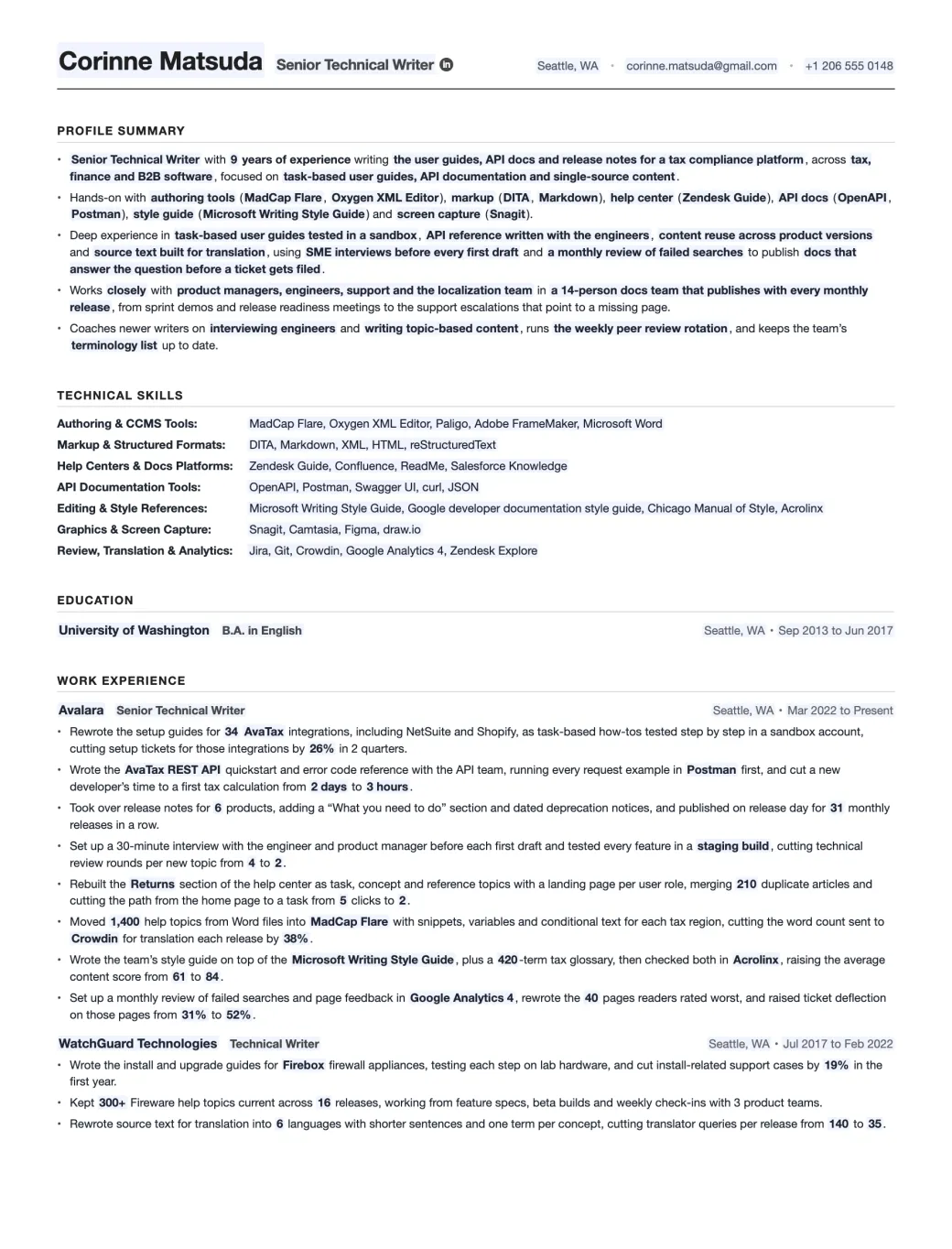
Filled-in Technical Writer resume template for a senior Avalara writer: a 5-bullet summary, 7 skill rows, and bullets on user guides, API docs and release notes
Emmanuel Gendre Ex-Google recruiter / Tech resume writer Updated Free, ATS-friendly, no signup

Interactive resume template generator

Interactive Technical Writer Resume Template

Fill in the side panel, then download your resume as a PDF or a Word file.

Edits update live as you type. Toggle Edit to rewrite paper text directly.

Edit mode is on. Click anywhere on the resume to rewrite text. Side-panel placeholders still update live.

Corinne Matsuda Senior Technical Writer

Seattle, WA • corinne.matsuda@gmail.com • +1 206 555 0148

Profile Summary

  • Senior Technical Writer with 9 years of experience writing the user guides, API docs and release notes for a tax compliance platform, across tax, finance and B2B software, focused on task-based user guides, API documentation and single-source content.
  • Hands-on with authoring tools (MadCap Flare, Oxygen XML Editor), markup (DITA, Markdown), help center (Zendesk Guide), API docs (OpenAPI, Postman), style guide (Microsoft Writing Style Guide) and screen capture (Snagit).
  • Deep experience in task-based user guides tested in a sandbox, API reference written with the engineers, content reuse across product versions and source text built for translation, using SME interviews before every first draft and a monthly review of failed searches to publish docs that answer the question before a ticket gets filed.
  • Works closely with product managers, engineers, support and the localization team in a 14-person docs team that publishes with every monthly release, from sprint demos and release readiness meetings to the support escalations that point to a missing page.
  • Coaches newer writers on interviewing engineers and writing topic-based content, runs the weekly peer review rotation, and keeps the team’s terminology list up to date.

Technical Skills

Authoring & CCMS Tools:
MadCap Flare, Oxygen XML Editor, Paligo, Adobe FrameMaker, Microsoft Word
Markup & Structured Formats:
DITA, Markdown, XML, HTML, reStructuredText
Help Centers & Docs Platforms:
Zendesk Guide, Confluence, ReadMe, Salesforce Knowledge
API Documentation Tools:
OpenAPI, Postman, Swagger UI, curl, JSON
Editing & Style References:
Microsoft Writing Style Guide, Google developer documentation style guide, Chicago Manual of Style, Acrolinx
Graphics & Screen Capture:
Snagit, Camtasia, Figma, draw.io
Review, Translation & Analytics:
Jira, Git, Crowdin, Google Analytics 4, Zendesk Explore

Education

University of Washington B.A. in English
Seattle, WA • Sep 2013 to Jun 2017

Work Experience

Avalara Senior Technical Writer
Seattle, WA • Mar 2022 to Present
  • Rewrote the setup guides for 34 AvaTax integrations, including NetSuite and Shopify, as task-based how-tos tested step by step in a sandbox account, cutting setup tickets for those integrations by 26% in 2 quarters.
  • Wrote the AvaTax REST API quickstart and error code reference with the API team, running every request example in Postman first, and cut a new developer’s time to a first tax calculation from 2 days to 3 hours.
  • Took over release notes for 6 products, adding a “What you need to do” section and dated deprecation notices, and published on release day for 31 monthly releases in a row.
  • Set up a 30-minute interview with the engineer and product manager before each first draft and tested every feature in a staging build, cutting technical review rounds per new topic from 4 to 2.
  • Rebuilt the Returns section of the help center as task, concept and reference topics with a landing page per user role, merging 210 duplicate articles and cutting the path from the home page to a task from 5 clicks to 2.
  • Moved 1,400 help topics from Word files into MadCap Flare with snippets, variables and conditional text for each tax region, cutting the word count sent to Crowdin for translation each release by 38%.
  • Wrote the team’s style guide on top of the Microsoft Writing Style Guide, plus a 420-term tax glossary, then checked both in Acrolinx, raising the average content score from 61 to 84.
  • Set up a monthly review of failed searches and page feedback in Google Analytics 4, rewrote the 40 pages readers rated worst, and raised ticket deflection on those pages from 31% to 52%.
WatchGuard Technologies Technical Writer
Seattle, WA • Jul 2017 to Feb 2022
  • Wrote the install and upgrade guides for Firebox firewall appliances, testing each step on lab hardware, and cut install-related support cases by 19% in the first year.
  • Kept 300+ Fireware help topics current across 16 releases, working from feature specs, beta builds and weekly check-ins with 3 product teams.
  • Rewrote source text for translation into 6 languages with shorter sentences and one term per concept, cutting translator queries per release from 140 to 35.

Done editing? Download a real PDF (selectable text, ATS-friendly, US Letter) or an editable Word file if a recruiter asks for one.

About this template

A Technical Writer resume template, built by a tech recruiter.

As a technical writer, you’re the one who turns a product into instructions people can follow. You write the user guides, the how-tos, the API and developer guides and the release notes, and you get the facts by interviewing the engineers who built the feature and trying it yourself. You’re also the one who decides how the whole doc set is organized, keep the terminology consistent, and check search and ticket data to see which pages are letting readers down.

Nearly every technical writer resume I open lists the same things: “wrote user guides, API docs and release notes”, then MadCap Flare, Confluence and a style guide. That’s a list every candidate in the pile can write. The interview goes to the one who proves the docs worked: the support tickets your rewrite cut, the search success you raised, the review rounds you shortened and the translation words you saved through reuse.

So Corinne’s Avalara job proves one competency per bullet: setup guides, API quickstarts, release notes, SME reviews, topic structure, Flare reuse, the glossary and deflection numbers. Orla, Callum and Vanessa’s resumes below hit the same 8 in that order. Haven’t written a resume in years? Skim the samples, then let 6 steps to write a Technical Writer resume guide you one section at a time.

Sending it out and hearing nothing back? Drop your current file in the box under this intro for a resume review for free. Each one lands in my own inbox.

Industry signal

What the market says about Technical Writer roles

If you’re asking whether companies still hire technical writers in 2026, look at the rule books. They say yes, at least for anything sold in Europe. Products there have needed accessible information on how they work since June 28, 2025, under the European Accessibility Act. The EU Machinery Regulation sets rules for digital instructions from January 20, 2027, and connected products need clear setup and security instructions once the Cyber Resilience Act applies on December 11, 2027. With BLS projecting only 1% growth to 2035, those jobs go to writers who can show results.

3,200 Projected yearly US technical writer openings US Bureau of Labor Statistics
$90,390 US technical writer median wage, May 2025 US Bureau of Labor Statistics

Resume Samples

Technical Writer Resume Examples

What separates a junior technical writer resume from a principal one? Each level gets one of my 3 technical writer resume samples. The junior writes configuration guides and release notes at Guidewire, the senior owns Xero’s API guides, and the principal set the content model for Ping Identity’s docs. You can download each one as a PDF or a Word file, free and with no signup.

Junior Technical Writer Resume Example

At junior level, a hiring manager wants proof you can take a feature from a demo to a published, tested article without hand-holding. Show the pages you own, one rewrite with a before-and-after number, and the support or QA work that taught you where readers get stuck.

Years of experience
5 years (2 in technical writing)
Industry
Insurance software (SaaS)
Stack
SnagitPostmanJiraConfluence
Download PDF Download Word

Click to download the Junior Technical Writer resume example as a PDF or a Word file. Free / No signup.

Orla Fitzgibbon

Junior Technical Writer

Dublin, Ireland · orla.fitzgibbon@gmail.com · +353 1 555 0144 · linkedin.com/in/orlafitzgibbon

Profile Summary

  • Junior Technical Writer with 2 years writing configuration guides and release notes for Guidewire ClaimCenter, the claims software insurers run, after 3 years answering support tickets for a Galway hosting company.
  • Writes DITA topics in Oxygen XML Editor, captures screens with Snagit, checks API examples in Postman, tracks work in Jira and follows the Microsoft Writing Style Guide.
  • Strongest in task-based procedures, release notes and product terminology, with a support background that shows which pages customers give up on and why.
  • Works with 2 product teams, the senior writers and customer support, from sprint demos and short engineer interviews to the weekly docs review.
  • Runs the team’s monthly screenshot check after UI changes, keeps the claims glossary current and brings the top support ticket themes to the writers each month.

Technical Skills

Authoring & CCMS Tools:
Oxygen XML Editor, Microsoft Word, Google Docs
Markup & Structured Formats:
DITA, Markdown, HTML
Help Centers & Docs Platforms:
Confluence, Zendesk Guide
API Documentation Tools:
Postman, curl, JSON
Editing & Style References:
Microsoft Writing Style Guide, plain language editing
Graphics & Screen Capture:
Snagit, Figma (basics)
Review, Translation & Analytics:
Jira, Git, Google Analytics 4
Page 2 of 2

Work Experience

Guidewire Technical Writer Dublin, Ireland · Nov 2024 to Present
  • Wrote and now maintain 85 topics in the ClaimCenter configuration guide for insurer IT teams, testing every procedure in a dev environment before each topic goes live.
  • Drafted the release notes for 2 ClaimCenter feature areas with the product managers, adding a short “Who this affects” line that cut follow-up questions on the customer community by 22%.
  • Rewrote the 15 most-viewed claims setup topics as task-based procedures with one goal per topic, raising “Was this helpful?” yes votes on them from 54% to 71%.
  • Built a 90-term glossary for the claims docs with the senior writers, so the product UI, the docs and the translated topics all use the same words.
  • Ran every request example in 12 Cloud API how-tos with an engineer from the API team, fixing outdated fields and auth headers that support had been answering by hand.
Nostra Customer Support Specialist Galway, Ireland · Jul 2021 to Oct 2024
  • Answered 1,400+ tickets a year on hosting, email and broadband for small business customers, tagging every ticket that a missing or unclear help article had caused.
  • Wrote 60 internal knowledge base articles in Confluence on repeat issues, cutting average handling time on those issues by 3 minutes.
  • Brought the 10 most-asked customer questions from the monthly unresolved ticket review to the website team, and 7 of them became new public help pages.

Education

University of Galway B.A. in English and Information Technology Galway, Ireland · Sep 2018 to Jun 2021
Google Technical Writing One and Two (online courses) Online · Mar 2024

Senior Technical Writer Resume Example

A senior resume needs a doc set you own from start to finish and the numbers that moved because of it. Lead with the guides developers or customers rely on, then show a standard other writers now follow, like a style guide or a review process.

Years of experience
8 years
Industry
Accounting software (SaaS)
Stack
OpenAPIPostmanPaligoFigma
Download PDF Download Word

Click to download the Senior Technical Writer resume example as a PDF or a Word file. Free / No signup.

Callum Ferreira

Senior Technical Writer

Wellington, New Zealand · callum.ferreira@gmail.com · +64 4 555 0176 · linkedin.com/in/callumferreira

Profile Summary

  • Senior Technical Writer with 8 years documenting accounting and retail software, now writing the API guides and help center content for Xero’s developer platform and its small business users.
  • Works in OpenAPI, Postman and Markdown on GitHub for the developer docs, Salesforce Knowledge for help articles and Figma for diagrams, following the Google developer documentation style guide.
  • Strongest in API getting-started guides, reference descriptions written from the spec and help center restructures, using engineer interviews and search data to decide what to write next.
  • Partners with 4 product teams, the API engineers and partner support, from API design reviews to the release checklist every feature has to clear.
  • Mentors 2 writers on API documentation, runs the docs review rotation and wrote the team’s API style rules and shared glossary.

Technical Skills

Authoring & CCMS Tools:
Paligo, Oxygen XML Editor, Microsoft Word
Markup & Structured Formats:
Markdown, DITA, HTML, YAML
Help Centers & Docs Platforms:
Salesforce Knowledge, Confluence, ReadMe
API Documentation Tools:
OpenAPI, Postman, Swagger UI, curl, JSON
Editing & Style References:
Google developer documentation style guide, Microsoft Writing Style Guide, Vale
Graphics & Screen Capture:
Figma, Snagit, draw.io
Review, Translation & Analytics:
GitHub, Git, Jira, Google Analytics 4
Page 2 of 2

Work Experience

Xero Senior Technical Writer Wellington, New Zealand · Mar 2021 to Present
  • Rewrote the getting-started guide for the Xero Accounting API around the OAuth 2.0 flow, with sample requests checked in Postman, cutting a new app developer’s time to a first successful call from 47 minutes to 9.
  • Wrote reference descriptions for the payroll endpoints from the OpenAPI specs with the API engineers, filling in 140 fields that had shipped with no description at all.
  • Took over the developer changelog and deprecation notices for 6 APIs, giving every breaking change a dated migration guide, and cut partner support tickets after API changes by 45%.
  • Restructured the bank feeds help into task, concept and troubleshooting topics, merging 70 overlapping articles and raising search success on bank feed queries from 49% to 68%.
  • Wrote the API docs style rules and a shared glossary with the product content team, cutting style comments per review from 11 to 2 across 4 product teams.
Vend Technical Writer Auckland, New Zealand · Dec 2018 to Feb 2021
  • Wrote setup guides for 9 receipt printers, barcode scanners and cash drawers, tested on the hardware itself, which cut installation support calls by 41%.
  • Reorganized the retailer help center by store task instead of product menu, lifting self-service resolution from 52% to 74% in a year.
  • Moved 380 help articles to shared snippets covering the web and iPad registers, so one feature change meant 1 edit instead of 2.

Education

Victoria University of Wellington B.A. in Linguistics Wellington, New Zealand · Feb 2016 to Nov 2018

Principal Technical Writer Resume Example

At principal level, your resume moves from pages you wrote to decisions that changed how a whole docs team works. Show the content model, the standards and the measurement you set up, which teams adopted them, and the writing you still do so nobody reads you as a manager.

Years of experience
13 years
Industry
Identity and security software
Stack
PaligoCrowdinOpenAPIGoogle Analytics 4
Download PDF Download Word

Click to download the Principal Technical Writer resume example as a PDF or a Word file. Free / No signup.

Vanessa Okorie

Principal Technical Writer

Denver, CO · vanessa.okorie@gmail.com · +1 303 555 0119 · linkedin.com/in/vanessaokorie

Profile Summary

  • Principal Technical Writer with 13 years in identity and security software, now an individual contributor setting the content strategy for Ping Identity’s workforce and customer identity docs.
  • Works in Paligo, DITA and Oxygen XML Editor, documents APIs from OpenAPI specs, manages translation in Crowdin and measures the docs with Google Analytics 4.
  • Strongest in doc set architecture after a merger, structured content reuse and terminology programs, using content audits and support case data to decide what the team writes next.
  • Partners with product leadership, 9 product teams, localization and support, from quarterly planning to the release sign-off every feature needs.
  • Mentors 6 writers, chairs the style council and wrote the team’s content model and topic templates.

Technical Skills

Authoring & CCMS Tools:
Paligo, Oxygen XML Editor, Adobe FrameMaker, MadCap Flare
Markup & Structured Formats:
DITA, XML, Markdown, AsciiDoc
Help Centers & Docs Platforms:
Confluence, Salesforce Knowledge, Docusaurus
API Documentation Tools:
OpenAPI, Postman, Swagger UI, curl
Editing & Style References:
Microsoft Writing Style Guide, Chicago Manual of Style, Acrolinx
Graphics & Screen Capture:
Snagit, Lucidchart, Visio
Review, Translation & Analytics:
Jira, Git, Crowdin, Google Analytics 4
Page 2 of 2

Work Experience

Ping Identity Principal Technical Writer Denver, CO · Jan 2019 to Present
  • Planned one doc set structure after Ping Identity and ForgeRock combined in 2023, mapping 14 product libraries by task and audience and cutting duplicate topics across them by 37%.
  • Led the move of the PingFederate docs into a shared DITA content model in Paligo, reusing topics across cloud and on-premises versions and cutting translation costs by 31%.
  • Merged the two companies’ style guides and terminology lists into one standard of 600 terms, now used by every writer and checked in Acrolinx before each page is published.
  • Built a quarterly docs scorecard from search, page feedback and support case data, then got the 50 worst pages rewritten, cutting docs-related support cases by 18%.
  • Added a docs sign-off to the release process for 9 product teams, so each feature ships with its release note and how-to on day one and engineers review drafts before code freeze.
LogRhythm Technical Writer to Senior Technical Writer Boulder, CO · Jun 2013 to Dec 2018
  • Wrote the deployment and admin guides for the SIEM platform, testing every procedure in the lab first, and cut install-related support cases by 27% over 2 releases.
  • Wrote the first REST API guide for the case management and alarm APIs with the platform engineers, covering 48 endpoints with working examples.
  • Moved the product docs from Adobe FrameMaker to DITA in Oxygen XML Editor, so the team could publish PDF and web help from one source for 5 product versions.

Education

Colorado State University B.A. in English Fort Collins, CO · Aug 2009 to May 2013

Free resume review

A recruiter screen, but with feedback

You applied to hundreds of jobs: no result. Companies won’t give you feedback, so you’re stuck in a loop. Rejections will keep coming until you know what’s wrong.

Let’s break this cycle today!

I’ll screen your resume the same way I did at Google.

You’ll get:

  • Your resume sections and content scored.
  • A clear list of what to improve, why, and how.
  • Behind the scenes secrets on the screening process.

How I rewrite Technical Writer resumes

How to write a Technical Writer resume

Emmanuel Gendre, ex-Google recruiter

Emmanuel Gendre Ex-Google recruiter, tech resume writer

Technical writer resumes have crossed my desk from both directions: first as a recruiter, 13 years with a big share of them at Google, and now as the one rewriting them. They’re the best-written resumes I get, and that’s the trap. Every bullet says what the writer produced, and almost none says what changed for the readers who used it.

Short on time? Through my tech resume writing service, I’ll rewrite it around your own docs and numbers. If you’re doing it yourself, though, focus on these 6 steps. I’ve filled each one with examples from technical writer resumes.

  1. Step 1 Format & layout Style the page like strict docs: one column, plain headings, PDF. Go to step 1
  2. Step 2 Profile Summary Your level, tools, strengths, teams and standards in 5 bullets. Go to step 2
  3. Step 3 Work Experience One bullet per competency, all inside your most recent job. Go to step 3
  4. Step 4 Bullet Points Grow “wrote the admin guide” until it carries a technique, a tool and a result. Go to step 4
  5. Step 5 Technical Skills 7 tool categories in job ad wording, plus soft skills proven with bullets. Go to step 5
  6. Step 6 Keywords & Metrics Keywords by priority, a posting checker and 24 metrics with bullets. Go to step 6

Step 1 · Format & Layout

Technical Writer resume format and layout

Layout is where I start every technical writer rewrite, because a broken layout wastes good bullets. Your file goes through software before any human reads it, and both hunt for your title, company and dates first. 3 things decide whether they find them quickly.

01ATS Compliance

ATS compliance for your Technical Writer resume

Technical writers know that structure decides whether a reader can use a page, and an Applicant Tracking System is the most literal reader you’ll ever have. It copies each line you wrote into a candidate record (job title, company, start date, tools), and recruiters filter on that record later. Set your jobs side by side in two columns and Paligo can end up filed as your employer, a mistake my ATS parsing explainer shows with real examples. For the parser, it comes down to 3 rules:

The 3 rules
  1. Use a 100% text based format (no Canva!)

  2. Avoid tables, pictures, and complex structures.

  3. Use the most predictable section names, like “Profile Summary” and “Work Experience”

02Design & Layout

Technical Writer resume design and layout

You’d never ship a help page where the steps jump around on every screen, and recruiters feel the same about resumes. Recruiters hate fancy designs. By mid-morning they’ve opened 30 of them, and they expect title, company and dates where the other 29 had them. Sidebars and icon rows only slow that hunt down.

Corinne’s template is boring and predictable on purpose, the resume version of a strict style guide: one column, one font, headings like Work Experience. Writing samples live in a portfolio linked from your header, never pasted in. If you’re recreating it from scratch, follow the specs below in Word or Google Docs.

Layout Spec
Columns
One. No sidebars, tables, columns, pictures or tabs.
Margins
0.7 in on all four sides
Body size
10 to 11 pt
Type
One family, weight for hierarchy
Length
One page under 5 years, two after
Section order
Summary, Skills, Experience, Education
PDF

03File Format

Resume file format for your Technical Writer resume

9 times out of 10, a technical writer should apply with a PDF. Nothing shifts between your laptop and theirs, an exported PDF hands the ATS clean, selectable text, and no reviewer can tweak your wording by accident. Recruiting agencies break that rule: a lot of them drop each candidate into a branded Word file for the client, so keep a .docx ready. My guide to resume file formats goes through the edge cases.

Format Guide
PDF
Your default. Layout holds, text stays selectable.
Word (.docx)
When the posting or a recruiter asks for it. Use the Word download above.
Plain text
For portals that make you paste into a box
Never
Images, scans, password-protected PDFs, shared-drive links
File name
Corinne-Matsuda-Technical-Writer.pdf

Step 2 · Profile Summary

Technical Writer profile summary

Juniors often ask me if a technical writer resume needs a profile summary at all. It does. Recruiters go through the whole stack fast and come back later for a careful read of a shortlist. In that first sort they might read nothing but your summary, as my article on the 2-round resume screen explains.

Any docs manager reading that summary is after 3 answers: which docs you write, for which readers, and whether engineers trust your drafts. So every bullet below answers one of them, and my profile summary walkthrough has worked examples for other roles too.

  1. 1

    Title, years and scope

    Start with the posting’s exact title (Technical Writer, Documentation Specialist, Content Developer), then your years and the product you write for: tax software, a medical device, an identity platform. Get this line right and nobody has to guess your level.

  2. 2

    Your stack

    Your authoring tools, markup, help center platform, API tools, style guide and screen capture software, each after a short label in bold. Copy product names exactly from the job ad (MadCap Flare, not Flare), because ATS search looks for the exact product name.

  3. 3

    Domain expertise

    The docs you’re best at, like API quickstarts or single-source help, plus how you do them: SME interviews, failed-search reviews, usability tests. This line shows a docs manager where you’d fit on their backlog.

  4. 4

    Collaboration

    The people you pull facts from and write alongside: engineers, product managers, support, localization. Add the rituals where that happens, like sprint demos or release readiness. If you’re writing alone, you’ll miss half the changes.

  5. 5

    Leadership

    The standards other writers follow because of you: the style guide, the glossary, the review rotation, the new hires you trained on Flare. Writers with no reports still have this bullet, and recruiters read it as a sign you’re ready for senior work.

Technical Writer resume summary example, from the template above
  • Senior Technical Writer with 9 years of experience writing the user guides, API docs and release notes for a tax compliance platform, across tax, finance and B2B software, focused on task-based user guides, API documentation and single-source content.
  • Hands-on with authoring tools (MadCap Flare, Oxygen XML Editor), markup (DITA, Markdown), help center (Zendesk Guide), API docs (OpenAPI, Postman), style guide (Microsoft Writing Style Guide) and screen capture (Snagit).
  • Deep experience in task-based user guides tested in a sandbox, API reference written with the engineers, content reuse across product versions and source text built for translation, using SME interviews before every first draft and a monthly review of failed searches to publish docs that answer the question before a ticket gets filed.
  • Works closely with product managers, engineers, support and the localization team in a 14-person docs team that publishes with every monthly release, from sprint demos and release readiness meetings to the support escalations that point to a missing page.
  • Coaches newer writers on interviewing engineers and writing topic-based content, runs the weekly peer review rotation, and keeps the team’s terminology list up to date.

Step 3 · Work Experience

Technical Writer work experience

This is the slower read that Step 2 warned you about. A docs manager now goes through every job on the page, yet the job you’re doing today counts for about 95% of the decision. That’s reasonable, since the docs you’re shipping this year predict the docs you’d ship for them.

Your current role needs a separate bullet for every competency below. Recruiters compare your resume with this technical writer role profile, area by area. Skip release notes or SME interviews and they’ll assume you’ve only ever polished drafts other people researched.

Technical Writer role profile
  1. User Guides & How-To Docs

    You write the guides people open when they’re stuck halfway through a task. Every confusing step turns into a support ticket someone pays for, so a docs manager wants guides tested against the real product. Show them how task analysis and hands-on testing in a sandbox cut setup tickets or failed tasks.

    Techniques
    task analysis, step testing in a sandbox, troubleshooting sections, knowledge base articles
    Tools
    Zendesk Guide, MadCap Flare, Snagit, Confluence
    Metrics
    setup tickets, task completion, helpful votes
  2. API & Developer Guides

    You document the API so a developer can make a first call without opening a ticket. Developers judge a product by its docs before they pick it, and one wrong example costs that trust fast. Walk them through your OpenAPI and Postman work: examples that run, and how much sooner developers made a first call.

    Techniques
    quickstarts, authentication guides, error references, request examples
    Tools
    OpenAPI, Postman, Swagger UI, curl
    Metrics
    time to first call, endpoints documented, broken examples
  3. Release Notes & Change Communication

    You announce every change in words customers can act on. A breaking change buried in a changelog comes back as an angry escalation the week after release, so managers want writers who own this on a schedule. Tell them which deprecation notices and migration guides kept customers ahead of each release.

    Techniques
    release notes, changelogs, deprecation notices, migration guides
    Tools
    Jira, Confluence, ReadMe, Zendesk Guide
    Metrics
    on-time releases, post-release tickets, deprecation lead time
  4. SME Interviews & Technical Review

    You interview the engineers who built the feature, then test it yourself. Engineers don’t have much time, and a writer who wastes it with vague questions stops getting meetings. Describe how short, prepared interviews and staging builds got your drafts through technical review in fewer rounds.

    Techniques
    prepared interviews, staging build testing, technical review, review tracking
    Tools
    Jira, Confluence, Slack, Postman
    Metrics
    review rounds, draft to publish time, errors found after publishing
  5. Information Architecture & Topic Structure

    You organize the doc set so readers land on the right page the first time. Readers don’t browse docs, they search or give up, and support picks up the slack. Explain how topic types and content audits helped you merge duplicates and shorten the path to an answer.

    Techniques
    topic types, landing pages per audience, content audits, cross-linking
    Tools
    MadCap Flare, Paligo, Zendesk Guide, draw.io
    Metrics
    clicks to answer, duplicate pages, search success
  6. Structured Authoring & Localization

    You build content once and reuse it across products, versions and languages. Translation is billed per word, so every duplicate paragraph gets paid for again in each language. Point out where DITA or MadCap Flare snippets, variables and conditions cut word counts and kept translations in step with English.

    Techniques
    DITA topics and maps, snippets and variables, conditional text, translation memory
    Tools
    Paligo, MadCap Flare, Oxygen XML Editor, Crowdin
    Metrics
    reuse rate, translation word count, translation turnaround
  7. Style Guides & Terminology

    You keep a doc set sounding like one careful writer wrote all of it. Mixed terms confuse readers, break search and trip up translators, and a docs manager can’t fix that without one person who owns the standard. Mention the style guide and glossary you built, and how they raised consistency and shortened editing.

    Techniques
    style guide ownership, glossaries, plain language editing, accessible text and images
    Tools
    Microsoft Writing Style Guide, Acrolinx, Vale, Simplified Technical English
    Metrics
    content scores, style comments per review, glossary terms
  8. Docs Metrics & Content Improvement

    You track whether pages actually answer the question, then rewrite the ones that don’t. Leadership funds a docs team when you can show the tickets it prevented, so hiring managers want writers who keep count. Detail how you picked rewrites from failed-search reviews and page feedback, and how far ticket deflection rose.

    Techniques
    failed-search reviews, page feedback, ticket tagging, usability tests
    Tools
    Google Analytics 4, Zendesk Explore, Hotjar, Looker Studio
    Metrics
    ticket deflection, search success, helpful votes

Freelance or agency writer? Give each client doc set its own bullet with the product, the readers and what changed. Don’t have a writing job yet? A docs fix you got merged into an open source project earns its own Projects entry.

Submit your resume for a free review!

Step 4 · Bullet Points

Technical Writer resume bullet points

Technical writers are trained to describe the product, not themselves, so their bullets often read like a table of contents (“Wrote user guides for the admin console”). On a typical technical writer rewrite, half my hours go into the bullets. The tool I fix them with is my Level System, which stretches Google’s XYZ formula by a few steps for tech roles. This resume bullet point method lays out all 5 levels.

Picture one onboarding guide you rewrote. Every level asks you something about it, and whatever you answer gets written into the bullet. In technical writing, the final answer is the proof: a ticket count, a search success rate, a review time or a translation saving. Here’s that bullet at all 5 levels.

  1. Level 1Task

    What did I work on? Start with the doc you wrote or rewrote. On its own, it’s only proof you had a writing job.

    Rewrote the onboarding guide for payroll admins.

  2. Level 2+ Techniques

    How did I do it? Add the writing technique. This is where your craft shows, beyond the fact that you typed the words.

    Rewrote the onboarding guide for payroll admins as task-based topics with a troubleshooting section for each step.

  3. Level 3+ Tools

    What tools did I use? Add the authoring tool and anything else you used. Recruiters search the ATS for “Paligo”, not “a CCMS”.

    Rewrote the onboarding guide for payroll admins as task-based topics with a troubleshooting section for each step, in Paligo with screenshots from Snagit.

  4. Level 4+ Method

    What method did I follow? Say how you made sure the content was right. Few writers include it, and docs managers notice when you do.

    Rewrote the onboarding guide for payroll admins as task-based topics with a troubleshooting section for each step, in Paligo with screenshots from Snagit, after sitting in on 12 support calls and testing every step in a demo account.

  5. Level 5+ Metric

    What was the result? End on one number. It’s the part a docs manager repeats when they ask to interview you.

    Rewrote the onboarding guide for payroll admins as task-based topics with a troubleshooting section for each step, in Paligo with screenshots from Snagit, after sitting in on 12 support calls and testing every step in a demo account, cutting onboarding tickets by 34% in a quarter.

    1. 01 Task What you worked on
    2. 02 Techniques How you did it
    3. 03 Tools The stack you used
    4. 04 Method The method you followed
    5. 05 Metric The result, one number

Your numbers are probably sitting in tools you’ve already got. The help center tracks views and helpful votes, the support system counts tickets per article, and Jira shows how long each review took. Pull them before you write.

Step 5 · Technical Skills

Technical Writer resume skills

When I read a technical writer’s skills section, I look for 4 things first. Those are a structured authoring tool (MadCap Flare, Paligo or DITA in Oxygen), a help center platform, API documentation tools and a style guide you follow by name. Graphics, translation and analytics tools fill in the rest. Copy each product from the job ad letter for letter, since a search for “Oxygen XML Editor” won’t match “XML editor”.

Treat the section as an index for your bullets: if Paligo sits in your skills rows, a docs manager will hunt for it in Work Experience and won’t believe it if it isn’t there. Below that come my 7 technical writer categories, the skills rows from Corinne’s resume, then 5 behaviours you can only prove with results. Keywords get their own step next.

The 7 skill categories for a Technical Writer resume

I starred the tools that keep turning up in technical writer job ads, and each starred item leads its row. Keep an unstarred tool only if one of your bullets uses it.

Authoring & CCMS Tools

Where you write and manage topics. MadCap Flare and Paligo lead the postings I read, and Oxygen XML Editor or FrameMaker show you’ve worked on older structured doc sets.

MadCap FlarePaligoOxygen XML EditorAdobe FrameMakerHerettoMicrosoft Word

Markup & Structured Formats

The formats your content lives in. DITA and Markdown cover most ads, and XML or HTML helps when you edit topics by hand.

DITAMarkdownXMLHTMLAsciiDocreStructuredText

Help Centers & Docs Platforms

Where readers find your docs. Confluence and Zendesk Guide come up most, while ReadMe or GitBook are common for developer docs.

ConfluenceZendesk GuideReadMeGitBookDocusaurusSalesforce Knowledge

API Documentation Tools

What you use to read specs and test requests. OpenAPI and Postman are expected for API writing, with curl and JSON for the examples.

OpenAPIPostmanSwagger UIcurlJSONYAML

Editing & Style References

The style guide you follow and the checkers that enforce it. Microsoft or Google style is the usual ask, and Simplified Technical English or Acrolinx shows up in hardware and regulated docs.

Microsoft Writing Style GuideGoogle developer documentation style guideChicago Manual of StyleSimplified Technical EnglishAcrolinxVale

Graphics & Screen Capture

How you make screenshots, videos and diagrams. Snagit and Figma appear most, with Camtasia for video and draw.io or Visio for diagrams.

SnagitFigmaCamtasiadraw.ioLucidchartVisio

Review, Translation & Analytics

How work gets tracked, translated and measured. Jira and Git are the usual asks, plus a translation tool like Crowdin and analytics like Google Analytics 4.

JiraGitGitHubCrowdinPhraseGoogle Analytics 4Zendesk Explore

A finished Technical Writer skills section

Technical Skills sample, from the template above
Authoring & CCMS Tools
MadCap Flare, Oxygen XML Editor, Paligo, Adobe FrameMaker, Microsoft Word
Markup & Structured Formats
DITA, Markdown, XML, HTML, reStructuredText
Help Centers & Docs Platforms
Zendesk Guide, Confluence, ReadMe, Salesforce Knowledge
API Documentation Tools
OpenAPI, Postman, Swagger UI, curl, JSON
Editing & Style References
Microsoft Writing Style Guide, Google developer documentation style guide, Chicago Manual of Style, Acrolinx
Graphics & Screen Capture
Snagit, Camtasia, Figma, draw.io
Review, Translation & Analytics
Jira, Git, Crowdin, Google Analytics 4, Zendesk Explore

Soft skills for a Technical Writer resume

“Excellent communication skills” shows up on almost every technical writer resume, which is exactly why a recruiter skips past it. These 5 are worth proving with a bullet instead, like the examples below.

  • Getting time with engineers who’d rather be coding

    Resume bulletReplaced hour-long doc reviews with a 15-minute interview after each sprint demo, so engineers answered doc questions within 2 days, down from a week.

  • Asking the question everyone else was too proud to ask

    Resume bulletAsked what a default setting did during a feature walkthrough, found it broke EU tax imports, and got it fixed before 300 customers upgraded.

  • Cutting a page in half without losing a fact

    Resume bulletCut a 4,000-word admin guide to 1,800 words with every step and warning kept, and its helpful votes rose by half.

  • Taking edits from 5 reviewers and shipping one version

    Resume bulletMoved feature reviews into one shared doc with a deadline per reviewer, cutting draft-to-publish time from 19 days to 8.

  • Getting docs onto the release checklist

    Resume bulletGot a docs sign-off added to the release checklist for 4 product teams, and no feature shipped without its how-to for the next 2 quarters.

Step 6 · Keywords & Metrics

Technical Writer resume keywords and metrics

When a technical writer resume is nearly done, I read it twice more. Once for keywords, because the ATS only shows your resume when a recruiter’s search for MadCap Flare or API documentation matches it. Once for metrics, because the docs manager only believes bullets that finish on a measured result.

Next you’ll find the MadCap Flare, DITA and release note keywords recruiters search for, split by priority, plus a finder for any technical writer posting, and 24 metrics I’ve written into sample bullets.

+42%

Technical Writer resume keywords, ranked

Click any keyword for an example of how a posting words it. Ads say “structured authoring”, “topic-based authoring” or just “DITA” for much the same skill.

Must-have

10

Put each one in your summary, in at least one bullet and in your skills rows.

In a job description“3+ years of technical writing experience for software products”

Strong supporting

11

List the ones you’ve used in your skills rows, and back each one with a bullet.

In a job description“Experience with a component content management system such as Paligo or Heretto”

Bonus

10

Add these only where they’re true. They can set you apart, and nobody is screened out for missing them.

In a job description“Familiarity with Oxygen XML Editor or another XML editor”

Extract Technical Writer keywords from a job description

Pick the technical writer, documentation specialist or content developer ad you care most about and paste its full text below. The finder pulls out its authoring tools, formats, platforms and writing skills, sorted by priority. Whatever your resume lacks goes on your edit list before you hit send.

Must-have
Put these in your skills section and back each one with a bullet.
Strong supporting
Add the ones you’ve actually worked with. Skip the rest.

Nothing is uploaded: it all happens in your browser.

Metrics for a Technical Writer resume

Give each bullet one number, the one your readers or your support team would notice first.

MetricExample bullet
User guides
Setup tickets Count Support tickets about a task your guide covers, before and after a rewrite.Rewrote the admin setup guide and cut setup tickets from 310 to 190 a month.
Task completion Percent Share of test users who finish a task using only the docs.Raised task completion in usability tests of the import guide from 58% to 86%.
Articles maintained Count Help center or knowledge base articles you own and keep current.Own and maintain 140 help center articles on billing and account settings.
API & developer guides
Time to first call Time How long a new developer takes to make a first successful API request.Cut the time to a first successful API call from a day and a half to 2 hours with a new quickstart.
Endpoints documented Count API endpoints with complete descriptions, parameters and examples.Documented 64 endpoints with request and response examples tested in Postman.
Broken examples Count Code samples or requests in the docs that fail when a developer runs them.Fixed 38 broken request examples after running every sample against the current API.
Release notes
On-time release notes Frequency Releases where the notes went live on release day.Had release notes live on release day for 24 of 24 monthly releases across 2 years.
Post-release tickets Count Support tickets about a change in the first weeks after a release.Cut tickets in the 2 weeks after each release by 35% with clearer upgrade steps.
Deprecation lead time Time How far ahead customers hear about a breaking change.Moved deprecation notices to 6 months before removal, up from 4 weeks.
SME interviews & review
Review rounds Count Technical review cycles a page needs before publishing.Cut technical review rounds per new page from 5 to 2 by testing each feature in a staging build first.
Draft to publish time Time Time from a first draft to a published page.Brought draft to publish time down from 12 to 5 working days for new feature pages.
Errors found after publishing Count Technical errors readers or support report on a live page.Cut technical errors reported on new pages from 9 a quarter to 2.
Information architecture
Clicks to answer Count Clicks from the docs home page to the page that answers a common task.Cut the path from the docs home page to the top 20 tasks from 4 clicks to 2.
Duplicate pages Count Pages that cover the same task or concept as another page.Merged 180 duplicate pages into 52 task, concept and reference topics.
Search success Percent Share of docs searches that end with a click on a result.Raised search success on billing topics from 51% to 72% after retitling pages to match what readers type.
Structured authoring
Reuse rate Percent Share of content that comes from shared topics, snippets or variables.Raised content reuse across 3 product versions from 12% to 46% with DITA conrefs and keys.
Translation word count Count Words sent to translation for each release.Cut words sent to translation per release from 48,000 to 29,000 by reusing shared snippets.
Translation turnaround Time Time from English sign-off to translated docs going live.Cut the gap between English and translated docs from 6 weeks to 10 days.
Style & terminology
Content quality score Score The score a checker like Acrolinx gives your content against the style guide.Raised the average Acrolinx score across the help center from 58 to 82.
Style comments per review Count Style and wording comments an editor leaves on a typical draft.Cut style comments per review from 14 to 4 after publishing the team style guide.
Glossary terms Count Approved product terms that writers, the UI and translators share.Built a 350-term product glossary shared by writers, UX and translators.
Docs metrics
Ticket deflection Percent Share of help center visits that end without a support ticket.Raised ticket deflection on billing pages from 44% to 61%.
Helpful votes Percent Share of readers who rate a page as helpful.Lifted “helpful” votes on rewritten troubleshooting pages from 47% to 69%.
Failed searches Count Docs searches that return no results or get no click.Cut zero-result searches from 1,900 to 600 a month by writing pages for the 25 most searched missing topics.

What if you don’t have exact numbers?

  • 1

    Start with your help center and ticket data. Page views, helpful votes, search terms and tickets tagged to an article are usually stored for months, even if nobody’s looked.

  • 2

    Make a careful guess and go low. “Roughly 300 topics” or “a third fewer review rounds” holds up in an interview as long as you know which report the figure came from.

  • 3

    Count your doc set instead. Topics you own, products and languages you cover and the teams you write for are numbers too, and they show how much you handle.

Free resume review

A recruiter screen, but with feedback

You applied to hundreds of jobs: no result. Companies won’t give you feedback, so you’re stuck in a loop. Rejections will keep coming until you know what’s wrong.

Let’s break this cycle today!

I’ll screen your resume the same way I did at Google.

You’ll get:

  • Your resume sections and content scored.
  • A clear list of what to improve, why, and how.
  • Behind the scenes secrets on the screening process.

Frequently asked

Technical Writer resume FAQ

No cost, no login, no trial. Type into it on this page, keep the PDF, and update it later when a new doc set or a DITA migration earns a bullet.

Sure. The Word button saves a .docx, and Google Docs opens it too. Orla, Callum and Vanessa’s samples each come as a .docx next to the PDF. Apply with the PDF, though, since a .docx can reflow on someone else’s machine.

It’s built for that. Corinne’s layout uses one column, headings parsers know, and a PDF with real, selectable text instead of a picture of text, so Workday and Greenhouse fill every field. Double-check your own copy with the free ATS compatibility checker on this site.

With fewer than 5 years in the job, stick to one page. Most technical writers past that point run to 2, because user guides, API docs, release notes and a DITA migration can’t share one page without losing their results. Recruiters mind padding, not page count, which how many pages a tech resume needs covers.

Yes. A portfolio is usually the first link a docs manager clicks. Pick 3 to 5 public pieces (a how-to, an API guide, a set of release notes) and link them from your header. If your best docs sit behind a customer login, write a short sample for a public product and label it as a sample.

The ones docs managers believe: tickets your pages cut, search success, helpful votes, how fast a new developer makes a first API request, review rounds per page and translation words saved through reuse. All 24 of mine sit in Step 6, each beside a sample bullet. Use one at a time, the number your readers would notice.

Not usually. You’ll find few technical writer postings that ask for one. On a junior resume, Google’s free Technical Writing One and Two courses fit under Education. After that, your portfolio and your results do the convincing.

Look at where your week goes. Technical writers get hired on the content they wrote and what it changed for readers. Documentation engineers get hired on the build, the checks and the docs site, and developer advocates on talks, content and community. Building docs tooling most days? My documentation engineer resume template is closer to that work. More time on stage than in a style guide? Try my developer advocate resume template.

Start from writing real people already use: knowledge base articles from a support job, a README you rewrote, a lab manual, an internship guide. Every one of those gets a bullet with its result. A merged fix to an open source project’s docs is worth a Projects entry with the link.

Not at all. Plenty of candidates apply with this layout, and recruiters never check. The risk is sending Corinne’s Avalara bullets with your name on top, so rewrite each one around your own docs and numbers.

More resources

More help with your Technical Writer resume