System Administrator Resume Examples & Free Template (PDF, Word)

Edit this free sysadmin resume template in your browser, then download it in PDF or Word. Scroll down for 3 system administrator resume examples I wrote for juniors, seniors and leads, plus the 6 steps I follow as a former Google recruiter.

4.9 5.0
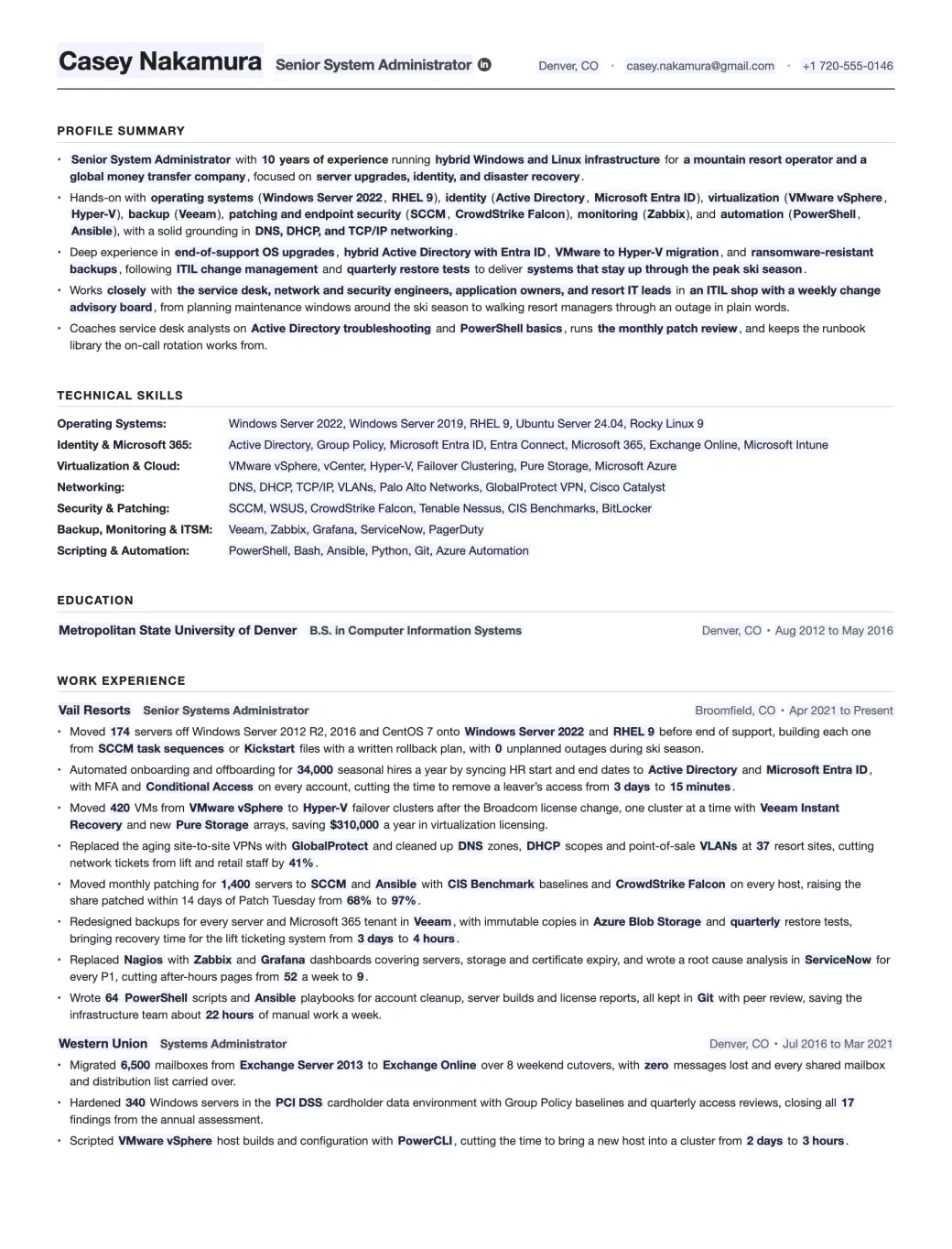
The System Administrator resume template filled in for a senior sysadmin at Vail Resorts: profile summary, 7 skills rows, education and 11 work experience bullets
Emmanuel Gendre Ex-Google recruiter / Tech resume writer Updated Free, ATS-friendly, no signup

Interactive resume template generator

Interactive System Administrator Resume Template

Fill in the side panel, then download your resume as a PDF or a Word file.

Edits update live as you type. Toggle Edit to rewrite paper text directly.

Edit mode is on. Click anywhere on the resume to rewrite text. Side-panel placeholders still update live.

Casey Nakamura Senior System Administrator

Denver, CO • casey.nakamura@gmail.com • +1 720-555-0146

Profile Summary

  • Senior System Administrator with 10 years of experience running hybrid Windows and Linux infrastructure for a mountain resort operator and a global money transfer company, focused on server upgrades, identity, and disaster recovery.
  • Hands-on with operating systems (Windows Server 2022, RHEL 9), identity (Active Directory, Microsoft Entra ID), virtualization (VMware vSphere, Hyper-V), backup (Veeam), patching and endpoint security (SCCM, CrowdStrike Falcon), monitoring (Zabbix), and automation (PowerShell, Ansible), with a solid grounding in DNS, DHCP, and TCP/IP networking.
  • Deep experience in end-of-support OS upgrades, hybrid Active Directory with Entra ID, VMware to Hyper-V migration, and ransomware-resistant backups, following ITIL change management and quarterly restore tests to deliver systems that stay up through the peak ski season.
  • Works closely with the service desk, network and security engineers, application owners, and resort IT leads in an ITIL shop with a weekly change advisory board, from planning maintenance windows around the ski season to walking resort managers through an outage in plain words.
  • Coaches service desk analysts on Active Directory troubleshooting and PowerShell basics, runs the monthly patch review, and keeps the runbook library the on-call rotation works from.

Technical Skills

Operating Systems:
Windows Server 2022, Windows Server 2019, RHEL 9, Ubuntu Server 24.04, Rocky Linux 9
Identity & Microsoft 365:
Active Directory, Group Policy, Microsoft Entra ID, Entra Connect, Microsoft 365, Exchange Online, Microsoft Intune
Virtualization & Cloud:
VMware vSphere, vCenter, Hyper-V, Failover Clustering, Pure Storage, Microsoft Azure
Networking:
DNS, DHCP, TCP/IP, VLANs, Palo Alto Networks, GlobalProtect VPN, Cisco Catalyst
Security & Patching:
SCCM, WSUS, CrowdStrike Falcon, Tenable Nessus, CIS Benchmarks, BitLocker
Backup, Monitoring & ITSM:
Veeam, Zabbix, Grafana, ServiceNow, PagerDuty
Scripting & Automation:
PowerShell, Bash, Ansible, Python, Git, Azure Automation

Education

Metropolitan State University of Denver B.S. in Computer Information Systems
Denver, CO • Aug 2012 to May 2016

Work Experience

Vail Resorts Senior Systems Administrator
Broomfield, CO • Apr 2021 to Present
  • Moved 174 servers off Windows Server 2012 R2, 2016 and CentOS 7 onto Windows Server 2022 and RHEL 9 before end of support, building each one from SCCM task sequences or Kickstart files with a written rollback plan, with 0 unplanned outages during ski season.
  • Automated onboarding and offboarding for 34,000 seasonal hires a year by syncing HR start and end dates to Active Directory and Microsoft Entra ID, with MFA and Conditional Access on every account, cutting the time to remove a leaver’s access from 3 days to 15 minutes.
  • Moved 420 VMs from VMware vSphere to Hyper-V failover clusters after the Broadcom license change, one cluster at a time with Veeam Instant Recovery and new Pure Storage arrays, saving $310,000 a year in virtualization licensing.
  • Replaced the aging site-to-site VPNs with GlobalProtect and cleaned up DNS zones, DHCP scopes and point-of-sale VLANs at 37 resort sites, cutting network tickets from lift and retail staff by 41%.
  • Moved monthly patching for 1,400 servers to SCCM and Ansible with CIS Benchmark baselines and CrowdStrike Falcon on every host, raising the share patched within 14 days of Patch Tuesday from 68% to 97%.
  • Redesigned backups for every server and Microsoft 365 tenant in Veeam, with immutable copies in Azure Blob Storage and quarterly restore tests, bringing recovery time for the lift ticketing system from 3 days to 4 hours.
  • Replaced Nagios with Zabbix and Grafana dashboards covering servers, storage and certificate expiry, and wrote a root cause analysis in ServiceNow for every P1, cutting after-hours pages from 52 a week to 9.
  • Wrote 64 PowerShell scripts and Ansible playbooks for account cleanup, server builds and license reports, all kept in Git with peer review, saving the infrastructure team about 22 hours of manual work a week.
Western Union Systems Administrator
Denver, CO • Jul 2016 to Mar 2021
  • Migrated 6,500 mailboxes from Exchange Server 2013 to Exchange Online over 8 weekend cutovers, with zero messages lost and every shared mailbox and distribution list carried over.
  • Hardened 340 Windows servers in the PCI DSS cardholder data environment with Group Policy baselines and quarterly access reviews, closing all 17 findings from the annual assessment.
  • Scripted VMware vSphere host builds and configuration with PowerCLI, cutting the time to bring a new host into a cluster from 2 days to 3 hours.


Done editing? Download a real PDF (selectable text, ATS-friendly, US Letter) or an editable Word file if a recruiter asks for one.

About this template

A System Administrator resume template, built by a tech recruiter.

As a system administrator, you’re the reason a company’s servers, accounts and backups keep working while everyone else gets on with their day. You build and patch Windows and Linux servers, run Active Directory and Microsoft 365, look after the VMware or Hyper-V clusters, and check that last night’s backup actually restores. When something breaks at 2 a.m., you’re usually the one who gets the page.

Most sysadmin resumes I’ve read list the same tools: Windows Server, Active Directory, VMware and PowerShell. That list doesn’t show whether you reset passwords or ran the whole server room. What does is proof of the work behind it: the servers you upgraded before end of support, the backup you restored in a test, the patch rate you raised, the hours your scripts saved.

I put this sysadmin resume template together so each part of that proof has a home. In your latest job, every one of the 8 areas a hiring manager screens for gets its own bullet, from server upgrades to automation. The 3 sample resumes below do the same for a junior, a senior and a lead. If you’d rather write yours from scratch, I’ve laid out 6 steps to write a System Administrator resume further down.

Got a resume already? Upload it, and I’ll read it myself and send you a free resume critique.

Industry signal

What the market says about System Administrator roles

I’ll be straight with you. The Bureau of Labor Statistics expects network and systems administrator jobs to shrink 4% between 2025 and 2035, because automation and DevOps teams are taking over some tasks. Still, people retiring or changing careers will leave roughly 13,400 openings each year. And the work keeps piling up: Windows Server 2016 support ends in January 2027, and an August 2026 CISA ransomware advisory describes attackers deleting a victim’s backups. That’s why your resume needs to prove you get upgrades, patching and backups done.

13,400 Projected yearly openings, network and sysadmins US Bureau of Labor Statistics
$95,599 Average base pay, US Systems Administrator ads Indeed
  • BleepingComputer @BleepinComputer · Tech and security news site
    🚨 BREAKING: Microsoft's October 2026 Patch Tuesday is MASSIVE! Microsoft has fixed a record-breaking 1,411 security vulnerabilities, including 70 critical flaws and 3 zero-days, one of which is actively exploited in attacks.
  • nixCraft 🐧 @nixcraft · Linux and Unix sysadmin site
    “It’s always DNS” is a running joke among sysadmins because DNS misconfigurations really are one of the most common causes of outages 😅
  • Windows Server @windowsserver · Microsoft's Windows Server account
    Secure Boot certificate updates aren’t automatic for Windows Server. Read up on what’s changing and how to proactively update your environment before certificates expire: msft.it/6013vrdb7
  • Techno Tim @TechnoTimLive · Engineer and homelab YouTuber
    Just a heads up if you are updating Proxmox to kernel 7.0.0-3-pve. Some LXCs might not be compatible with that kernel version.

Resume Samples

System Administrator Resume Examples

A sysadmin with 2 years and one with 11 both keep servers running, but they’re hired for different things, so their resumes can’t look the same. Here are 3 system administrator resume samples I’ve written, one per level. The junior went from contract store IT to Windows servers at Trader Joe’s. The senior runs Linux and Windows hosting for University of Michigan departments, and the lead runs the team that looks after Kaiser Permanente’s hospital servers. You can download each one as a PDF or a Word file, free and with no signup.

Junior System Administrator Resume Example

At junior level, your system administrator resume should prove you do real admin work: the servers and accounts you look after, a script that saves the team time, and a restore or patch number you measured. Don’t cut your help desk or field tech years either.

Years of experience
2 years
Industry
Grocery retail
Stack
Windows ServerMicrosoft 365PowerShellVeeam
Download PDF Download Word

Click to download the Junior System Administrator resume example as a PDF or a Word file. Free / No signup.

Brenda McAllister

Junior System Administrator

Monrovia, CA · brenda.mcallister@gmail.com · +1 626-555-0148 · linkedin.com/in/brendamcallister

Profile Summary

  • Junior System Administrator with 2 years on the infrastructure team of a 600+ store grocery chain, covering headquarters servers and store back offices, after 2 years of contract IT support in retail stores.
  • Works daily in Windows Server, Active Directory and Group Policy, Microsoft 365 and Intune, with VMware vSphere, SCCM, CrowdStrike Falcon, Veeam and ServiceNow, and writes PowerShell for repeat account tasks.
  • Learning change management and monthly patch cycles from the senior admins, tests every Group Policy change on a pilot group of 5 stores first, and turns each fix into a help desk article.
  • Works with the store support help desk, network engineers and store operations, presents planned changes at the weekly change advisory board, and takes after-hours on-call 1 week a month.
  • Owns the new store opening checklist, coaches new help desk hires on safe MFA resets, and plans to sit the CompTIA Security+ exam in early 2027.

Technical Skills

Operating Systems:
Windows Server 2019 and 2022, Windows 11, Ubuntu Server (basics)
Identity & Microsoft 365:
Active Directory, Group Policy, Microsoft 365, Microsoft Entra ID, Exchange Online, Microsoft Intune
Virtualization & Cloud:
VMware vSphere, Microsoft Hyper-V (basics)
Networking:
DNS, DHCP, TCP/IP, VPN, VLANs, Cisco Meraki
Security & Patching:
SCCM, WSUS, CrowdStrike Falcon, BitLocker
Backup, Monitoring & ITSM:
Veeam, ServiceNow, PRTG
Scripting & Automation:
PowerShell, Bash (basics), Git
Page 2 of 2

Work Experience

Trader Joe’s Junior System Administrator Monrovia, CA · Oct 2024 to Present
  • Moved the headquarters print queues and scan folders off the last Windows Server 2012 R2 machines onto 2 new Windows Server 2022 VMs, retiring 5 servers the company was paying Extended Security Updates for.
  • Built a monthly Active Directory report of accounts with no sign-in for 90 days, checked each one against HR termination records, and disabled 214 stale accounts in the first quarter.
  • Took over datastore checks on the headquarters VMware vSphere cluster, deleting orphaned snapshots and old ISO files after owner sign-off, which freed 2.3 TB and pushed back a planned storage purchase.
  • Set up monthly test restores in Veeam for the store file shares and the pricing database server, which found 3 backup jobs that had been skipping locked files without an alert.
  • Wrote a PowerShell script that creates the AD groups, user accounts and Intune enrollment for a new store from one CSV, cutting account setup per opening from 2 days to 3 hours.
TEKsystems (Allegis Group) IT Support Technician (Contract) Los Angeles, CA · Jun 2022 to Sep 2024
  • Replaced switches and Wi-Fi access points overnight in 146 stores for a drugstore chain client, checking DHCP scopes, VLAN tags and the Cisco Meraki dashboard before each store opened.
  • Reimaged back-office and pharmacy PCs with SCCM task sequences during store visits, raising patch compliance on the client’s Southern California fleet from 71% to 96%.
  • Worked store outage tickets in ServiceNow from the first call to closure, adding photos and port maps so remote engineers fixed 83% of repeat issues without another site visit.

Education

CompTIA Network+ and A+ certifications Online · Aug 2024
Pasadena City College A.S. in Computer Information Systems, System and Network Administration Pasadena, CA · Aug 2020 to May 2022

Senior System Administrator Resume Example

By year 7, hiring managers want proof that a platform is yours to run: the fleet you upgrade and patch, the build standard other admins follow, and a before and after number for each big change.

Years of experience
7 years
Industry
Higher education
Stack
RHELRocky LinuxAnsibleVMware vSphere
Download PDF Download Word

Click to download the Senior System Administrator resume example as a PDF or a Word file. Free / No signup.

Hossein Ahmadi

Senior System Administrator

Ann Arbor, MI · hossein.ahmadi@gmail.com · +1 734-555-0173 · linkedin.com/in/hosseinahmadi

Profile Summary

  • Senior System Administrator with 7 years in higher education and healthcare, now running the Linux and Windows servers University of Michigan ITS hosts for campus departments and research labs.
  • Runs RHEL 9, Rocky Linux and Windows Server 2022 on VMware vSphere, works in Active Directory and Group Policy, patches with Ansible and SCCM, backs up with Veeam, and monitors with Zabbix and Grafana.
  • Knows shared hosting for departments (delegated OUs, MCommunity admin groups), CIS Benchmark hardening for Linux and the FERPA and HIPAA rules on campus data, and builds every server from Ansible roles in Git.
  • Works with department IT staff, the ITS network and security teams and Advanced Research Computing, brings every production change to the weekly change advisory board, and is on call 1 week in 6.
  • Mentors 2 junior admins through their first on-call weeks, wrote the RHEL 9 build standard the team follows for new servers, and leads the post-incident review after any Sev-1 or Sev-2 outage.

Technical Skills

Operating Systems:
Red Hat Enterprise Linux 8 and 9, Rocky Linux, Ubuntu Server, Windows Server 2019 and 2022
Identity & Microsoft 365:
Active Directory, Group Policy, Microsoft Entra ID, Microsoft 365, Kerberos, SSSD
Virtualization & Cloud:
VMware vSphere 8, vSAN, NetApp ONTAP, Microsoft Azure, AWS (EC2, S3)
Networking:
DNS, DHCP, TCP/IP, VLANs, VPN, Cisco, F5 BIG-IP
Security & Patching:
SCCM, CrowdStrike Falcon, Tenable Nessus, CIS Benchmarks, SELinux
Backup, Monitoring & ITSM:
Veeam, Zabbix, Grafana, SolarWinds, TeamDynamix, ServiceNow
Scripting & Automation:
Ansible, Bash, Python, PowerShell, Git
Page 2 of 2

Work Experience

University of Michigan ITS Systems Administrator Senior Ann Arbor, MI · May 2022 to Present
  • Rebuilt 186 department servers from CentOS 7 on Rocky Linux 9 and RHEL 9 before CentOS 7 reached end of life in June 2024, scheduling each cutover with the department’s IT lead.
  • Tied sudo rights on managed Linux servers to MCommunity admin groups through SSSD and Kerberos, removing 2,340 local accounts and letting departments grant server access without an ITS ticket.
  • Ran the rolling upgrade of the VMware vSphere clusters behind MiServer from 7.0 to 8.0, draining each host with vMotion first, across 46 ESXi hosts with no customer-facing downtime.
  • Moved monthly Linux patching from hand-run updates to staged Ansible playbooks (test servers first, then production), raising on-time patching from 74% to 98% of the fleet.
  • Wrote a Python tool that reads new MiServer requests from TeamDynamix, builds the VM, joins it to the domain and applies the Ansible baseline, cutting build time from 3 days to 35 minutes.
Henry Ford Health Systems Administrator Detroit, MI · Jun 2019 to Apr 2022
  • Grew Cisco AnyConnect VPN capacity when billing and scheduling staff went remote in March 2020, adding licenses, address pools and split DNS, taking concurrent users from 1,500 to 8,700.
  • Moved clinical and business server backups from tape to Veeam with immutable copies on a hardened Linux repository, cutting the time to restore a full server from 11 hours to 2.5.
  • Added certificate expiry and disk space checks in SolarWinds for the Windows servers behind lab and radiology interfaces, catching 14 certificates before they expired and stopped a feed.

Education

Red Hat Red Hat Certified System Administrator (RHCSA) Online · Mar 2024
University of Michigan B.S. in Information Ann Arbor, MI · Sep 2015 to May 2019

Lead System Administrator Resume Example

A lead system administrator resume has to go past your own tickets. Show the plans you wrote and saw through (an OS retirement, a disaster recovery test), the admins you lead and hire, and the results your whole team is accountable for.

Years of experience
11 years
Industry
Healthcare (hospitals)
Stack
CitrixWindows ServerCommvaultServiceNow
Download PDF Download Word

Click to download the Lead System Administrator resume example as a PDF or a Word file. Free / No signup.

Marisol Vargas

Lead System Administrator

Oakland, CA · marisol.vargas@gmail.com · +1 510-555-0166 · linkedin.com/in/marisolvargas

Profile Summary

  • Lead System Administrator with 11 years in hospital IT at Kaiser Permanente and Sutter Health, now leading the team behind the Windows, Linux and Citrix servers that 24/7 medical centers in Northern California depend on.
  • Sets the standards for Windows Server and RHEL builds, VMware vSphere and Nutanix AHV, hybrid Active Directory with Entra ID, Citrix Virtual Apps, SCCM and Intune, Commvault, ServiceNow and Ansible.
  • Expert in Epic hosting infrastructure (Hyperspace on Citrix, print and interface servers), HIPAA Security Rule controls and disaster recovery for clinical systems, planning every major change around hospital downtime procedures.
  • Works with Epic technical services, clinical application teams, network and security, and the regional command center, chairs the infrastructure change review, and is the escalation lead for every Sev-1 outage.
  • Leads 8 system administrators on a 24/7 on-call rotation, wrote the team’s server lifecycle plan and DR runbooks, and has hired and onboarded 4 admins since 2023.

Technical Skills

Operating Systems:
Windows Server 2016 to 2025, Red Hat Enterprise Linux 8 and 9
Identity & Microsoft 365:
Active Directory, Group Policy, Microsoft Entra ID, Microsoft 365, Microsoft Intune, Imprivata OneSign
Virtualization & Cloud:
VMware vSphere, vSAN, Nutanix AHV, Citrix Virtual Apps and Desktops, Pure Storage, Microsoft Azure
Networking:
DNS, DHCP, TCP/IP, VLANs, NetScaler, F5 BIG-IP, Palo Alto Networks
Security & Patching:
SCCM, WSUS, Microsoft Defender for Endpoint, Tenable Nessus, CIS Benchmarks
Backup, Monitoring & ITSM:
Commvault, ServiceNow (ITOM, CMDB), Splunk, PagerDuty
Scripting & Automation:
PowerShell, PowerShell DSC, Ansible, Python, Git
Page 2 of 2

Work Experience

Kaiser Permanente Lead Systems Administrator Oakland, CA · May 2020 to Present
  • Wrote the plan to retire Windows Server 2016 before extended support ends in January 2027 and led the team through monthly upgrade waves, finishing 583 of 612 servers so far.
  • Moved the Citrix Virtual Apps servers that deliver Epic Hyperspace onto 2 new VMware vSphere clusters on all-flash storage, cutting average clinician logon time from 48 seconds to 17.
  • Split server admin rights into tiered Active Directory admin accounts with quarterly access reviews signed off by each app owner, removing standing Domain Admin rights from 212 accounts.
  • Rewrote the disaster recovery plan for the Windows and Citrix servers around Epic and ran failover tests twice a year with Commvault, cutting recovery time from 9 hours to 3 hours 40 minutes.
  • Rebuilt server alerting in ServiceNow Event Management and Splunk, grouping duplicate alerts into one incident routed by CMDB owner, which cut overnight pages to the team by 63%.
Sutter Health Infrastructure Engineer II, Server Sacramento, CA · Jun 2015 to Apr 2020
  • Moved monthly Windows patching from WSUS to SCCM maintenance windows set for each clinical application, with app owner sign-off, cutting servers left unpatched after a cycle from 230 to 18.
  • Set up DHCP failover pairs and scope alerts on Windows Server for the Valley region hospitals, ending address shortages that had knocked Vocera badges and workstations on wheels offline 6 times the year before.
  • Turned the manual Windows server build checklist into PowerShell DSC configurations kept in Git, cutting configuration drift findings in the yearly internal audit from 37 to 4.

Education

San José State University B.S. in Business Administration, Management Information Systems San Jose, CA · Aug 2011 to May 2015

Free resume review

A recruiter screen, but with feedback

You applied to hundreds of jobs: no result. Companies won’t give you feedback, so you’re stuck in a loop. Rejections will keep coming until you know what’s wrong.

Let’s break this cycle today!

I’ll screen your resume the same way I did at Google.

You’ll get:

  • Your resume sections and content scored.
  • A clear list of what to improve, why, and how.
  • Behind the scenes secrets on the screening process.

How I rewrite System Administrator resumes

How to write a System Administrator resume

Emmanuel Gendre, ex-Google recruiter

Emmanuel Gendre Ex-Google recruiter, tech resume writer

I spent 13 years on the hiring side of tech, a lot of it at Google, before I started rewriting resumes for a living. Sysadmin resumes reach me every week, and the same thing keeps happening: someone who keeps hundreds of servers and thousands of accounts running describes it as “Responsible for server maintenance and user support”. That line could belong to anyone in IT, so it won’t get you an interview.

When a sysadmin hires me through my technology resume writing service, I work through every line of their resume, rewrite it and suggest what’s missing. By the end, each bullet shows the systems, the tools and the result. If you’re doing it yourself, though, focus on these 6 steps. Each one comes with sysadmin examples.

  1. Step 1 Format & layout One column, standard headings, and a PDF file by default. Go to step 1
  2. Step 2 Profile Summary 5 lines up top that show your level, stack and scale. Go to step 2
  3. Step 3 Work Experience Cover servers, identity, backups and 5 more areas in your current job. Go to step 3
  4. Step 4 Bullet Points Turn “maintained servers” into a bullet with tools, a method and a number. Go to step 4
  5. Step 5 Technical Skills 7 rows of tools and the soft skills a sysadmin team values. Go to step 5
  6. Step 6 Keywords & Metrics Match the ad’s keywords, then back each bullet with one of 24 metrics. Go to step 6

Step 1 · Format & Layout

System Administrator resume format and layout

Let’s sort out the layout first, since it takes an hour at most. Software pulls your titles and dates out of the file, then a recruiter skims for the same details, and a plain layout with the right file type makes both easy.

01ATS Compliance

ATS compliance for your System Administrator resume

Before a recruiter ever opens your file, software has already read it. Nearly every company runs an Applicant Tracking System (ATS) that breaks your resume into fields. Later on, a recruiter can type “Hyper-V” or “Group Policy” into a search box and pull up every match. Columns, tables and text boxes confuse that step, so your skills may never come up in those searches. If you want the details, read my article on how ATS software parses a resume. On a sysadmin resume, getting this right comes down to 3 rules:

The 3 rules
  1. Use a 100% text based format (no Canva!)

  2. Avoid tables, pictures, and complex structures.

  3. Use the most predictable section names, like “Profile Summary” and “Work Experience”

02Design & Layout

System Administrator resume design and layout

I’ve seen sysadmin resumes styled like a terminal window, green text on black, or covered in vendor logos. They get noticed, but it’s not the kind of attention you want. Recruiters hate fancy designs. After hundreds of resumes, they expect your job title and dates in one predictable spot, and a creative layout makes them dig.

So go plain and boring on purpose: a single column, a standard font and the section titles every recruiter expects. Add a GitHub link only if it holds scripts or playbooks you’d show in an interview. The template above is already set up this way. The specs below are for anyone building a resume in a word processor instead.

Layout Spec
Columns
One. No sidebars, tables, columns, pictures or tabs.
Margins
0.7 in on all four sides
Body size
10 to 11 pt
Type
One family, weight for hierarchy
Length
One page under 5 years, two after
Section order
Summary, Skills, Experience, Education
PDF

03File Format

Resume file format for your System Administrator resume

PDF is the format I’d send by default. Your layout can’t shift on the recruiter’s screen, and any ATS can read the text, as long as you export it from your editor instead of scanning a printout. Save the Word file for the times a recruiter or a posting requests it: IT staffing firms often want a .docx so they can put their logo on it before they submit you to a client. For other cases, like online forms, my guide to choosing a resume file format has you covered.

Format Guide
PDF
Your default. Layout holds, text stays selectable.
Word (.docx)
When the posting or a recruiter asks for it. Use the Word download above.
Plain text
For portals that make you paste into a box
Never
Images, scans, password-protected PDFs, shared-drive links
File name
Casey-Nakamura-System-Administrator.pdf

Step 2 · Profile Summary

System Administrator profile summary

Put a profile summary at the top of your sysadmin resume, even if you’re a junior. Recruiters screen in 2 steps, a quick look and then a closer read, which I cover in my article on how a recruiter screens a resume. On a busy day, these 5 bullets might be all that gets the quick look.

For a system administrator, the summary has 3 questions to answer. Do you run Windows, Linux or both, and at what size? Which tools do you know well? Can the help desk, security and the business count on you when something breaks? Here’s the job of each bullet, in order, and the rest of the method is in my profile summary guide for IT resumes.

  1. 1

    Title, years and scope

    Copy the job title from the ad (System Administrator, Systems Administrator, Windows Administrator), add your years, what you run and the kind of company. Server and user counts go here too, so a recruiter can place your level in one line.

  2. 2

    Your stack

    The tools you use, sorted into the groups sysadmin job ads use: operating systems, identity, virtualization, backup, patching, monitoring and scripting. Recruiters hold the posting’s list up against this line, so it’s worth matching its product names.

  3. 3

    Domain expertise

    Your strongest areas (OS upgrades, hybrid identity, disaster recovery) and the habits behind them, like change management or restore testing. A hiring manager reads this line to work out which problems you could take off their plate.

  4. 4

    Collaboration

    The people you deal with every week (service desk, network and security teams, app owners, vendors) and where: change boards, maintenance windows, incident calls. Sysadmins support everyone, so show you can explain an outage to someone non-technical.

  5. 5

    Leadership

    Runbooks you wrote, help desk staff you trained, the patch review you chair. No direct reports needed. Hiring managers want the admin whose fixes still hold when someone else is on call.

System Administrator resume summary example, from the template above
  • Senior System Administrator with 10 years of experience running hybrid Windows and Linux infrastructure for a mountain resort operator and a global money transfer company, focused on server upgrades, identity, and disaster recovery.
  • Hands-on with operating systems (Windows Server 2022, RHEL 9), identity (Active Directory, Microsoft Entra ID), virtualization (VMware vSphere, Hyper-V), backup (Veeam), patching and endpoint security (SCCM, CrowdStrike Falcon), monitoring (Zabbix), and automation (PowerShell, Ansible), with a solid grounding in DNS, DHCP, and TCP/IP networking.
  • Deep experience in end-of-support OS upgrades, hybrid Active Directory with Entra ID, VMware to Hyper-V migration, and ransomware-resistant backups, following ITIL change management and quarterly restore tests to deliver systems that stay up through the peak ski season.
  • Works closely with the service desk, network and security engineers, application owners, and resort IT leads in an ITIL shop with a weekly change advisory board, from planning maintenance windows around the ski season to walking resort managers through an outage in plain words.
  • Coaches service desk analysts on Active Directory troubleshooting and PowerShell basics, runs the monthly patch review, and keeps the runbook library the on-call rotation works from.

Step 3 · Work Experience

System Administrator work experience

Once the summary earns you a closer read, the recruiter starts on your work history, most recent job first. Roughly 95% of the decision rests on that one job. A role from 6 years ago shows where you started, but it doesn’t show what you could run on Monday.

In that job, cover the System Administrator role profile from top to bottom, with a bullet for each of its 8 areas. That’s the list a hiring manager ticks off as they read. Skip one and they’ll assume you’ve never done it. If backups never come up, they’ll wonder who restored anything when a server died.

System Administrator role profile
  1. Windows & Linux Server Administration

    You keep the Windows and Linux servers built, upgraded and supported. Every server left on Windows Server 2016 or CentOS 7 is one an auditor will ask about, so hiring managers look for upgrades finished on time. Walk them through how you used standard images and change windows to upgrade servers with no surprise downtime.

    Techniques
    standard builds, in-place upgrades, change requests, capacity planning
    Tools
    Windows Server 2022, RHEL 9, SCCM, Kickstart
    Metrics
    servers upgraded, uptime, build time
  2. Active Directory & Access Management

    You control who gets into what, from an employee’s first day to their last. A leaver who still has access 6 weeks later is a real security risk, and most hiring managers have seen one. Explain how you used Group Policy and Conditional Access to give the right access fast and take it away the same day.

    Techniques
    onboarding and offboarding, least privilege, access reviews, MFA rollout
    Tools
    Active Directory, Group Policy, Microsoft Entra ID, Okta
    Metrics
    time to remove access, MFA coverage, stale accounts
  3. Virtualization & Storage

    You run the hosts and storage that every other system sits on. Since Broadcom changed VMware licensing, plenty of companies are either moving platforms or paying a lot more, so a hiring manager will want to see a migration you’ve run. Describe how you used vSphere or Hyper-V clusters and your storage arrays to move VMs and cut costs.

    Techniques
    cluster upgrades, VM migrations, right-sizing, storage tiering
    Tools
    VMware vSphere, Hyper-V, Proxmox VE, Pure Storage
    Metrics
    VMs migrated, licensing saved, VMs per host
  4. Network Services & Remote Access

    You make sure DNS, DHCP and VPN just work for everyone. Users only notice these services when they break, and one bad DHCP scope or expired certificate can stop a whole office. Point out how you used DNS cleanup and remote access tools like GlobalProtect to cut the tickets users open about the network.

    Techniques
    DNS zone cleanup, DHCP scope planning, VLAN segmentation, certificate renewals
    Tools
    Windows DNS, Palo Alto GlobalProtect, Cisco Catalyst, Infoblox
    Metrics
    network tickets, VPN success rate, certificate outages
  5. Patch Management & Hardening

    You patch every server on a schedule and lock down the ones that matter most. An unpatched server is one of the easiest ways in for ransomware, so hiring managers often ask for your patch rate first. Show them how you used SCCM and CIS Benchmarks to raise the share of servers patched on time.

    Techniques
    monthly patch cycles, CIS hardening, vulnerability remediation, EDR rollout
    Tools
    SCCM, WSUS, CrowdStrike Falcon, Tenable Nessus
    Metrics
    patch compliance, critical vulnerabilities, EDR coverage
  6. Backup & Disaster Recovery

    You prove the company can get its data back after a bad day. A backup that’s never been restored is a guess, and after a ransomware attack, it’s the only thing between the company and paying up. Tell them how you used Veeam and scheduled restore tests to bring recovery time down to hours.

    Techniques
    immutable backups, restore testing, DR plans, RTO and RPO targets
    Tools
    Veeam, Commvault, Azure Blob Storage, Microsoft 365 backup
    Metrics
    recovery time, restore success, backup job success
  7. Monitoring & Incident Response

    You catch problems before users call, and you lead the fix when you don’t. Noisy alerts wear out the on-call team and hide the one alert that mattered, which is why managers look for an admin who tunes them. Mention how you used Zabbix and ServiceNow root cause reviews to cut pages and repeat incidents.

    Techniques
    alert tuning, on-call rotation, root cause analysis, runbooks
    Tools
    Zabbix, PRTG, Grafana, ServiceNow
    Metrics
    after-hours pages, time to resolve, repeat incidents
  8. Automation & Configuration Management

    You turn the checklists you run every week into scripts. An admin who scripts can look after more servers with fewer mistakes, and that habit is often what gets a sysadmin into a senior role. Let them know how you used PowerShell and Ansible to save hours and keep servers consistent.

    Techniques
    PowerShell scripting, configuration management, scheduled jobs, version control
    Tools
    PowerShell, Bash, Ansible, Git
    Metrics
    hours saved, tasks automated, configuration drift

Coming from the help desk? Your ticket work counts once it has numbers: accounts you managed, laptops you imaged, scripts you wrote. In a mostly Linux shop, keep all 8 areas and swap in Linux tools, like FreeIPA for identity, Ansible for patching and KVM for virtualization.

Submit your resume for a free review!

Step 4 · Bullet Points

System Administrator resume bullet points

Of everything in a rewrite, I spend the longest on bullet points. The way I write them grew into what I now call the Level System. It starts from the XYZ formula I learned at Google and adds the detail technical resumes need, and my guide to writing IT resume bullet points covers it in full.

The system has 5 levels, and each one adds a layer to the bullet: the task, how you did it, the tools, the method and the result. On a sysadmin resume, that last layer is usually uptime, a patch rate, a recovery time or hours saved. Below, I build the same bullet up, one level per row.

  1. Level 1Task

    What did I work on? Open with a strong verb and one project you finished. On its own, it reads like a ticket title.

    Rebuilt the backup system for the lift ticketing servers.

  2. Level 2+ Techniques

    How did I do it? Add the techniques. That’s how a hiring manager sees the decisions you made, not just the task.

    Rebuilt the backup system for the lift ticketing servers, adding immutable copies and scheduled restore tests.

  3. Level 3+ Tools

    What tools did I use? Write the exact products, because recruiters filter on them. “Backup software” won’t show up in a search for Veeam.

    Rebuilt the backup system for the lift ticketing servers in Veeam with Azure Blob Storage and SureBackup, adding immutable copies and scheduled restore tests.

  4. Level 4+ Method

    What method did I follow? Mention the standard or practice you worked to. It shows you plan for the day something fails.

    Rebuilt the backup system for the lift ticketing servers in Veeam with Azure Blob Storage and SureBackup, adding immutable copies and scheduled restore tests, following the 3-2-1 rule with 1 copy kept offline.

  5. Level 5+ Metric

    What was the result? Finish with one number a manager outside IT would care about, like hours of downtime avoided or money saved.

    Rebuilt the backup system for the lift ticketing servers in Veeam with Azure Blob Storage and SureBackup, adding immutable copies and scheduled restore tests, following the 3-2-1 rule with 1 copy kept offline, and cut recovery time from 3 days to 4 hours.

    1. 01 Task What you worked on
    2. 02 Techniques How you did it
    3. 03 Tools The stack you used
    4. 04 Method The method you followed
    5. 05 Metric The result, one number

You’ve probably got most of these numbers already. Veeam keeps every job and restore result, Zabbix and ServiceNow log every alert and incident, and SCCM reports patch compliance by month. Pull a year of history before you write anything.

Step 5 · Technical Skills

System Administrator resume skills

Sysadmin job ads tend to group their requirements the same way: operating systems, identity, virtualization, networking, patching and security, backup and monitoring, and scripting. Write each product the way the ad does, even if you’d call it something else. If it says “MECM” and you wrote “SCCM”, add both, because Microsoft renamed it more than once and recruiters search for whichever word is in front of them.

Only list tools you could talk about for 10 minutes in an interview, since anyone who sees Proxmox on your resume will ask what you ran on it. Below are my 7 sysadmin skill categories, a complete skills section from the template, and the soft skills sysadmin managers care about. Keywords get their own step next.

The 7 skill categories for a System Administrator resume

Starred items appear on most sysadmin job ads I see, so put them first in each row. Add the others only if you’ve used them on the job, not just in a lab.

Operating Systems

The Windows Server and Linux versions you’re running today, newest first. Write “Red Hat Enterprise Linux (RHEL)” once, so a search for either spelling finds you.

Windows ServerRed Hat Enterprise LinuxUbuntu ServerRocky LinuxDebianSUSE Linux Enterprise

Identity & Microsoft 365

Your directory, how you manage it and the Microsoft 365 services you look after. You’ll find Active Directory with Group Policy on almost every sysadmin posting.

Active DirectoryGroup PolicyMicrosoft 365Microsoft Entra IDExchange OnlineMicrosoft IntuneOkta

Virtualization & Cloud

The hypervisors you run, the storage under them and any cloud you’ve moved workloads to. List both vSphere and Hyper-V if you’ve worked with both.

VMware vSphereMicrosoft Hyper-VProxmox VENutanix AHVMicrosoft AzureAWS

Networking

The network services a sysadmin owns day to day, plus the firewall and switch vendors you’ve configured. DNS and DHCP come first.

DNSDHCPTCP/IPVPNVLANsCiscoFortinet FortiGatePalo Alto Networks

Security & Patching

How you patch, what protects your servers and what scans them for vulnerabilities. SCCM and an EDR tool like CrowdStrike Falcon come up most often.

SCCMCrowdStrike FalconWSUSMicrosoft Defender for EndpointTenable NessusQualysCIS Benchmarks

Backup, Monitoring & ITSM

Your backup platform, your monitoring stack and the ticketing system you work incidents in. Veeam and ServiceNow are the pair I see requested most.

VeeamServiceNowZabbixCommvaultPRTGDatadogNagiosPagerDuty

Scripting & Automation

The languages you script in and the tool you use for configuration. PowerShell for Windows, Bash for Linux and Ansible for both is the classic set.

PowerShellBashAnsiblePythonGitTerraform

A finished System Administrator skills section

Technical Skills sample, from the template above
Operating Systems
Windows Server 2022, Windows Server 2019, RHEL 9, Ubuntu Server 24.04, Rocky Linux 9
Identity & Microsoft 365
Active Directory, Group Policy, Microsoft Entra ID, Entra Connect, Microsoft 365, Exchange Online, Microsoft Intune
Virtualization & Cloud
VMware vSphere, vCenter, Hyper-V, Failover Clustering, Pure Storage, Microsoft Azure
Networking
DNS, DHCP, TCP/IP, VLANs, Palo Alto Networks, GlobalProtect VPN, Cisco Catalyst
Security & Patching
SCCM, WSUS, CrowdStrike Falcon, Tenable Nessus, CIS Benchmarks, BitLocker
Backup, Monitoring & ITSM
Veeam, Zabbix, Grafana, ServiceNow, PagerDuty
Scripting & Automation
PowerShell, Bash, Ansible, Python, Git, Azure Automation

Soft skills for a System Administrator resume

Writing “team player” in a skills list won’t win you anything. Proving it in a bullet will. Below are 5 behaviours I’d like to see proven on any sysadmin resume, each with a sample bullet.

  • Keeping a clear head during a 2 a.m. outage

    Resume bulletLed the 3 a.m. recovery after a storage controller failed and had 140 VMs back online before the lifts opened.

  • Explaining an outage to non-technical staff in plain words

    Resume bulletSent plain-language updates to resort managers every 30 minutes during major incidents, which cut calls to the service desk during outages by 54%.

  • Writing runbooks a teammate can follow without calling you

    Resume bulletWrote 46 runbooks in Confluence for restores, failovers and certificate renewals, so new on-call admins closed P2 incidents without escalating.

  • Coaching the help desk so fewer tickets reach you

    Resume bulletTrained 12 service desk analysts on Active Directory and DNS troubleshooting, cutting tickets escalated to the sysadmin team by 38%.

  • Pushing back on a risky change before it goes live

    Resume bulletMoved a core switch upgrade out of Christmas week after spotting a routing bug in testing that would have cut off 37 resort sites.

Step 6 · Keywords & Metrics

System Administrator resume keywords and metrics

Before a sysadmin resume leaves my desk, I check 2 things. First, the keywords: will a recruiter who searches the ATS for “Active Directory” or “Veeam” find you? Second, the metrics: do your bullets carry numbers that prove what they claim, like uptime, patch rates or recovery times?

Work through the 3 keyword tiers first, then run a real job ad through the keyword finder. At the bottom, you’ll find 24 metrics grouped under the 8 role-profile areas, each one used in a sysadmin bullet.

+42%

System Administrator resume keywords, ranked

Tap any keyword and you’ll see it the way a sysadmin job ad would write it. Ads phrase the same thing in different ways (“AD”, “directory services”), so get used to spotting all of them.

Must-have

8

Put each one in your summary, in a Work Experience bullet and in your skills section.

In a job description“Install, configure and support Windows Server 2019 and 2022 in a production environment”

Strong supporting

10

Add the ones you’ve really used. When 2 resumes look alike, these usually decide it.

In a job description“Experience administering Red Hat or Ubuntu Linux servers”

Bonus

6

Nice extras. Mention them only where they’re true for you.

In a job description“Familiarity with ITIL incident, problem and change management”

Extract System Administrator keywords from a job description

Paste a system administrator, Windows administrator or Linux administrator posting below. You’ll get back the operating systems, Microsoft products, and backup and monitoring tools it mentions, ranked by tier, so you know what’s missing from your resume before you apply.

Must-have
Put these in your skills section and back each one with a bullet.
Strong supporting
Add the ones you’ve actually worked with. Skip the rest.

Nothing is uploaded: it all happens in your browser.

Metrics for a System Administrator resume

Every row below is one metric, grouped by role-profile area, with a sysadmin bullet that uses it. You only need one real number per bullet, and small ones count too.

MetricExample bullet
Server administration
Servers upgraded before end of support Count Servers moved to a supported OS version before the vendor stops patches.Rebuilt 58 CentOS 7 servers on RHEL 9 from Kickstart files before CentOS 7 reached end of life.
Server uptime Percent Share of time a service was available, outside planned maintenance.Kept the lift ticketing and point-of-sale servers at 99.97% uptime across the 2024 to 2025 ski season.
Server build time Time How long it takes to hand over a new server, patched and monitored.Cut the time to deliver a new Windows server from 5 days to 4 hours with SCCM task sequences and a standard image.
Active Directory & access
Time to remove access Time Time between a termination in HR and the account being disabled everywhere.Cut the time to disable a departing employee’s accounts from 3 days to 15 minutes by syncing HR end dates to Active Directory.
MFA coverage Percent Share of user accounts that have to use multi-factor sign-in.Raised MFA coverage from 62% to 100% of 11,000 year-round accounts with Conditional Access in Microsoft Entra ID.
Stale accounts removed Count Unused or orphaned accounts found and disabled in a cleanup.Disabled 1,870 stale accounts in Active Directory after a PowerShell audit of last sign-in dates and group membership.
Virtualization & storage
Licensing saved Money Yearly license or support spend removed by a platform change.Saved $310,000 a year in licensing by moving 420 VMs from VMware vSphere to Hyper-V failover clusters.
VMs per host Count Virtual machines running on each physical host.Raised average density from 18 to 31 VMs per host after right-sizing CPU and memory, which let us retire 14 older hosts.
Storage headroom Percent Free capacity left on the primary storage arrays.Brought free space on the primary SAN from 9% to 38% by moving cold file shares to cheaper storage and turning on deduplication.
Network services
Network tickets Count Tickets a month blamed on DNS, DHCP, VPN or Wi-Fi.Cut monthly network tickets from resort staff from 310 to 183 after cleaning up DNS zones and DHCP scopes at 37 sites.
VPN connection success Percent Share of remote access attempts that connect on the first try.Raised first-try VPN connections from 88% to 99.2% by moving remote staff to GlobalProtect with certificate sign-in.
Certificate outages Count Outages caused by an internal or public certificate that expired.Went from 4 certificate outages a year to 0 by tracking every certificate in Zabbix with 30-day alerts.
Patching & hardening
Patch compliance Percent Share of servers patched within the agreed window after a release.Raised the share of servers patched within 14 days of Patch Tuesday from 68% to 97% with SCCM and Ansible.
Critical vulnerabilities open Count Critical findings from the vulnerability scanner still unresolved.Brought open critical findings in Tenable from 412 to 23 in 2 quarters by fixing the oldest servers first.
EDR coverage Percent Share of servers running the endpoint detection agent.Raised CrowdStrike Falcon coverage from 76% to 100% of servers, including the resort kiosks no one had on the inventory.
Backup & recovery
Recovery time (RTO) Time How long it takes to bring a system back after a failure.Brought recovery time for the lift ticketing system from 3 days to 4 hours with Veeam replicas and a tested runbook.
Restore test success Percent Share of scheduled test restores that work the first time.Raised first-time restore success in quarterly tests from 79% to 100% by fixing the job settings each test exposed.
Backup job success Percent Share of nightly backup jobs that finish without errors.Raised nightly Veeam job success from 91% to 99.6% across 1,400 servers after splitting oversized jobs.
Monitoring & incidents
After-hours pages Frequency How often on-call gets paged outside working hours.Cut after-hours pages from 52 a week to 9 by removing duplicate Nagios checks and tuning Zabbix thresholds with each system owner.
Mean time to resolve (MTTR) Time Average time from an incident being opened to being fixed.Cut mean time to resolve P1 incidents from 3.5 hours to 70 minutes with ServiceNow runbooks linked to each Zabbix alert.
Repeat incidents Count Incidents with the same root cause as an earlier one.Cut repeat P1 and P2 incidents from 11 a quarter to 2 by writing a root cause analysis and a follow-up task for each one.
Automation
Manual hours saved Time Hours of repeat work a script or playbook removes each week.Saved the infrastructure team about 22 hours a week with PowerShell scripts for account cleanup and license reports.
Tasks automated Count Recurring checklists turned into scripts, playbooks or scheduled jobs.Turned 64 manual checklists into PowerShell scripts and Ansible playbooks, all kept in Git with peer review.
Configuration drift Percent Share of servers that don’t match their approved baseline.Cut configuration drift on Linux servers from 27% to 3% by running Ansible playbooks against every host each night.

What if you don’t have exact numbers?

  • 1

    Check the tools first. SCCM compliance reports, Veeam job history, Zabbix event logs and your ServiceNow queue usually keep at least 12 months of history.

  • 2

    Guess low, not high. “Around 300 servers” or “close to 2,000 users” is believable, provided you could show an interviewer how you counted.

  • 3

    Show the scale instead. When there’s no result to measure, the servers, sites, users or mailboxes you support still tell a recruiter how big your job is.

Free resume review

A recruiter screen, but with feedback

You applied to hundreds of jobs: no result. Companies won’t give you feedback, so you’re stuck in a loop. Rejections will keep coming until you know what’s wrong.

Let’s break this cycle today!

I’ll screen your resume the same way I did at Google.

You’ll get:

  • Your resume sections and content scored.
  • A clear list of what to improve, why, and how.
  • Behind the scenes secrets on the screening process.

Frequently asked

System Administrator resume FAQ

Yes, and you won’t need an account or an email address. Edit the fields, download it in PDF or Word, and reopen this page whenever you’ve got a new project to add.

Yes. The Word button sits right beside Download PDF and gives you a .docx you can open in Word or Google Docs, and each of the 3 sysadmin examples has a Word version as well. For applications, I’d use the PDF. The .docx is handy for IT staffing agencies, which often ask for one on contract roles.

It is. A single column, standard section titles and selectable text in the PDF mean an ATS reads your Windows Server and Active Directory experience as words, not as a picture. Once yours is done, test it with my free resume ATS checker and you’ll see exactly which fields it fills.

Keep it to one page with under 5 years in IT. Past that, a second page is fine, especially if you’ve run Windows and Linux or moved from the help desk into infrastructure. Recruiters reject vague bullets, not long resumes.

List the ones you hold in a Certifications section, with dates. On sysadmin job ads, I mostly see CompTIA Server+, Linux+ and Security+, Red Hat Certified System Administrator (RHCSA) and Microsoft’s Azure Administrator Associate. A certification helps a junior get through the keyword filter. For a senior, the projects in your bullets count for more.

The ones that prove scale and impact: servers and users you support, uptime, patch compliance, recovery time, pages or tickets you cut, and hours your scripts saved. You’ll find 24 of them in Step 6, grouped by area and used in sample bullets.

Sysadmins run and protect the systems a company already has: servers, Active Directory, patching and backups. DevOps engineers focus on how code gets built and shipped, through pipelines, containers and infrastructure as code. If your week is mostly Terraform and release pipelines, the DevOps engineer resume template will fit you better.

Match the job ad. The same job gets posted as System Administrator, Systems Administrator, Windows or Linux Administrator, or Systems Engineer, and recruiters tend to type the exact title into the search. Use the version that fits most of the jobs you want in your header, and work the others into your summary where they’re true.

A lot of juniors start on the help desk, and that work counts. Write about the accounts you managed in Active Directory, the laptops you imaged, the tickets you closed and any script you wrote, each with a number. Add a home lab as its own entry (a Hyper-V or Proxmox host, a domain controller, a Linux server with backups), and list a certification like CompTIA Server+ near the top.

Not if you fill it with your own work. Recruiters actually prefer a layout they recognize. What they skip is a page of generic lines. Replace every default bullet with your own servers, sites, tools and numbers, and nobody will care that you started from a template.

More resources

More help with your System Administrator resume