How long should my resume be?
The most common question I get from clients. Find out whether length actually matters for resumes... the answer is probably not what you think!
Posted on June 20, 2025

Last updated: May 7th, 2026 | 6 min read
What file type should a resume be? A resume should be a text-based PDF because it preserves formatting and is easiest for ATS parsers to read. Unlike DOCX, a PDF ensures your data is captured accurately 100% of the time.
During my 13 years working as a recruiter, I would often run into a brilliant candidate in our database who was rejected automatically. The reason? ATS couldn't read the text of their resume correctly because of the file format. Now, I see this same issue constantly with clients, as a technical resume writer. They submit files that can't be parsed by ATS correctly. Though it's an easy fix, formatting choice can be the difference between an interview invite and an automatic rejection.
"What format should my resume be in?" is one of the most common questions I get as a resume writer. It surprised me in the first few times, because the answer seemed obvious to me as a recruiter. I then realized that there's no definitive answer online, so in this article I'll explain why pdf is the way to go.
Resume file format might feel like it is a matter of preference, but make no mistake: It can have drastic effects on your chances at getting an interview.
Wait... What?
Imagine having put in the effort of acquiring a great education, building a top career and writing an amazing resume, for all of it to be washed down the drain because of a formatting issue…
This is what unfortunately happens to many, and it might be your case too. So let’s put a stop to all that formatting nonsense today. We’ll answer the question of what type of file should a resume be once and for all!
In this guide, we will cover:
As you read this, please keep one thing in mind: The mission here is to make your resume very easy for both Applicant Tracking Software (ATS) and Recruiters to read.
Let's first answer the first key consideration most of us have when sending their resume to a Recruiter.
Should the cv file be a word/.docx or a pdf?
As mentioned, when applying to a role online, your resume will be processed by an ATS (Applicant Tracking System). Making that ATS's job easy should be a priority for you: not only is it in charge of grabbing data from your resume, but it also applies filters based on that data when Recruiters perform searches.
ATS text parsers often favor PDFs because they preserve the formatting and structure of your cv file.
We therefore want to make both processing and parsing as easy and efficient as possible.
ATS text parsers often favor PDFs because they preserve formatting and structure.
This enables accurate interpretation of headings, bullet points, and contact details, which means that the Software will be able to make use of your resume data almost 100% of the time.
The pdf format is optimized for file sharing, so it uses image compression and embedded fonts, which makes it lighter and ensures your resume has a consistent look across platforms.
Docx or other editable formats on the other hand are designed for editing and tend to be heavier due to metadata, formatting options and other features. This makes pdf much easier for any software to process and visualize.
Last but not least, the .pdf format ensures that your information isn’t modified easily by anyone who receives it.
Yes, it is still possible with a copy and paste, but it's much less likely for someone to go through the hassle. It does happen: some ill-intentioned people may actually want to modify your resume without you knowing. It could be a hungry agency recruiter wanting to make your experience look better to get a better chance at a commission, for example…
You want to discourage any temptation, because many competitive companies may flag inaccurate resumes as misrepresentation internally, which may put you on a black list… which would be extremely unfair if it was done without you even being aware!
So keep it safe, use a .pdf
That’s just it? Nope! It gets slightly more complicated than that.
The "Edit" Warning: As a former recruiter, I always warn clients and candidates that .docx files are easily modified by third-party agencies who might "tweak" your skills/experience for a better chance at hitting a commission. Stick to a PDF to ensure the hiring manager sees exactly what you wrote.
It’s not just about the type of file you use.
Most people assume that a PDF is just a PDF. Wrong. There are major differences in how PDFs are created, and these differences matter. Why? Because not all pdfs can actually be parsed by Applicant Tracking Systems.
Let me explain…There are 2 main types of pdfs: Text-based PDFs and image-based PDFs.
Text-based PDFs are exactly what they sound like: documents where the text is embedded as actual characters that can be selected, searched, and parsed.
The "Invisible Text" Trap: Many of my clients use design tools like Canva that export resumes as flat images. Yes, it's nice for design but to an ATS your resume looks like a blank page. If you can't copy-paste the text, neither can ATS software. Always export from Word or Google Docs to ensure your data is saved under a text-based format.
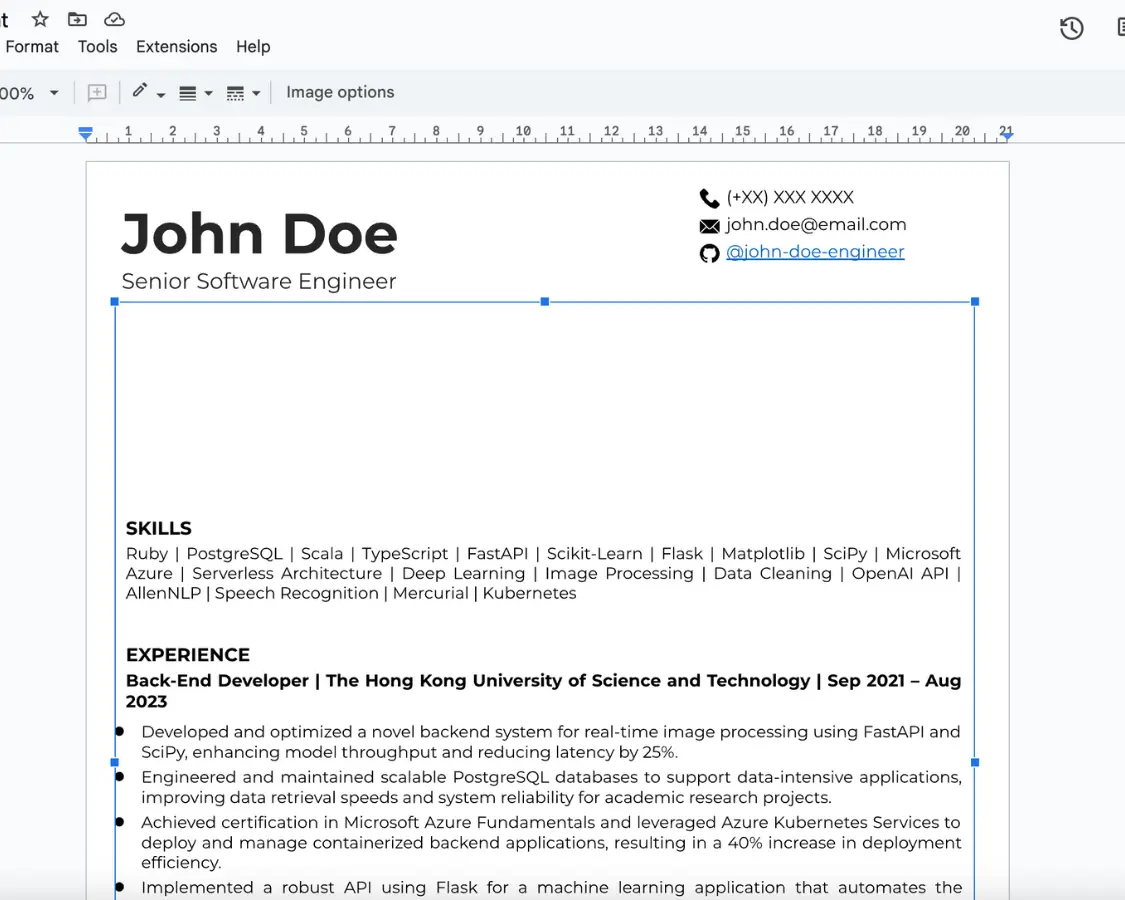
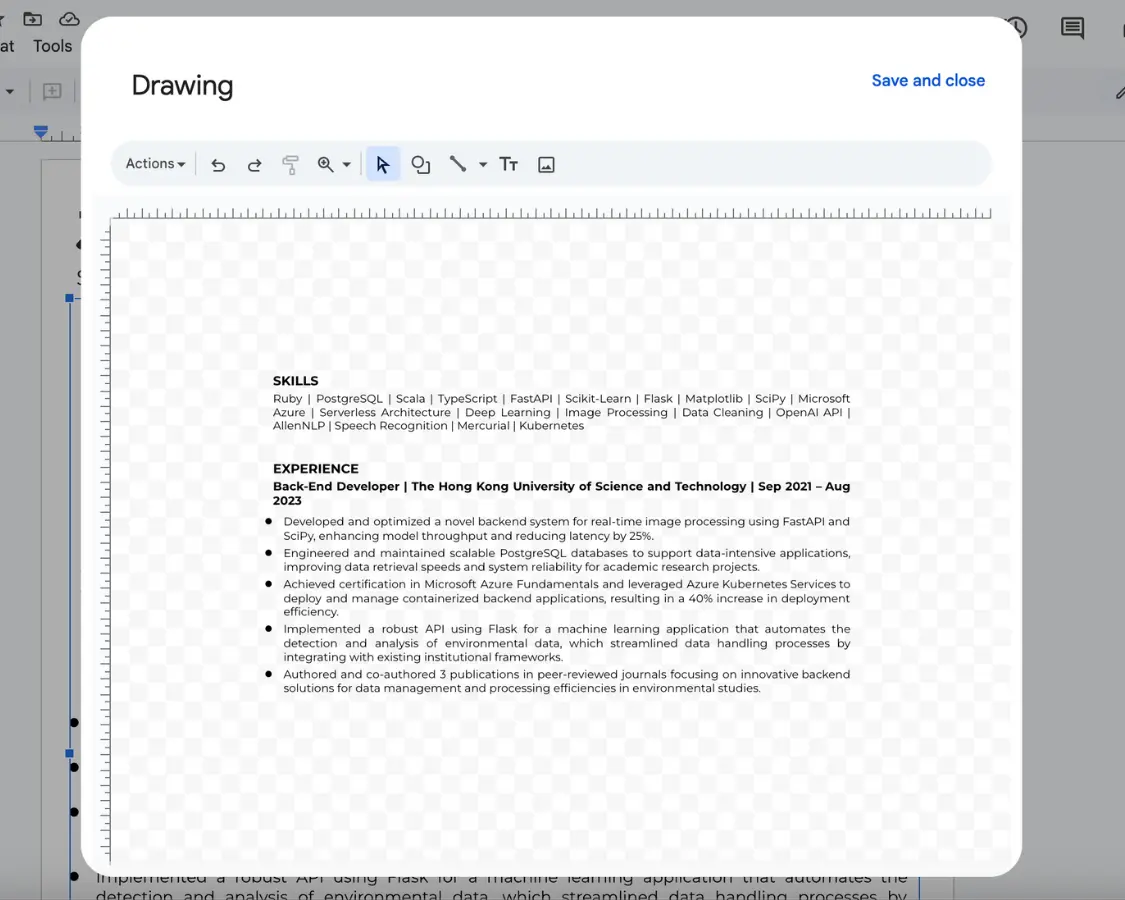
On the other hand, image-based pdf files treat the entire document as a picture. Sure, they might look good, but if your text is trapped in an image. This means that the text isn’t selectable or searchable, which makes it essentially invisible to ATS software.
This is a common problem with resumes created using design tools like Canva, where the final export often flattens text into images. While these tools might give you a visually pleasing result, they’re a disaster for ATS compatibility. If you care about landing an interview, you need a text-based PDF. And remember: Recruiters don’t really care about fancy designs anyways.
If you open an image-based pdf file in Google Doc, here's what you'll get.
It’s like selecting a tech stack to build an app: you need to use the right tool for the job and avoid overkill.
Google Docs and Microsoft Word both allow you to export documents as text-based PDFs. Their exports retain the embedded text, which ensures your resume stays ATS-friendly. If you absolutely need a design-heavy resume (again…you don’t!), use Adobe InDesign, which can still output a text-based PDF if configured correctly.
Avoid design tools like Canva at all costs!
Only maniacs test in production 😉 It’s easy: export your pdf and try selecting the text. If you can’t, the ATS won’t be able to either.
You haven't eliminated all your enemies yet... Two of them remain and they can ruin your life: Tables and Sidebars. They are extremely common (and I understand the visual appeal) but they’re an absolute nightmare to ATS.
Many ATS systems still can’t properly read tables or multi-column layouts. Your job titles might get separated from the companies, your skills could end up in the wrong section, or entire parts of your resume could just disappear.
Here’s the thing: ATS software isn’t designed to appreciate fancy formatting. It reads resumes in a straightforward, top-to-bottom, left-to-right order. Anything that disrupts that flow - like a table or a sidebar - throws it off.
Keep it simple with a clean, single-column layout.
PDF is the gold standard. It preserves your formatting, locks your information, and is optimized for ATS parsing.
While some older systems preferred DOCX, modern platforms handle PDFs much better. As a tech resume writer, I recommend PDF to ensure that the layout I build for you looks exactly the same on the recruiter's screen as it does on yours.
ATS software reads text, not pictures. Image-based PDFs (often exported from tools like Canva) flatten your words into a single graphic, and a photograph on CV creates a similar parsing problem.
This makes your experience "invisible" to the system. If the software can't extract your skills or contact info, you will likely face an automatic rejection before a human ever sees your application.
The simplest test is the "Highlight Test": Open your PDF and try to select a sentence with your mouse.
If you can highlight, copy, and paste the text into a notepad and it remains legible, the ATS can read it. If you can only select the entire document as one big block, it’s an image, and you need to re-export it from a text editor like Google Docs or Word.
I strongly advise against it. Many ATS systems parse text in a linear, top-to-bottom fashion.
Tables and sidebars often scramble this reading order, causing your dates to detach from your job titles or your skills to disappear entirely. To guarantee 100% data capture, stick to a clean, single-column layout.
If you send a DOCX file, it is very easy for others to edit. While most recruiters are ethical, some may "tweak" your experience to better fit a job description without your knowledge.
Sending a PDF makes unauthorized edits much harder, ensuring your professional integrity remains intact throughout the hiring process.
You applied to hundreds of jobs: no result.
Companies won’t bother giving you
feedback,
so you’re stuck in a loop. This will keep happening until you know what’s wrong.
Let’s break this cycle today.
Learn why you’re getting rejected with a Free resume review. You get a simulated recruiter screen and a clear list of action items.
Want to read more first? See how the resume review works →