Emmanuel GendreEx-Google recruiter / Tech resume writerUpdated October 21, 202624 min read
Share
What Is a Resume Summary, and Where Does It Go?
What is a resume summary? A resume summary, also called a profile summary, is the 4 to 6
bullet points at the top of your resume that tell a recruiter who you are and why you fit the job.
As a former Google recruiter, I’ve screened tens of thousands of resumes in 13 years of recruiting. I now use
that insider perspective as a resume writer to help
developers stand out in the job market. I’ve worked with 1,500+ clients, many of whom come to me with common
struggles and questions. I try to address each of these periodically with this blog, so that everyone can
benefit from insider knowledge.
The Profile Summary is probably the one change you can make to improve conversions right
away. It’s also the most misunderstood resume section, and it causes a lot of confusion amongst
my clients.
“Profile Summary”, “Professional Summary”, and “Resume Profile” mean the same thing
A profile summary, a professional summary and a resume profile are all the same section. You might also see
it called a summary statement, a summary of qualifications, a summary profile or, on a CV, a personal profile.
As a recruiter, I recommend using “Profile Summary” because it is the most common label for it, which is
widely expected by both recruiters and ATS.
Avoid calling it “Highlights” or “Key Accomplishments”, which are often a mix of items that belong in a
profile summary and job blocks (I recommend against using these anyway). Another name to avoid is
“Objective”, which is a different section that states your career goal.
Where the Summary Goes on Your Resume
The resume summary goes at the very top of your resume, right after your name and contact information, above
your work experience and skills. You want to minimize any effort on the recruiter’s behalf, so they
shouldn’t have to scroll!
If you use a headline (a one-line title under your name) and/or an objective statement, the summary goes
under those. This is not only best practice in the industry, but also the officially recommended order for
US federal resumes.
Under your contact detailsBest spot.
It’s the first thing the recruiter reads.Under a headlineAlso fine. Headline
first, then the summary.Below your experienceToo late. The
first screen often ends before it.In a sidebarEasy to miss. And some
ATS read sidebars out of order.
Resume Summary Example: 6 key bullet points on a real resume
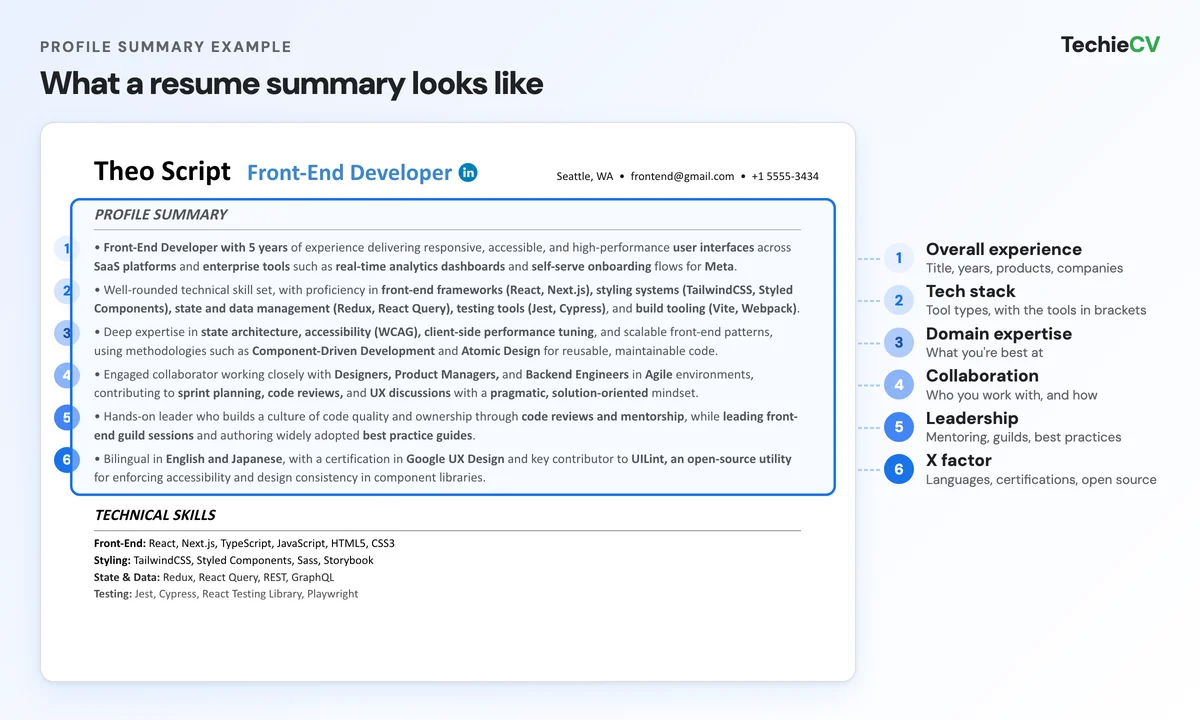
Here’s what a profile summary looks like on a real tech resume, with the 6 bullet points I recommend to pass recruiter screens.
A profile summary on a Front-End Developer resume: one bullet point per part of the formula. I break down
each part below.
Why Recruiters Read Your Resume Summary First
From experience, I can tell you that resumes are reviewed in several steps. During the first step, a
recruiter will try to create a first list of relevant candidates. They won’t bother reading your entire resume
because they need to make the same quick decision hundreds of times. This is what a profile summary is
designed for!
Studies confirm this. In Ladders’ 2018 eye-tracking study, recruiters spent an average of
7.4 seconds on their first screen of a resume, and the best-performing resumes had a profile
summary at the top of the first page. My resume eye tracker replays those seconds on your own resume.
CareerOneStop also gives a similar number: employers usually spend less than 10 seconds scanning
a resume.
I read a lot of bad advice online, telling candidates they don’t need a profile summary, or that if you’re a
junior you do not need one. Unfortunately, that advice often isn’t based on recruiting experience. It
completely ignores what the profile summary is actually for: doing the recruiter’s job.
First, they’re just trying to filter out the ones that don’t fit from a list of hundreds of resumes. This
is increasingly true in 2026 when they are flooded with AI applications.
Then, they read resumes again in more detail when deciding whom to call in for an interview.
In that first round, they go through tons of resumes and only spend a few seconds on each. This means
they often don’t read your work history. Instead, they’ll look for a Profile Summary to get
the gist, so that they can make that first decision fast.
I wasn’t different. Back when I was recruiting, I loved this part of a resume because it saved me a ton of
time! Here’s what I checked in a summary, in order:
Title: is this the job I’m hiring for?
Level: do the years and the scope match the seniority?
Stack: are the must-have tools from the job posting there?
Domain: has this person worked on the kind of product or systems we build?
If all 4 matched, I shortlisted the CV.
When recruiting for popular positions at Google, I would often screen 200+ resumes a day. I didn’t have time to
search for skills in the “Experience” section. If the Profile Summary didn’t immediately
confirm the candidate had the right stack or domain expertise, I’d move on.
Conveniently enough, the Profile Summary is the only part of your resume where you’re allowed some level of
subjectivity. You get to “judge” your own skillset and experience.
So if you write about the right aspects, in the right way… they’ll tend to get your word for it. Because of
this, resumes with a Profile Summary (even for juniors) usually do much better.
Hopefully, you’re starting to see the opportunity here: Recruiters will let you do the review for them.
After you’ve made it through the first filter they will take a look at your work experience, but it
helps even then. Writing a great Profile Summary creates a situation of confirmation bias, where
recruiters instinctively look for evidence supporting your claims.
Your Summary Is the Ad at the Top of Your Resume
Your resume summary is the ad at the top of your resume. You have to see your resume for what it actually
is: marketing material. It’s a piece of advertising which you use to promote a
product (your skill set) to an audience (recruiters). Therefore your writing
should follow the principles of copywriting.
Here’s what top advertising copy does:
It defines a clear value proposition from the get go.
It lists the benefits for the reader.
It hooks you before diving into the nitty-gritty.
On a website, this would basically be the “above the fold” section. It grabs your attention, and sells you
early on, before making you want to read more.
Do You Need a Resume Summary? Yes, Even as a Junior
Yes: every tech resume needs a summary, juniors included.
You’ll find mixed advice on this. Again, it’s mostly because people think it is there to “summarize” the
rest of your content. Here’s how I think of it for juniors: you should have detailed work or project
experience on your resume anyway, which means it should be too long for a recruiter to read during the
first screening. So if you find too much overlap between your main content and your profile summary, you
probably need more content.
Profile Summary vs. Cover Letter
I sometimes get asked the difference between a profile summary and a cover letter. A profile summary and a
cover letter both serve as an introduction of your profile, but they don’t do the same job. Here’s the
difference:
Section
What it says
Use it?
Profile summary
Who you are and why you fit: title, years, stack, domain and results.
Yes, on every resume, at the top.
Cover letter
Why this company and this role: your research and your motivation.
When the job posting asks for one, or to explain a move.
The easiest distinction I could offer between a Profile Summary and a Cover Letter is this:
A Profile Summary is about you: the primary goal is to demonstrate your fit for a type of role.
A Cover Letter is about the company: its purpose is to show that you have researched the company, and
explain your motivations for a specific role or team.
The nuance may feel a bit “abstract”, but when done correctly these 2 pieces are complementary. Here’s
how to write a tech cover letter
that does its half of the job.
What to Put in a Resume Profile Summary
Now I’m going to give you my secret formula for what you put in a resume profile. Based on my experience,
here’s the structure that works best. It hits a sweet spot between core and soft skills, and it ticks all the
boxes for what recruiters look for!
You can split your skills and experience in 6 parts, with one bullet point for each: your overall experience,
tech stack, domain expertise, collaboration, leadership and an optional X factor. It’s the same method I use
when writing a professional summary for an IT resume and for every other summary resume example on this page.
Part
What it tells the recruiter
What to include
1. Overall Experience
You’re the right title and level.
The position you’re applying to, your years of experience, your specialty, the products or systems
you worked on, key projects, and companies (only if they are well known).
2. Technology Stack
You have the must-have tools.
The types of technology used in the role, with the specific tools you’ve used inside parentheses.
3. Domain Expertise
What you’re best at.
Your “claim to fame” within your discipline, plus the methods and concepts that are industry standard
in your field.
4. Collaboration
You work well with others.
The teams you work with, how you work together (Agile, code reviews) and your engagement style.
5. Leadership
You make the team better.
People management if you have it, mentoring, ad hoc projects and thought leadership (articles, docs,
tech talks).
6. X Factor (optional)
What makes you stand out.
Foreign languages, certifications, open-source work, entrepreneurship, awards or patents.
What to Leave Out of Your Summary
Your summary only has 4 to 6 lines, so there’s no room for filler. Here’s what I cut from my clients’
summaries:
Objective lines, like “Seeking a challenging position where I can grow”. They take a full
line and say nothing about your fit.
“I”, “me” and “my”. Write in the implied first person: “Front-End Developer with 5 years
of experience…”
Adjectives with no proof, like “hard-working”, “passionate” or “detail-oriented”. Show it
with a tool, a domain or a result.
A copy of your work history. CareerOneStop gives the same advice: avoid repeating your
work experience or using “puffed up” phrases.
Seeking a positionHard-workingPassionate aboutGo-getterDetail-orientedResults-driven
How to Write a Profile Summary for a Resume or CV
Now it’s your turn! I’ll walk you through how to write a profile summary for a resume or CV, with one bullet
point per part of the formula. Let’s look at each part in this step-by-step guide. I’ll explain what each one
corresponds to, and provide an example. We’ll use a specific position so that you have a
concrete example(Front-End Developer). The same steps work
for an IT resume summary or any other tech role.
I’m going to tell you exactly what type of info should be included within each sentence, so that you can
easily adapt it to your specific case.
Before you start, open 2 or 3 job postings for the role you want and note the title, the must-have tools and
the domain they have in common. Bullets 1 to 3 have to match them.
Bullet 1: Overall Experience
Include:
Resume Title
the position you’re applying to.
Years of experience
if you’re a junior, stay vague with “a solid track record” or “a wealth of experience”.
Domain Expertise: your specialty within your discipline.
Product/Systems Types
you worked on.
Key deliveries/projects
that you’re particularly proud of.
Companies you
worked for (only if they are well known).
Front-End Developer
with
5 years of
experience delivering responsive, accessible, and high-performance
user interfaces
across
SaaS platforms
and
enterprise tools
such as
real-time analytics dashboards
and
self-serve onboarding
flows for
Meta.
Bullet 2: Technology Stack
Include:
Key Technology types, corresponding to the categories of tools
typically used in the role.
Specific technologies
you’ve used, inside parentheses.
Well-rounded technical skill set, with proficiency in
front-end frameworks
(React, Next.js),
styling systems(TailwindCSS, Styled Components), state and
data management(Redux, React Query),
testing tools
(Jest, Cypress), and
build tooling
(Vite, Webpack).
Bullet 3: Domain Expertise
Include:
Specialties/priorities
within your discipline. This is your “claim to fame”, the area of the job in which you excel.
Engineering Methodologies & Concepts
that are industry standard for companies within your field.
Deep expertise in
state architecture, accessibility
(WCAG),
client-side performance tuning, and scalable front-end
patterns, using methodologies such as
Component-Driven Development
and
Atomic Design
for reusable, maintainable code.
Bullet 4: Collaboration
Include:
Cross-functional collaboration / stakeholder engagement,
to show you as a team player.
Development methodologies,
collaborative frameworks or situations.
Engagement style,
which shows your personality and lets them picture you as a human.
Engaged collaborator working closely with
Designers, Product Managers,
and
Backend Engineers
in Agile environments,
contributing to
sprint planning, code reviews,
and
UX discussions
with a
pragmatic, solution-oriented
mindset.
Bullet 5: Leadership
Include:
People Management/Operational Leadership,
if applicable.
Peer Support/Mentorship:
it’s important to show you care about helping others.
Ad Hoc projects
completed outside of the scope of your main role.
Thought Leadership
which can include articles, documentation or tech talks.
Hands-on leader who builds a culture of code quality and ownership through
code reviews and mentorship, while
leading front-end guild sessions
and authoring widely adopted
best practice guides.
Bullet 6: X Factor
This bullet point is optional, and it can include anything else that can make you stand out, such as:
Foreign Languages
Certifications, if they are highly relevant to the target role.
Open-Source Contributions
Entrepreneurship
Awards
Patents
Bilingual in
English and Japanese, with a certification in
Google UX Design
and key contributor to
UILint, an open-source utility
for enforcing accessibility and design consistency in component libraries.
Resume Summary Rules: Length, Format and Keywords
A resume summary should be 4 to 6 bullet points of 2 lines each at most, placed at the top of the page,
written without “I” and matched to the job posting. Here are the rules I follow on every resume I write:
My resume summary rules
Keep it to 4 to 6 bullet points. Each bullet point should span 2 lines at most.
CareerOneStop suggests 3 to 5 bullet points (or 3 to 4 sentences). On tech resumes I go up to 6, because the
tech stack needs a bullet of its own.
Use bullet points. The summary is there to help the recruiter quickly get a sense of who
you are and decide whether to keep reading. Bullet points make it much easier to scan and absorb key
highlights than a block of text. The Ladders study found the same thing: short statements are easier to
process than paragraph-length descriptions.
Put it at the very top. Right after your name and contact information, so the recruiter
sees it without scrolling.
Open with the job title you’re applying for. Use the title the way the job posting writes
it. In the Ladders study, recruiters spent more time on job titles than on any other part of the
resume.
Write without “I”. Start with your title (“Front-End Developer with 5 years…”) or with
how you work (“Engaged collaborator…”), like every example on this page.
Use the job posting’s keywords, in context. CareerOneStop recommends using keywords from
the job posting. Ladders found that keyword stuffing hurts, so put each tool inside a line about what you
did with it. Here’s how applicant tracking systems read your keywords.
Tailor it to each job. Match the title to the posting, move its must-have tools to the
front of your stack bullet and adjust the domain. The rest can stay as it is.
Software Engineer Profile Summary Example
Just for the sake of legibility, here’s the entire Profile Summary example, without colors:
Profile Summary
Front-End Developer with
5 years of experience delivering
responsive, accessible, and high-performance
user interfaces across
SaaS platforms and
enterprise tools such as
real-time analytics dashboards
and self-serve onboarding flows
for Meta.
Well-rounded technical skill set, with proficiency in
front-end frameworks (React, Next.js),
styling systems(TailwindCSS, Styled Components),
state and
data management(Redux, React Query),
testing tools
(Jest, Cypress), and
build tooling
(Vite, Webpack).
Deep expertise in
state architecture, accessibility (WCAG),
client-side performance tuning,
and scalable front-end patterns, using methodologies such as
Component-Driven Development and
Atomic Design for reusable, maintainable code.
Engaged collaborator working closely with
Designers, Product Managers, and
Backend Engineers in
Agile environments, contributing
to
sprint planning, code reviews,
and UX discussions with a
pragmatic, solution-oriented
mindset.
Hands-on leader who builds a culture of code quality and ownership through
code reviews and mentorship,
while
leading front-end guild sessions
and authoring widely adopted
best practice guides.
Bilingual in
English and Japanese, with a
certification in
Google UX Design and key
contributor to
UILint, an open-source utility
for enforcing accessibility and design consistency in component
libraries.
Before and After profile summary example
Here’s a concrete example of a basic resume summary rewritten with the formula, so you can see the
difference. Which one do you think a recruiter will choose to shortlist?
Before
Passionate and hard-working software developer with experience in many technologies. Team
player looking for an opportunity to grow my skills in a fast-paced company. Skilled in front-end and
back-end development, with knowledge of JavaScript, React, CSS and other tools. Strong communication
skills, detail-oriented and a fast learner.
After
Front-End Developer with 5 years of experience delivering responsive,
accessible, and high-performance user interfaces across SaaS platforms
and enterprise tools such as real-time analytics dashboards and
self-serve onboarding flows for Meta.
Well-rounded technical skill set, with proficiency in front-end frameworks (React,
Next.js), styling systems (TailwindCSS, Styled Components), state and
data management (Redux, React Query), testing tools (Jest, Cypress), and
build tooling (Vite, Webpack).
Deep expertise in state architecture, accessibility (WCAG), client-side performance
tuning, and scalable front-end patterns, using methodologies such as Component-Driven
Development and Atomic Design for reusable, maintainable code.
Engaged collaborator working closely with Designers, Product Managers, and
Backend Engineers in Agile environments, contributing to sprint
planning, code reviews, and UX discussions with a pragmatic,
solution-oriented mindset.
Hands-on leader who builds a culture of code quality and ownership through code reviews and
mentorship, while leading front-end guild sessions and authoring widely adopted
best practice guides.
Bilingual in English and Japanese, with a certification in Google UX
Design and key contributor to UILint, an open-source utility for enforcing
accessibility and design consistency in component libraries.
The title went from “software developer” to the exact job: Front-End Developer.
“Experience in many technologies” became 5 years and a stack the recruiter can match
against the job posting.
“Looking for an opportunity to grow” is gone: it’s about what you want, and it takes space your stack can
use.
“Passionate” and “hard-working” gave way to proof: the products, the users and a well-known company.
Professional Summary Examples for IT and Tech Resumes
Here are 13 examples of a professional summary on a resume, one per tech role, each built from the same 6
parts. Pick the resume profile summary example closest to your job, then swap in your own title, years, tools
and results. Each one links to a full resume for that role, so you can see the summary in place.
IT and Infrastructure Summary Examples
An IT resume summary has to show the size of what you support (users, servers, sites), the platforms you run
and how people can count on you when something breaks.
IT Support Specialist
IT Support Specialist with 4 years of experience running Tier 1 and Tier 2 support for 600+ users across 3 offices in healthcare and professional services.
Hands-on with endpoint management (Intune, Jamf), identity and access (Active Directory, Entra ID, Okta), ticketing (ServiceNow, Jira Service Management) and Microsoft 365 administration.
Known for first-contact resolution and clear documentation, with knowledge base articles for onboarding, MFA resets and VPN issues that cut repeat tickets.
Patient communicator with non-technical staff, working with HR on onboarding and with the security team on phishing response.
System Administrator with 7 years of experience managing a mixed Windows and Linux estate of 400+ servers for a logistics company with 2,500 employees.
Strong across server operating systems (Windows Server, RHEL, Ubuntu), virtualization (VMware vSphere, Hyper-V), automation (PowerShell, Bash, Ansible) and backup (Veeam).
Deep expertise in patch management, Active Directory and Group Policy, and disaster recovery, with ITIL change management on every production change.
Trusted partner for the help desk, security and application teams, on call for P1 incidents and mentor to 2 junior admins.
Network Engineer (CCNP Enterprise) with 6 years of experience designing and running campus, data center and WAN networks for multi-site retail and finance companies.
Proficient in Cisco Catalyst and Nexus switching, Juniper routers, FortiGate and Palo Alto firewalls, Meraki SD-WAN and network monitoring (SolarWinds, PRTG).
Specialized in BGP and OSPF design, network segmentation and zero-downtime migrations, with Python and Ansible scripts for config backups and audits.
Works closely with security, cloud and help desk teams on change windows and incident response, and writes the runbooks the on-call team follows.
Systems Engineer with 8 years of experience building and supporting the infrastructure behind SaaS products used by 2M+ customers.
Strong technical range across cloud (AWS, Azure), infrastructure as code (Terraform, Ansible), containers (Docker, Kubernetes), Linux and observability (Prometheus, Grafana, Datadog).
Deep expertise in capacity planning, high availability and cloud cost control, keeping uptime above 99.9% while cutting spend.
Link between engineering, security and IT, leading post-incident reviews and coaching junior engineers on automation.
Back-End Engineer with 6 years of experience building APIs and distributed services for payments and marketplace platforms that handle millions of requests a day.
Strong in languages (Go, Java, Python), frameworks (Spring Boot, FastAPI), databases (PostgreSQL, Redis, DynamoDB), messaging (Kafka) and cloud (AWS).
Deep expertise in API design, event-driven architecture and database performance, with test-driven development and code reviews as daily habits.
Owns services end to end with product, front-end and SRE teams, and mentors new hires through on-call and design reviews.
AI Engineer with 4 years of experience shipping LLM features to production, including RAG search, AI agents and document extraction for B2B SaaS products.
Hands-on with model APIs (OpenAI, Anthropic), frameworks (LangGraph, LlamaIndex), vector databases (pgvector, Pinecone), model serving (vLLM) and Python back ends (FastAPI).
Specialized in evaluation and guardrails: offline eval sets, regression tests for prompts, and cost and latency tuning before every launch.
Works with product managers and platform teams to turn prototypes into features customers use every day.
Data Analyst with 3 years of experience turning sales, marketing and product data into dashboards and reports for an e-commerce company with $200M in yearly revenue.
Proficient in SQL (PostgreSQL, BigQuery), Python (pandas), BI tools (Tableau, Looker), data modeling (dbt) and spreadsheets (Excel, Google Sheets).
Strong in A/B test analysis, customer segmentation and KPI design, with documented data models the whole team can reuse.
Partners with marketing and product managers to answer business questions, and presents findings to leadership in plain language.
Game Developer with 5 years of experience on PC and console titles, including 2 released games on Steam and PlayStation.
Proficient in game engines (Unity, Unreal Engine 5), languages (C#, C++), version control (Perforce, Git) and profiling tools (Unity Profiler, RenderDoc).
Specialized in gameplay systems and performance: player controllers, AI behavior trees and frame-rate optimization to hold 60 FPS on console.
Works closely with designers, artists and QA through playtests and sprint reviews, and mentors junior programmers on engine code.
Hardware Engineer with 7 years of experience designing boards for consumer electronics and industrial IoT products, from schematic to mass production.
Proficient in EDA tools (Altium Designer, Cadence OrCAD), simulation (LTspice), lab equipment (oscilloscopes, logic analyzers) and scripting (Python).
Deep expertise in mixed-signal PCB design, power electronics and signal integrity, with design for manufacturing (DFM) and EMC compliance built in from the start.
Works hand in hand with firmware, mechanical and manufacturing teams, and runs design reviews with contract manufacturers.
To write a resume summary with no experience, replace years of experience with what you’ve built and
learned: your degree or bootcamp, projects, internships and certifications. Everything else in the formula
stays the same.
If you have some experience but not much, stay vague on years in bullet 1, with “a solid track record” or “a
wealth of experience”. With no work experience at all, open with your degree, bootcamp or certification, and
your best project.
What to use in place of work experience:
Projects: apps or tools you built, with users, GitHub stars or a live link.
Internships, freelance and volunteer work: they count as experience, so write them up
like jobs.
Education: your degree, your bootcamp or the coursework that matches the job.
Certifications: CompTIA A+ or Network+ for IT support, AWS Certified Cloud Practitioner
for cloud roles.
Your previous career, if you’re changing fields: the skills that carry over, like
troubleshooting, training people or running a team.
Leave out “no experience”, “seeking an entry-level position” and “eager to learn”. Those lines use up space
and say nothing about your skills.
Example: Computer Science Graduate
Junior Software Developer with a B.S. in Computer Science and 3 shipped projects, including a full-stack budgeting app with 200+ active users.
Hands-on with front-end (React, TypeScript), back-end (Node.js, Express), databases (PostgreSQL, MongoDB) and tools (Git, Docker, AWS).
Strong foundation in data structures, REST API design and testing (Jest), built during a 12-week software engineering internship at a fintech startup.
Used to Agile sprints and code reviews from the internship, and teaching assistant for an intro to programming course with 120 students.
Example: Career Changer Moving Into IT Support
IT Support Technician (CompTIA A+, Network+) moving into IT after 6 years managing retail stores, with hands-on practice from a home lab and volunteer IT work.
Practical skills in Windows 11 and macOS support, Active Directory, Microsoft 365, ticketing (Freshservice) and networking basics (DNS, DHCP, VLANs).
Strong at troubleshooting under pressure and explaining tech to non-technical people, from years of running busy stores and training new staff.
Set up and supported the computers, printers and Wi-Fi for a 30-person nonprofit as a volunteer, with how-to guides for its staff.
Follow these guidelines and you will find yourself with a Profile Summary that helps your resume convert.
Want to check yours? Send it for a free tech resume review and I’ll tell you how a
recruiter reads it.
What’s next?
Writing Amazing Bullet Points
If you want to learn how to improve the rest of your resume, I suggest checking out the article on my
formula to
write amazing bullet points →
Frequently Asked Questions
A short summary about yourself is one or two lines: your title, your years of experience, your main tools and the kind of product you work on. For example: “Front-End Developer with 5 years of experience building React and Next.js dashboards for SaaS companies.”
It works as a LinkedIn headline, or as the first line of your answer to “tell me about yourself”.
Yes. “Resume description”, “profile”, “professional summary” and “summary statement” are all names for the same section: the few lines at the top of your resume that describe who you are and why you fit the job.
Whatever you call it, it carries the same 6 parts: experience, stack, domain expertise, collaboration, leadership and an X factor.
It’s the same section. In the UK, India and much of Europe, people say CV where Americans say resume, so a CV profile summary (or personal profile) is the resume summary under another name.
In the US, a CV usually means a longer academic document, and it can open with a short profile too.
Your resume summary should mention the IT skills the job posting lists as must-haves, grouped by type: for example operating systems (Windows Server, Linux), cloud (Azure, AWS), identity (Active Directory, Entra ID) and ticketing (ServiceNow).
A good technician summary opens with your title and years of experience, then lists the systems and devices you support, your certifications and one result, like ticket volume or resolution time.
For example: “IT Support Technician (CompTIA A+) with 3 years of experience supporting 300+ users on Windows and macOS, with a 90% first-contact resolution rate.” There’s a full IT support summary example above.
Yes, and it only takes a few minutes. For each application, match the title to the job posting, move the must-have tools to the front of your stack bullet and adjust the domain.
The rest can stay as it is.
Free resume review
A recruiter screen, but with feedback
You applied to hundreds of jobs: no result. Companies won’t give you
feedback, so you’re stuck in a loop. Rejections will keep coming until you know
what’s wrong.
Let’s break this cycle today!
I’ll screen your resume the same way I did at Google.
You’ll get:
Your resume sections and content scored.
A clear list of what to improve, why, and how.
Behind the scenes secrets on the screening process.