Database Administrator Resume Examples & Free Template (PDF, Word)

This free Database Administrator template is pre-filled with Priya Raman, a senior DBA at Cengage. Swap her engines, restore times and audits for yours, then grab the PDF or Word file. You’ll also get 3 sample DBA resumes, plus my 6-step method.

4.9 5.0
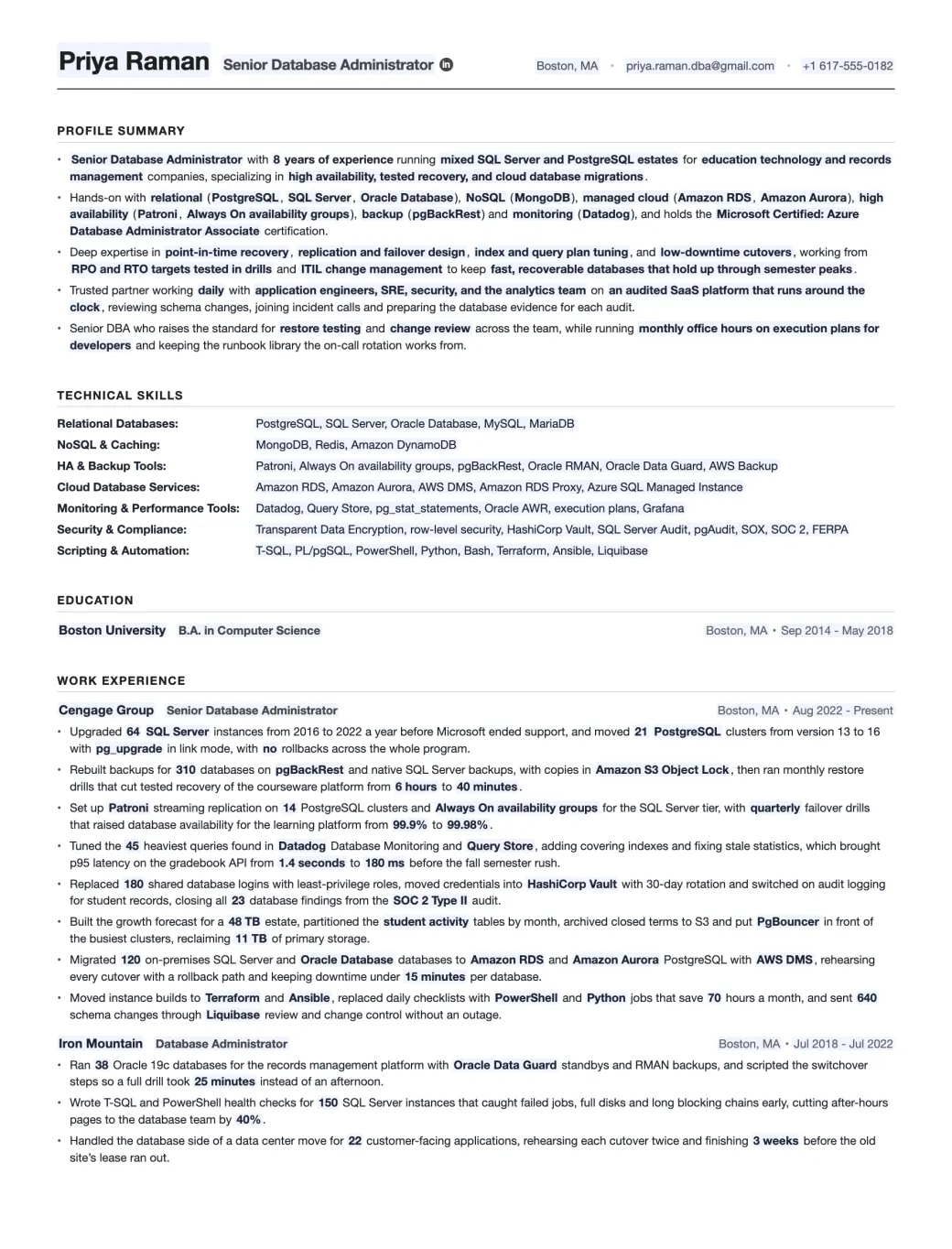
Database Administrator resume template filled in for a senior DBA at Cengage Group, showing the profile summary, technical skills, education and one bullet for each of the 8 DBA competencies
Emmanuel Gendre Ex-Google recruiter / Tech resume writer Updated Free, ATS-friendly, no signup

Interactive resume template generator

Interactive Database Administrator Resume Template

Fill in the side panel, then download your resume as a PDF or a Word file.

Edits update live as you type. Toggle Edit to rewrite paper text directly.

Edit mode is on. Click anywhere on the resume to rewrite text. Side-panel placeholders still update live.

Priya Raman Senior Database Administrator

Boston, MA • priya.raman.dba@gmail.com • +1 617-555-0182

Profile Summary

  • Senior Database Administrator with 8 years of experience running mixed SQL Server and PostgreSQL estates for education technology and records management companies, specializing in high availability, tested recovery, and cloud database migrations.
  • Hands-on with relational (PostgreSQL, SQL Server, Oracle Database), NoSQL (MongoDB), managed cloud (Amazon RDS, Amazon Aurora), high availability (Patroni, Always On availability groups), backup (pgBackRest) and monitoring (Datadog), and holds the Microsoft Certified: Azure Database Administrator Associate certification.
  • Deep expertise in point-in-time recovery, replication and failover design, index and query plan tuning, and low-downtime cutovers, working from RPO and RTO targets tested in drills and ITIL change management to keep fast, recoverable databases that hold up through semester peaks.
  • Trusted partner working daily with application engineers, SRE, security, and the analytics team on an audited SaaS platform that runs around the clock, reviewing schema changes, joining incident calls and preparing the database evidence for each audit.
  • Senior DBA who raises the standard for restore testing and change review across the team, while running monthly office hours on execution plans for developers and keeping the runbook library the on-call rotation works from.

Technical Skills

Relational Databases:
PostgreSQL, SQL Server, Oracle Database, MySQL, MariaDB
NoSQL & Caching:
MongoDB, Redis, Amazon DynamoDB
HA & Backup Tools:
Patroni, Always On availability groups, pgBackRest, Oracle RMAN, Oracle Data Guard, AWS Backup
Cloud Database Services:
Amazon RDS, Amazon Aurora, AWS DMS, Amazon RDS Proxy, Azure SQL Managed Instance
Monitoring & Performance Tools:
Datadog, Query Store, pg_stat_statements, Oracle AWR, execution plans, Grafana
Security & Compliance:
Transparent Data Encryption, row-level security, HashiCorp Vault, SQL Server Audit, pgAudit, SOX, SOC 2, FERPA
Scripting & Automation:
T-SQL, PL/pgSQL, PowerShell, Python, Bash, Terraform, Ansible, Liquibase

Education

Boston University B.A. in Computer Science
Boston, MA • Sep 2014 - May 2018

Work Experience

Cengage Group Senior Database Administrator
Boston, MA • Aug 2022 - Present
  • Upgraded 64 SQL Server instances from 2016 to 2022 a year before Microsoft ended support, and moved 21 PostgreSQL clusters from version 13 to 16 with pg_upgrade in link mode, with no rollbacks across the whole program.
  • Rebuilt backups for 310 databases on pgBackRest and native SQL Server backups, with copies in Amazon S3 Object Lock, then ran monthly restore drills that cut tested recovery of the courseware platform from 6 hours to 40 minutes.
  • Set up Patroni streaming replication on 14 PostgreSQL clusters and Always On availability groups for the SQL Server tier, with quarterly failover drills that raised database availability for the learning platform from 99.9% to 99.98%.
  • Tuned the 45 heaviest queries found in Datadog Database Monitoring and Query Store, adding covering indexes and fixing stale statistics, which brought p95 latency on the gradebook API from 1.4 seconds to 180 ms before the fall semester rush.
  • Replaced 180 shared database logins with least-privilege roles, moved credentials into HashiCorp Vault with 30-day rotation and switched on audit logging for student records, closing all 23 database findings from the SOC 2 Type II audit.
  • Built the growth forecast for a 48 TB estate, partitioned the student activity tables by month, archived closed terms to S3 and put PgBouncer in front of the busiest clusters, reclaiming 11 TB of primary storage.
  • Migrated 120 on-premises SQL Server and Oracle Database databases to Amazon RDS and Amazon Aurora PostgreSQL with AWS DMS, rehearsing every cutover with a rollback path and keeping downtime under 15 minutes per database.
  • Moved instance builds to Terraform and Ansible, replaced daily checklists with PowerShell and Python jobs that save 70 hours a month, and sent 640 schema changes through Liquibase review and change control without an outage.
Iron Mountain Database Administrator
Boston, MA • Jul 2018 - Jul 2022
  • Ran 38 Oracle 19c databases for the records management platform with Oracle Data Guard standbys and RMAN backups, and scripted the switchover steps so a full drill took 25 minutes instead of an afternoon.
  • Wrote T-SQL and PowerShell health checks for 150 SQL Server instances that caught failed jobs, full disks and long blocking chains early, cutting after-hours pages to the database team by 40%.
  • Handled the database side of a data center move for 22 customer-facing applications, rehearsing each cutover twice and finishing 3 weeks before the old site’s lease ran out.

Done editing? Download a real PDF (selectable text, ATS-friendly, US Letter) or an editable Word file if a recruiter asks for one.

About this template

A Database Administrator resume template, built by a tech recruiter.

A Database Administrator keeps the company’s databases running, safe and fast. You patch and upgrade SQL Server, Oracle or PostgreSQL, and you take the backups and prove they restore. You set up replication so one dead server doesn’t take the app down with it, and you tune whatever query is hurting this week. More and more of that work now happens on Amazon RDS or Azure SQL, and you’re usually the one moving the databases there.

Pick up any pile of DBA resumes and most begin the same way: Oracle, SQL Server and PostgreSQL in a row, then “responsible for database administration”. A hiring manager learns nothing from that. They want the moments you were on the hook: the restore you tested and its time, the availability you held, the upgrade you finished before end of support and the audit findings you fixed.

That’s why Priya’s Cengage job in the template gets 8 bullets, and each one proves a separate DBA competency, from patching up to change control. 3 complete DBA resumes follow the template, or you can jump to 6 steps to write a Database Administrator resume.

Not sure your draft is there yet? Upload it for a tech resume review. It costs nothing, and I’m the one who reads it.

Industry signal

What the market says about Database Administrator roles

There’s plenty of DBA work in 2026, and the vendors’ support calendars explain a lot of it. Microsoft ended extended support for SQL Server 2016 on July 14, MySQL 8.0 reached end of life in April, and PostgreSQL 14 stops getting fixes on November 12. Each one is an upgrade somebody has to plan and test. The BLS expects DBA jobs to stay flat while database architect jobs grow, partly because the cloud lets fewer admins look after more companies. So the DBAs getting hired now can run managed cloud databases too.

7,300 Yearly openings, US DBAs and database architects US Bureau of Labor Statistics
$104,620 US database administrator median pay, May 2025 US Bureau of Labor Statistics

Resume Samples

Database Administrator Resume Examples

A junior DBA and a lead DBA can run the same engines and still need very different resumes, and the 3 database administrator resume samples here make that easy to see. The junior DBA patches and restores SQL Server for InPost in Kraków, the senior runs a 340-instance estate for Travelers, and the lead owns the payment databases at Global Payments in Dublin. You can download each one as a PDF or a Word file, free and with no signup.

Junior Database Administrator Resume Example

Nobody expects a junior DBA to design the failover plan. What a hiring manager wants to see is that you can patch on schedule, restore a database you tested yourself and fix a slow query with a real before and after.

Years of experience
2 years
Industry
Logistics
Stack
SQL ServerPostgreSQLPowerShellZabbix
Download PDF Download Word

Click to download the Junior Database Administrator resume example as a PDF or a Word file. Free / No signup.

Tadeusz Wiśniewski

Junior Database Administrator

Kraków, Poland · tadeusz.wisniewski.db@gmail.com · +48 12 555 0134 · linkedin.com/in/tadeuszwisniewski

Profile Summary

  • Junior Database Administrator with 2 years looking after SQL Server and PostgreSQL at InPost, the parcel locker company, after 4 years on the IT service desk at Nokia.
  • Works across relational (SQL Server 2022, PostgreSQL 16), backup (native backups, pgBackRest), monitoring (Zabbix, Query Store) and scripting (PowerShell, T-SQL), and holds the Azure Database Administrator Associate certification.
  • Strongest in restore testing, index and statistics maintenance and monthly patching, and helped move the first test databases to Azure SQL Database this year.
  • Part of a 5-person database team working with developers and the infrastructure group, taking second-line escalations and joining the on-call rotation one week in five.
  • Wrote the team’s restore runbook in Polish and English, and shows new service desk hires how to triage database tickets before they reach the DBAs.

Technical Skills

Relational Databases:
SQL Server 2019 and 2022, PostgreSQL 15 and 16, MySQL 8.4 (basics)
NoSQL & Caching:
Redis (basics)
HA & Backup Tools:
Always On availability groups, log shipping, native SQL Server backups, pgBackRest
Cloud Database Services:
Azure SQL Database, Azure SQL Managed Instance (lab)
Monitoring & Performance Tools:
Query Store, execution plans, pg_stat_statements, Zabbix, Grafana
Security & Compliance:
role-based access, Transparent Data Encryption, access logging, GDPR
Scripting & Automation:
T-SQL, PL/pgSQL, PowerShell, Bash, Git
Page 2 of 2

Work Experience

InPost Junior Database Administrator Kraków, Poland · Oct 2024 to Present
  • Patch and support 62 SQL Server and PostgreSQL instances across production and test, applying cumulative updates every month inside a 2-hour window with no failed rollouts so far.
  • Rebuilt the backup jobs for the parcel tracking databases and started monthly restore drills on a test server, taking a full tested restore from never tried to 35 minutes.
  • Tuned 28 slow queries found in Query Store, mostly missing indexes and stale statistics, cutting the nightly depot report from 9 minutes to 40 seconds.
  • Dropped 140 unused and duplicate indexes across 9 databases after checking usage stats with the developers, reclaiming 380 GB and taking 2 hours off nightly maintenance.
  • Joined the quarterly failover tests for the parcel tracking availability group and wrote the step-by-step runbook, cutting a manual failover from 25 minutes to 6.
Nokia IT Service Desk Analyst Kraków, Poland · Mar 2020 to Sep 2024
  • Handled about 1,100 tickets a year for a 4,000-person site, from database access requests and broken reports to application errors.
  • Automated password resets and 6 recurring report requests in PowerShell, giving the desk back about 5 hours a week.
  • Escalated database incidents with logs, timings and steps to reproduce, and 40 of those write-ups led to permanent fixes by the database team.

Education

AGH University of Krakow B.Eng. in Computer Science Kraków, Poland · Oct 2016 to Feb 2020
Microsoft Microsoft Certified: Azure Database Administrator Associate (DP-300) Online · Aug 2025

Senior Database Administrator Resume Example

At senior level the estate is yours. Show the size of it, the availability you held, a migration you led from start to finish and the recovery time you proved in a real test.

Years of experience
9 years
Industry
Insurance
Stack
SQL ServerAzure SQL Managed InstancePowerShellAzure DevOps
Download PDF Download Word

Click to download the Senior Database Administrator resume example as a PDF or a Word file. Free / No signup.

Rosalie Gauthier

Senior Database Administrator

Hartford, CT · rosalie.gauthier.dba@gmail.com · +1 860-555-0178 · linkedin.com/in/rosaliegauthier

Profile Summary

  • Senior Database Administrator with 9 years in insurance and health care, now running a 340-instance SQL Server estate for claims and policy systems at Travelers.
  • Works across SQL Server 2016 to 2022, Azure SQL Managed Instance, Always On availability groups, PowerShell with dbatools and Azure DevOps, and holds the Azure Database Administrator Associate certification.
  • Strongest in performance tuning, disaster recovery testing and large migrations, with a 99.99% availability target on every tier-1 database.
  • Works with the claims application teams, infrastructure and internal audit, and chairs the weekly database change review that every production change goes through.
  • Mentors 3 junior DBAs on tuning and recovery, and wrote the migration playbook the team uses for every move to Azure.

Technical Skills

Relational Databases:
SQL Server 2016 to 2022, Azure SQL Managed Instance, PostgreSQL (supporting)
NoSQL & Caching:
Azure Cosmos DB (operations), Redis
HA & Backup Tools:
Always On availability groups, failover cluster instances, log shipping, Commvault
Cloud Database Services:
Azure SQL Managed Instance, Azure SQL Database, Azure Database Migration Service
Monitoring & Performance Tools:
execution plans, Query Store, wait statistics, Redgate SQL Monitor, Resource Governor
Security & Compliance:
Transparent Data Encryption, Always Encrypted, row-level security, SQL Server Audit, SOX
Scripting & Automation:
T-SQL, PowerShell, dbatools, Azure DevOps pipelines, Flyway
Page 2 of 2

Work Experience

Travelers Senior Database Administrator Hartford, CT · Jan 2021 to Present
  • Run a 340-instance SQL Server estate for claims and policy systems, with Always On availability groups on every tier-1 database and 99.99% availability over the last 2 years.
  • Moved 90 databases to Azure SQL Managed Instance over 14 weekend cutovers using log replay, with no rollback and every cutover inside its 4-hour window.
  • Cut the nightly claims batch from 5.5 hours to 70 minutes by redesigning indexes, updating statistics with full scans and switching partitions instead of deleting rows.
  • Rebuilt the disaster recovery plan around quarterly failover tests to the secondary data center, proving a 25-minute RTO for the 40 tier-1 databases.
  • Run the quarterly SOX access review for 1,600 database logins, removing 410 that no longer needed access and moving the rest to Active Directory groups.
Hartford HealthCare Database Administrator Hartford, CT · Jun 2017 to Dec 2020
  • Supported 120 SQL Server instances behind clinical reporting and billing on a 24/7 rotation, applying cumulative updates every quarter with a tested rollback plan.
  • Automated backup checks and test restores with dbatools, finding 4 broken backup chains in the first year before anyone needed them.
  • Saved about $180K a year in storage by turning on page compression and archiving billing data older than 10 years.

Education

University of Connecticut B.S. in Management Information Systems Storrs, CT · Aug 2013 to May 2017
Microsoft Microsoft Certified: Azure Database Administrator Associate (DP-300) Online · Mar 2022

Lead Database Administrator Resume Example

A lead DBA is judged on the standards and the team, not on one database. Show the platform you own, the recovery standard you set, the audit results and how much faster other teams get a database because of you.

Years of experience
14 years
Industry
Payments
Stack
SQL ServerPostgreSQLTerraformDatadog
Download PDF Download Word

Click to download the Lead Database Administrator resume example as a PDF or a Word file. Free / No signup.

Hugo Steinmetz

Lead Database Administrator

Dublin, Ireland · hugo.steinmetz.db@gmail.com · +353 1 555 0163 · linkedin.com/in/hugosteinmetz

Profile Summary

  • Lead Database Administrator with 14 years in payments, now leading 7 DBAs who run the SQL Server and PostgreSQL platforms behind card authorization and settlement at Global Payments.
  • Works across SQL Server 2022, PostgreSQL 16, Patroni, Terraform, Ansible and Datadog, on platforms that carry Tier-0 payment traffic around the clock.
  • Strongest in cross-region disaster recovery, PCI DSS evidence and large version upgrades, and is leading the team’s first trials of Amazon Aurora PostgreSQL.
  • Works with payments engineering, security, risk and the Atlanta database team, and chairs the database design review for every new Tier-0 service.
  • Hired 4 of the 7 DBAs on the team, set the database standards from backup policy to access reviews, and runs the escalation rotation for Europe.

Technical Skills

Relational Databases:
SQL Server 2019 and 2022, PostgreSQL 14 to 16, Oracle 19c (legacy)
NoSQL & Caching:
Redis, MongoDB (operations)
HA & Backup Tools:
Always On distributed availability groups, Patroni, pgBackRest, Oracle Data Guard
Cloud Database Services:
Amazon Aurora PostgreSQL (pilot), Amazon RDS, AWS DMS
Monitoring & Performance Tools:
Datadog Database Monitoring, Query Store, pg_stat_statements, execution plans
Security & Compliance:
PCI DSS 4.0, Transparent Data Encryption, key rotation, pgAudit, quarterly access reviews
Scripting & Automation:
Terraform, Ansible, PowerShell, Python, Liquibase, ServiceNow
Page 2 of 2

Work Experience

Global Payments Lead Database Administrator Dublin, Ireland · Mar 2018 to Present
  • Own the database platform for European card processing, about 900 production databases on SQL Server and PostgreSQL, with an on-call team that covers it around the clock.
  • Set the cross-region recovery standard for Tier-0 databases on distributed availability groups and Patroni standby clusters, then proved a 15-minute RTO in 2 live failovers.
  • Ran the upgrade program that took 180 PostgreSQL clusters off version 13 before its November 2025 end of life, using logical replication on the 12 largest so card traffic never stopped.
  • Owned the database evidence for 3 PCI DSS assessments, adding TDE to every cardholder database and quarterly access reviews, with no database findings in the latest report.
  • Built self-service database requests with Terraform and Ansible behind a ServiceNow form, cutting new database lead time from 3 weeks to 2 days.
Elavon Senior Database Administrator Dublin, Ireland · Aug 2012 to Feb 2018
  • Supported about 200 SQL Server and Oracle instances for European merchant acquiring on a follow-the-sun rotation with the Atlanta team.
  • Cut p95 authorization lookup time from 120 ms to 35 ms with filtered indexes, partition-aligned tables and plan guides on the busiest procedures.
  • Moved 60 Oracle databases from Solaris to Linux using Data Guard, keeping each cutover under 30 minutes.

Education

Trinity College Dublin B.A.I. in Computer Engineering Dublin, Ireland · Sep 2008 to Jun 2012
Microsoft Microsoft Certified: Azure Database Administrator Associate (DP-300) Online · Nov 2023

Free resume review

A recruiter screen, but with feedback

You applied to hundreds of jobs: no result. Companies won’t give you feedback, so you’re stuck in a loop. Rejections will keep coming until you know what’s wrong.

Let’s break this cycle today!

I’ll screen your resume the same way I did at Google.

You’ll get:

  • Your resume sections and content scored.
  • A clear list of what to improve, why, and how.
  • Behind the scenes secrets on the screening process.

How I rewrite Database Administrator resumes

How to write a Database Administrator resume

Emmanuel Gendre, ex-Google recruiter

Emmanuel Gendre Ex-Google recruiter, tech resume writer

In my 13 years as a recruiter (Google was a big part of that), I saw the same DBA resume mistake again and again: it describes the database and forgets the DBA. “Managed a 40 TB Oracle environment” tells me how big the estate was. It doesn’t say whether you ever had to restore it.

When DBAs come to my tech resume writing service, I rebuild their bullets until each one carries a recovery time, an uptime figure or an audit result. I keep asking until the missing numbers turn up. If you’re doing it yourself, though, focus on these 6 steps. The Cengage template shows each step in practice.

  1. Step 1 Format & layout Plain headings and one column, so the ATS files your engines right. Go to step 1
  2. Step 2 Profile Summary Who you are as a DBA, in the 5 lines a recruiter reads first. Go to step 2
  3. Step 3 Work Experience Your current job, proving all 8 DBA competencies with one bullet each. Go to step 3
  4. Step 4 Bullet Points Task to technique to tool to method to number, level by level. Go to step 4
  5. Step 5 Technical Skills Engines, HA, cloud and scripting, grouped into 7 tidy rows. Go to step 5
  6. Step 6 Keywords & Metrics Use the posting’s keywords, then attach a figure to each bullet. Go to step 6

Step 1 · Format & Layout

Database Administrator resume format and layout

Start with the quick win. Software files your resume before a person ever opens it, then a recruiter gives it a few seconds to find your title, engines and dates. One plain layout works for the software and the person.

01ATS Compliance

ATS compliance for your Database Administrator resume

Applications at nearly every employer land in an Applicant Tracking System (ATS). It splits each resume into fields such as title, employer and skills, and recruiters search those for terms like “Always On” or “RMAN”. Put your skills in a sidebar, a table with two columns or a graphic, and the parser can misfile them or drop them, so your name never appears in the results. More on that in my explainer on how applicant tracking systems work. Whatever engine you run, it comes down to 3 rules:

The 3 rules
  1. Use a 100% text based format (no Canva!)

  2. Avoid tables, pictures, and complex structures.

  3. Use the most predictable section names, like “Profile Summary” and “Work Experience”

02Design & Layout

Database Administrator resume design and layout

Here’s a lesson from my Google days: recruiters hate fancy designs. Someone working through a pile of DBA applications wants the job title, employer and dates exactly where they were on every other resume in the pile. Some DBA resumes still arrive drawn like an entity diagram, with a box for each job and arrows between them. Clever, maybe, but now the recruiter has to hunt for your experience.

Boring wins here. Keep the page plain and predictable, with one column, one ordinary font and the 4 standard section headings. Certifications such as DP-300 sit in Education, each with the year. Drop the skill bars, because nobody can verify “80% Oracle”. The template above is built exactly this way.

Layout Spec
Columns
One. No sidebars, tables, columns, pictures or tabs.
Margins
0.7 in on all four sides
Body size
10 to 11 pt
Type
One family, weight for hierarchy
Length
One page under 5 years, two after
Section order
Summary, Skills, Experience, Education
PDF

03File Format

Resume file format for your Database Administrator resume

For DBA jobs, go with a PDF unless told otherwise. Your formatting can’t shift between machines, and any PDF you save from your word processor keeps its text readable for an ATS. Never send a scanned copy, because the parser only sees a picture. Recruitment agencies and consultancies sometimes rebuild resumes in their own format for clients, and a .docx makes that easier, so have one ready. My file format advice for tech resumes goes deeper.

Format Guide
PDF
Your default. Layout holds, text stays selectable.
Word (.docx)
When the posting or a recruiter asks for it. Use the Word download above.
Plain text
For portals that make you paste into a box
Never
Images, scans, password-protected PDFs, shared-drive links
File name
Priya-Raman-Database-Administrator.pdf

Step 2 · Profile Summary

Database Administrator profile summary

A lot of DBAs drop the summary and lead with a wall of engines. Please don’t. A recruiter decides in 2 rounds: a fast fit check and then, for whoever gets through it, a proper read. On a busy day, the fast check takes in your title and summary and not much more. Both rounds are explained in my piece on the recruiter’s 2-round screen.

In a DBA summary, the recruiter is checking three things: your engines, how big your estate is and whether anyone trusted you with production. I’ve split that across 5 bullets, shown below beside Priya’s version from the template. My profile summary walkthrough with examples covers other tech roles too.

  1. 1

    Title, years and scope

    Say the title you’re after, how long you’ve been a DBA and what you look after: a mixed estate, an Oracle shop, a cloud-first team. Add the industry, because banks and SaaS companies screen DBAs differently.

  2. 2

    Your stack

    Engines first, then your HA, backup, cloud and monitoring tools, each behind a short label like relational (PostgreSQL) or backup (pgBackRest). Finish with one current certification. That’s the line recruiters’ keyword searches land on.

  3. 3

    Domain expertise

    Pick the 3 or 4 parts of the job you’re best at, such as point-in-time recovery or query tuning, and say how you work (RPO and RTO you test, change control). That turns “knows SQL Server” into “keeps SQL Server up”.

  4. 4

    Collaboration

    Developers, SRE, security and auditors all lean on you, so mention who you support and where you show up: schema reviews, incident bridges, audit prep. A DBA nobody wants to call at 2 a.m. doesn’t get hired.

  5. 5

    Leadership

    Runbooks, review standards and the juniors you brought up all count here, even with zero direct reports. To a hiring manager, that says the people around you get better.

Database Administrator resume summary example, from the template above
  • Senior Database Administrator with 8 years of experience running mixed SQL Server and PostgreSQL estates for education technology and records management companies, specializing in high availability, tested recovery, and cloud database migrations.
  • Hands-on with relational (PostgreSQL, SQL Server, Oracle Database), NoSQL (MongoDB), managed cloud (Amazon RDS, Amazon Aurora), high availability (Patroni, Always On availability groups), backup (pgBackRest) and monitoring (Datadog), and holds the Microsoft Certified: Azure Database Administrator Associate certification.
  • Deep expertise in point-in-time recovery, replication and failover design, index and query plan tuning, and low-downtime cutovers, working from RPO and RTO targets tested in drills and ITIL change management to keep fast, recoverable databases that hold up through semester peaks.
  • Trusted partner working daily with application engineers, SRE, security, and the analytics team on an audited SaaS platform that runs around the clock, reviewing schema changes, joining incident calls and preparing the database evidence for each audit.
  • Senior DBA who raises the standard for restore testing and change review across the team, while running monthly office hours on execution plans for developers and keeping the runbook library the on-call rotation works from.

Step 3 · Work Experience

Database Administrator work experience

Step 2 earned you the slower read. Now the recruiter works through your jobs one at a time, and the current one gets far more attention than the rest. I’d put it at about 95% of the decision.

That’s logical, since they’re hiring the DBA you are now. So your current role should prove all 8 parts of the Database Administrator role profile, the scorecard recruiters compare every DBA resume against, with one bullet apiece. Below, the cards follow the order I’d check them in.

Database Administrator role profile
  1. Installation, Patching & Upgrades

    You keep every instance patched and on a version the vendor still supports. An unsupported SQL Server or PostgreSQL turns into a security finding, and upgrades are where a lot of outages start. Tell them how you used rolling patch windows and pg_upgrade to move the whole estate forward without a failed upgrade.

    Techniques
    rolling patch windows, major-version upgrades, standard builds
    Tools
    SQL Server, PostgreSQL, pg_upgrade, Oracle OPatch
    Metrics
    instances on supported versions, upgrade rollbacks, patch lag
  2. Backup, Restore & Disaster Recovery

    You guarantee the data comes back, whatever breaks. A backup job that says “succeeded” proves nothing until someone restores from it, and lost data is the one mistake nobody forgives. Show how you used point-in-time recovery and pgBackRest or RMAN to prove a recovery time you can quote in an interview.

    Techniques
    point-in-time recovery, restore drills, immutable copies
    Tools
    pgBackRest, Oracle RMAN, Veeam, AWS Backup
    Metrics
    tested RTO, RPO held, restore success rate
  3. High Availability & Replication

    You design for the day a primary server dies at 2 p.m. on a Tuesday. A failover that only works on paper is a classic DBA horror story, so hiring managers want drills and numbers. Walk them through how you used Always On, Data Guard or Patroni with scheduled failover tests to raise availability.

    Techniques
    failover drills, synchronous replication, read replicas
    Tools
    Always On availability groups, Oracle Data Guard, Patroni
    Metrics
    availability, failover time, replica lag
  4. Performance Monitoring & Tuning

    You find the query that’s slowing everyone down and fix it. Users feel a slow database before any dashboard turns red, so a before-and-after latency figure is one of the strongest lines a DBA can write. Point out how you used execution plans and pg_stat_statements or Query Store to cut response times.

    Techniques
    execution plan analysis, index tuning, statistics maintenance
    Tools
    Query Store, pg_stat_statements, Oracle AWR, Datadog
    Metrics
    p95 latency, batch run time, slow queries removed
  5. Database Security & Access Control

    You lock down who can read which data, and you can prove it to an auditor. Databases hold the records attackers want, and a bad SOX or PCI review lands on the DBA team first. Describe how you used least-privilege roles and audit logging to close findings and keep access reviews clean.

    Techniques
    least-privilege roles, encryption at rest, access reviews
    Tools
    HashiCorp Vault, SQL Server Audit, pgAudit, TDE
    Metrics
    audit findings closed, shared logins removed, review completion
  6. Capacity Planning & Storage

    You see the disk filling up months before it does. Running out of space or connections in a busy season causes outages nobody planned for, and storage costs real money. Explain how you used growth forecasts, partitioning and connection pooling to reclaim space and keep headroom.

    Techniques
    growth forecasting, partitioning, archiving, connection pooling
    Tools
    PgBouncer, page compression, Amazon S3
    Metrics
    storage reclaimed, headroom kept, connections per server
  7. Cloud Migrations & Managed Databases

    You move databases to RDS, Aurora or Azure SQL without losing a row. Most companies are somewhere in that move right now, and a clean cutover is what they’re hiring for. Mention how you used AWS DMS or Azure DMS and rehearsed cutovers to keep downtime inside the window.

    Techniques
    cutover rehearsals, schema conversion, rollback plans
    Tools
    AWS DMS, Azure DMS, Amazon RDS, Azure SQL Managed Instance
    Metrics
    databases migrated, downtime per cutover, rollbacks
  8. Automation & Change Control

    You script the morning checklist so nobody has to run it by hand. Teams want DBAs who build instances from code and review schema changes before they ship, not ones who do it all by hand at midnight. Let them know how you used PowerShell, Terraform and Liquibase to save hours and ship changes without outages.

    Techniques
    infrastructure as code, schema change review, runbooks
    Tools
    Terraform, Ansible, PowerShell, Liquibase
    Metrics
    hours saved, changes shipped, failed changes

Coming from the service desk or sysadmin work? Keep those wins if they carry numbers. If you’ve never failed over a production database, build an availability group or a Patroni cluster at home, break it on purpose, and put it under Projects so area 3 still has a bullet.

Submit your resume for a free review!

Step 4 · Bullet Points

Database Administrator resume bullet points

Bullets are the part of a DBA resume I rewrite most, and I always use the same 5-level method, the Level System. Google’s XYZ formula is where it began, and I’ve added the tool and method detail technical hiring managers check. My guide to writing tech resume bullet points covers every level in detail.

At each level you answer one question, and the answer becomes part of the bullet. On a DBA resume, the closing number is usually a restore time, an uptime percentage, a latency drop or the minutes a cutover took. Here’s a disaster recovery bullet, grown from an 8-word task.

  1. Level 1Task

    What did I work on? Start with one project you actually finished. A task on its own doesn’t tell a recruiter why it mattered.

    Set up disaster recovery for the billing databases.

  2. Level 2+ Techniques

    How did I do it? Add the techniques. They show you made choices instead of following a vendor checklist.

    Set up disaster recovery for the billing databases, adding a standby in a second region and scripted failover steps.

  3. Level 3+ Tools

    What tools did I use? Write the real product names. It’s the easiest keyword win on the page.

    Set up disaster recovery for the billing databases on Patroni and pgBackRest, adding a standby in a second region and scripted failover steps.

  4. Level 4+ Method

    What method did I follow? Mention the standard or process behind the work. Most DBAs leave it out, and it tells a hiring manager how you think.

    Set up disaster recovery for the billing databases on Patroni and pgBackRest, adding a standby in a second region and scripted failover steps, tested every quarter against the company’s RPO and RTO targets.

  5. Level 5+ Metric

    What was the result? End on one number. That’s the part that turns a claim into proof.

    Set up disaster recovery for the billing databases on Patroni and pgBackRest, adding a standby in a second region and scripted failover steps, tested every quarter against the company’s RPO and RTO targets, cutting recovery time from 5 hours to 20 minutes.

    1. 01 Task What you worked on
    2. 02 Techniques How you did it
    3. 03 Tools The stack you used
    4. 04 Method The method you followed
    5. 05 Metric The result, one number

Chances are you already have these numbers. Monitoring history, backup job logs, the last DR test report and old change tickets hold most of them. Spend 20 minutes collecting them first, and you’ll find the bullets much easier to write.

Step 5 · Technical Skills

Database Administrator resume skills

Recruiters scan a DBA skills section for four things: the engines you keep alive in production, how you protect them, the cloud database services you know, and what you monitor and script with. Group your skills the same way, since that’s how most DBA postings list them, and a recruiter looking for “Oracle RMAN” finds it in a second.

Don’t overthink this part. It supports your summary and bullets rather than replacing them, and any skill without a bullet behind it is an interview question waiting to trip you up. Below are 3 things: my 7 skill categories for DBAs, the skills rows from the template, filled in, and 5 soft skills to show through bullets rather than claim. Keywords get their own step next.

The 7 skill categories for a Database Administrator resume

A star means the skill is in most DBA job ads I see, so starred items open each row. Everything after them should be something you’ve actually kept running, not an engine you installed once for a class.

Relational Databases

The engines you run in production, most used first. Add the version range (SQL Server 2019 to 2022) if the job ad specifies one, and leave out engines you only touched in training.

PostgreSQLSQL ServerOracle DatabaseMySQLMariaDB

NoSQL & Caching

Add a NoSQL store only if you’ve operated it: backups, upgrades, replica sets. MongoDB and Redis come up most often next to a relational stack.

MongoDBRedisApache CassandraAmazon DynamoDBElasticsearch

HA & Backup Tools

The tools behind your uptime and recovery numbers. Write each feature by its real name (Always On availability groups, Data Guard), since recruiters type those exact words.

Always On availability groupsOracle RMANOracle Data GuardPatronipgBackRestVeeamCommvault

Cloud Database Services

Managed services you’ve run or migrated to. Write the service, not just the cloud: “Amazon RDS for SQL Server” says much more than “AWS”.

Amazon RDSAzure SQL Managed InstanceAmazon AuroraAzure SQL DatabaseAzure Database for PostgreSQLAWS DMS

Monitoring & Performance Tools

How you find and fix slow queries. Execution plans are expected everywhere, and engine tools like Query Store, AWR and pg_stat_statements show which engines you’ve tuned.

Execution plansDatadogQuery StoreOracle AWRpg_stat_statementsGrafanaPrometheus

Security & Compliance

Encryption, access control and the audits you’ve supported. SOX, PCI DSS and HIPAA tell a recruiter which regulated environments you already know.

Transparent Data EncryptionSOXRow-level securityHashiCorp VaultSQL Server AuditPCI DSSHIPAA

Scripting & Automation

Your automation languages and tools. T-SQL and PowerShell lead on SQL Server teams, Python and Bash on PostgreSQL and Linux teams, and Terraform shows you build from code.

T-SQLPowerShellPythonPL/SQLBashTerraformAnsibleLiquibaseFlyway

A finished Database Administrator skills section

Technical Skills sample, from the template above
Relational Databases
PostgreSQL, SQL Server, Oracle Database, MySQL, MariaDB
NoSQL & Caching
MongoDB, Redis, Amazon DynamoDB
HA & Backup Tools
Patroni, Always On availability groups, pgBackRest, Oracle RMAN, Oracle Data Guard, AWS Backup
Cloud Database Services
Amazon RDS, Amazon Aurora, AWS DMS, Amazon RDS Proxy, Azure SQL Managed Instance
Monitoring & Performance Tools
Datadog, Query Store, pg_stat_statements, Oracle AWR, execution plans, Grafana
Security & Compliance
Transparent Data Encryption, row-level security, HashiCorp Vault, SQL Server Audit, pgAudit, SOX, SOC 2, FERPA
Scripting & Automation
T-SQL, PL/pgSQL, PowerShell, Python, Bash, Terraform, Ansible, Liquibase

Soft skills for a Database Administrator resume

Writing “detail-oriented” under skills convinces nobody. These 5 soft skills carry real weight on DBA teams, so back each one with a bullet that has a number in it, like the examples next to them.

  • Working a 3 a.m. restore without panicking

    Resume bulletBrought a corrupted orders database back from point-in-time backups during a night-time outage, online again in 38 minutes with no lost transactions.

  • Blocking a dangerous schema change at peak traffic

    Resume bulletHeld back 3 schema changes that would have locked the payments table at peak, and rescheduled them as online changes the following week.

  • Explaining a slow database to a product manager

    Resume bulletShowed the product team why the reporting page took 12 seconds, and agreed on a nightly summary table that brought it under 1 second.

  • Writing runbooks someone else can follow

    Resume bulletWrote 14 runbooks for failover, restores and patching, and the junior DBAs handled 9 of the next 10 incidents without escalating.

  • Teaching developers to read an execution plan

    Resume bulletRan monthly execution plan workshops for 40 developers, and slow-query tickets to the DBA team dropped 48% in 6 months.

Step 6 · Keywords & Metrics

Database Administrator resume keywords and metrics

With the content written, two checks are left. Start with keywords. Recruiters search the ATS by engine and tool name, so mirror the job ad word for word (“Always On”, not “SQL HA”). Then check your metrics, because every bullet should carry an uptime, a recovery time, a latency or a downtime figure.

Next you’ll get the DBA keywords I meet most often in job ads, sorted into 3 tiers. After them come a finder that checks any posting for you and 24 metrics tied to lines from Priya’s Cengage job.

+42%

Database Administrator resume keywords, ranked

Each chip opens a line the way a real DBA posting might word it. Ads phrase one skill a dozen ways (“HA”, “high availability”, “Always On”), and you want to spot every variant.

Must-have

8

Get each one into your skills rows and back it up in at least one bullet.

In a job description“Own backup, restore and disaster recovery for production databases”

Strong supporting

10

Add every one you’ve really used, in your skills and in a bullet when you can.

In a job description“Experience with SQL Server Always On availability groups and failover clustering”

Bonus

8

Worth a line when they’re true. They help most at senior level.

In a job description“PostgreSQL high availability with Patroni or repmgr”

Extract Database Administrator keywords from a job description

Grab a DBA, database engineer or SQL Server administrator posting and drop the text in the box. Every engine, HA and backup tool, cloud service and compliance term it mentions comes back sorted by tier, and the gaps against your resume become your edit list.

Must-have
Put these in your skills section and back each one with a bullet.
Strong supporting
Add the ones you’ve actually worked with. Skip the rest.

Nothing is uploaded: it all happens in your browser.

Metrics for a Database Administrator resume

You’ll only need one metric per bullet. They’re grouped by role-profile area, and each example line comes straight from Priya’s Cengage job.

MetricExample bullet
Patching & upgrades
Instances on supported versions Percent Share of instances on a major version the vendor still supports.Took instances on a supported version from 71% to 100% before SQL Server 2016 reached end of support.
Patch lag Time Days between a security patch coming out and reaching production.Cut patch lag on production SQL Server from 45 days to 9 with a monthly rolling patch window.
Upgrade rollbacks Count Major-version upgrades that had to be rolled back.Moved 21 PostgreSQL clusters from version 13 to 16 with no rollbacks.
Backup & recovery
Tested recovery time (RTO) Time How long a full restore takes in a drill, not on paper.Cut tested recovery of the courseware platform from 6 hours to 40 minutes with monthly restore drills.
Recovery point (RPO) Time How much data a failure could cost, measured back to the last recoverable point.Brought the recovery point for student records from 24 hours to 5 minutes with continuous WAL archiving.
Restore success rate Percent Share of test restores that finished without errors.Raised the restore success rate in drills from 82% to 100% after fixing broken backup chains.
High availability
Database availability Percent Share of time the production databases were up and reachable.Raised availability of the learning platform databases from 99.9% to 99.98%.
Failover time Time Time from a primary failing to applications writing to the new one.Cut failover on the PostgreSQL clusters from 4 minutes to 20 seconds with Patroni and connection routing.
Replica lag Time How far a replica trails the primary at peak load.Held replica lag under 2 seconds across 14 clusters during the fall semester peak.
Performance tuning
p95 query latency Time The response time that 95% of queries beat.Cut p95 latency on the gradebook API from 1.4 seconds to 180 ms.
Batch run time Time How long a scheduled job or report takes from start to finish.Took the nightly enrollment batch from 3 hours to 35 minutes with partition switching.
Slow queries removed Count Queries over your latency threshold that you fixed.Fixed 45 of the 50 slowest queries in Query Store in one quarter.
Security & access
Audit findings closed Count Database findings from an audit that you fixed before the deadline.Closed all 23 database findings from the SOC 2 Type II audit ahead of the report date.
Shared logins removed Count Generic or shared accounts replaced with named, least-privilege roles.Replaced 180 shared logins with named, least-privilege roles.
Access review completion Percent Share of database accounts reviewed and approved each quarter.Brought quarterly access review completion from 60% to 100% by sending each owner a short list.
Capacity & storage
Storage reclaimed Count Space freed by partitioning, archiving, compression or cleanup.Reclaimed 11 TB of primary storage by archiving closed terms to S3.
Storage cost Money Monthly spend on database storage.Cut monthly database storage spend by $14K with gp3 volumes and page compression.
Capacity headroom Percent Free storage or CPU kept in reserve at peak.Kept at least 30% storage headroom on every cluster through 2 semester peaks.
Cloud migrations
Databases migrated Count Databases moved to a managed service and running in production.Migrated 120 databases from on-premises servers to Amazon RDS and Aurora.
Downtime per cutover Time How long applications were offline during each cutover.Kept downtime under 15 minutes per database across every cutover.
Migration savings Money Yearly savings after moving off on-premises hardware and licenses.Saved $420K a year in hardware and license costs after moving Oracle workloads to Aurora PostgreSQL.
Automation & change
Manual hours saved Time Hours of repeat work a month replaced by scripts or scheduled jobs.Saved 70 hours a month by replacing daily checklists with PowerShell and Python jobs.
Changes shipped Count Schema or configuration changes released through change control.Shipped 640 schema changes through Liquibase review with no outage.
Instance build time Time Time from a request to a ready, configured database server.Cut new instance builds from 3 days to 40 minutes with Terraform and Ansible.

What if you don’t have exact numbers?

  • 1

    Open the logs you already keep. SQL Server Agent history, pgBackRest and RMAN logs, Datadog dashboards and the DR test report have dates, durations and counts going back months, and they’re usually more precise than your memory.

  • 2

    Estimate, and be ready to defend it. “Roughly 300 databases” is fine when you know exactly how you’d back it up if a hiring manager asked.

  • 3

    Count what you looked after. Instances, terabytes, applications and teams supported give a recruiter the scale of your job, even with nothing to compare against.

Free resume review

A recruiter screen, but with feedback

You applied to hundreds of jobs: no result. Companies won’t give you feedback, so you’re stuck in a loop. Rejections will keep coming until you know what’s wrong.

Let’s break this cycle today!

I’ll screen your resume the same way I did at Google.

You’ll get:

  • Your resume sections and content scored.
  • A clear list of what to improve, why, and how.
  • Behind the scenes secrets on the screening process.

Frequently asked

Database Administrator resume FAQ

Yes, completely. Edit it on this page, download as many copies as you like, and come back after your next migration or upgrade to add it.

Yes, there are two download buttons. Word saves an editable .docx, and PDF saves a US Letter copy with selectable text. Apply with the PDF, and use the Word file only when an agency asks for it.

Yes. The whole thing is one column with the 4 headings parsers expect, and the exported PDF is real, selectable text, so every engine and tool name is readable. To double-check, run your export through my ATS checker for tech resumes.

Under about 5 years in the job, keep it to one page. Beyond that, two pages is normal: a senior DBA with several estates, migrations and audits behind them needs the room. Recruiters object to filler, not to length, so the first cut is any bullet without a number. My resume length advice by career stage goes into it.

Pick certifications that line up with the engines in the job ad. For SQL Server and Azure roles, Microsoft’s Azure Database Administrator Associate (DP-300) comes up most, and Oracle shops still look for an Oracle Certified Professional. AWS retired its Database Specialty exam in 2024, so you can’t earn that one anymore. Certifications help, but a tested restore in a bullet’s worth more.

Uptime, tested recovery time (RTO), how much data a failure could cost you (RPO), latency before and after tuning, downtime per migration and audit findings closed. Stick to one per bullet. Step 6 lists all 24 by role-profile area, each with a sample line.

Yours should read like someone who keeps databases alive: backups and restores, failover, patching, tuning, access control and migrations. The SQL developer resume template leads with queries, stored procedures and reports instead, and the data engineer resume template is all pipelines and warehouses. When your bullets are mostly SQL you wrote, consider applying for SQL developer roles as well.

Put first whichever engine the job ad puts first, if you’ve truly run it. Recruiters search one engine at a time, and giving three engines equal billing makes it look like you never owned any of them. The rest can sit in your skills and in a bullet or two.

Use the work you’ve done close to databases: service desk tickets about access and reports, a home lab where you broke and restored PostgreSQL, a class project with backups and an index you tuned. Give the lab work its own Projects entry with real tool names and one number per bullet.

Not at all. Nobody screening your resume cares where the layout came from. The risk is forgetting to change the sample numbers, so swap every figure for your own and rewrite any bullet that isn’t your work.

More resources

More help with your Database Administrator resume