Web Developer Resume Examples & Free Template (PDF, Word)

Ezra’s work on Contentful’s marketing site is already in this free template, so swap in your own sites and export to Word or PDF. You’ll also find 3 sample resumes, agency junior to team lead, and the 6 steps I follow.

4.9 5.0
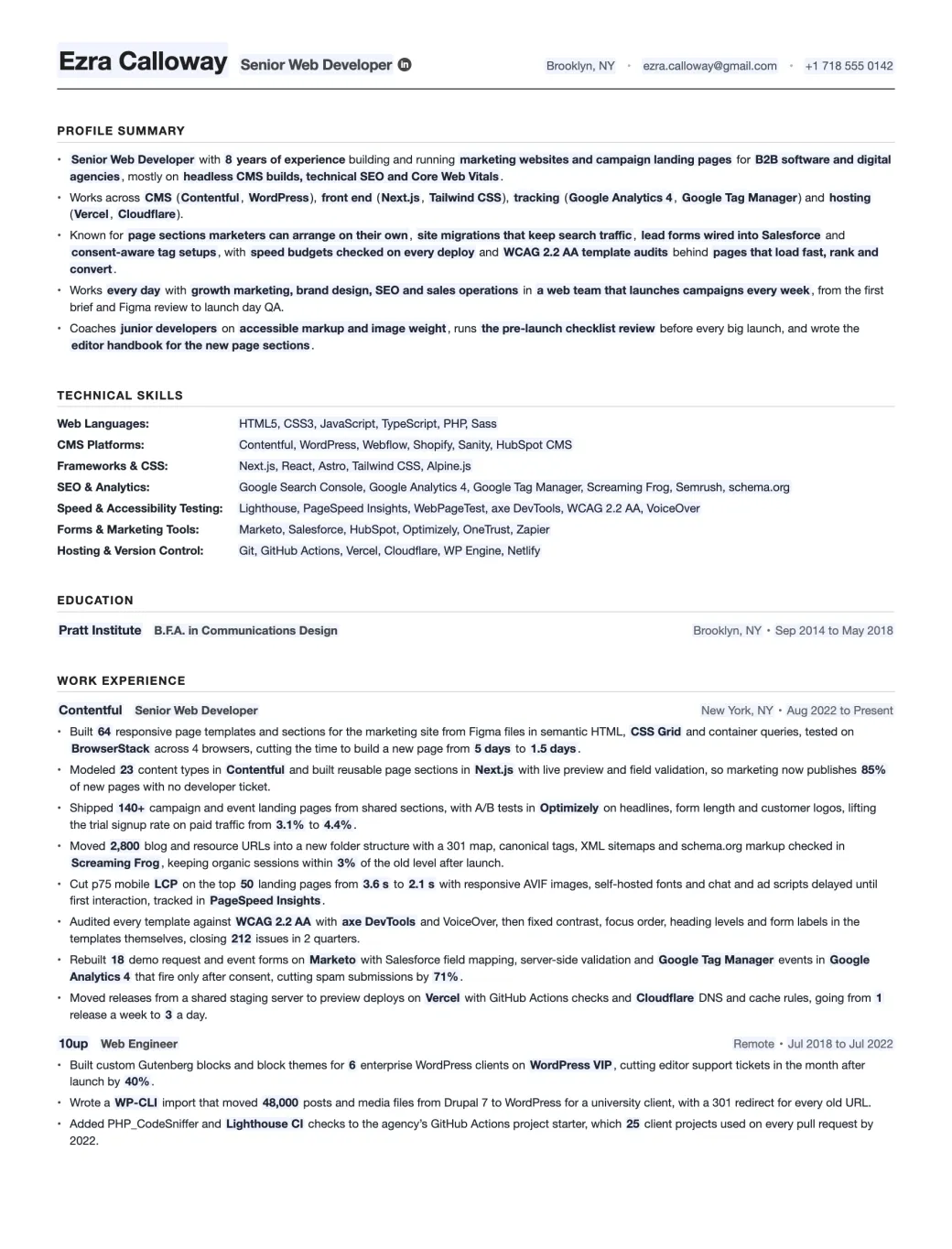
Filled-in Web Developer resume template for a senior web developer at Contentful: profile summary, 7 technical skills rows, education and 2 jobs with 11 bullets
Emmanuel Gendre Ex-Google recruiter / Tech resume writer Updated Free, ATS-friendly, no signup

Interactive resume template generator

Interactive Web Developer Resume Template

Fill in the side panel, then download your resume as a PDF or a Word file.

Edits update live as you type. Toggle Edit to rewrite paper text directly.

Edit mode is on. Click anywhere on the resume to rewrite text. Side-panel placeholders still update live.

Ezra Calloway Senior Web Developer

Brooklyn, NY • ezra.calloway@gmail.com • +1 718 555 0142

Profile Summary

  • Senior Web Developer with 8 years of experience building and running marketing websites and campaign landing pages for B2B software and digital agencies, mostly on headless CMS builds, technical SEO and Core Web Vitals.
  • Works across CMS (Contentful, WordPress), front end (Next.js, Tailwind CSS), tracking (Google Analytics 4, Google Tag Manager) and hosting (Vercel, Cloudflare).
  • Known for page sections marketers can arrange on their own, site migrations that keep search traffic, lead forms wired into Salesforce and consent-aware tag setups, with speed budgets checked on every deploy and WCAG 2.2 AA template audits behind pages that load fast, rank and convert.
  • Works every day with growth marketing, brand design, SEO and sales operations in a web team that launches campaigns every week, from the first brief and Figma review to launch day QA.
  • Coaches junior developers on accessible markup and image weight, runs the pre-launch checklist review before every big launch, and wrote the editor handbook for the new page sections.

Technical Skills

Web Languages:
HTML5, CSS3, JavaScript, TypeScript, PHP, Sass
CMS Platforms:
Contentful, WordPress, Webflow, Shopify, Sanity, HubSpot CMS
Frameworks & CSS:
Next.js, React, Astro, Tailwind CSS, Alpine.js
SEO & Analytics:
Google Search Console, Google Analytics 4, Google Tag Manager, Screaming Frog, Semrush, schema.org
Speed & Accessibility Testing:
Lighthouse, PageSpeed Insights, WebPageTest, axe DevTools, WCAG 2.2 AA, VoiceOver
Forms & Marketing Tools:
Marketo, Salesforce, HubSpot, Optimizely, OneTrust, Zapier
Hosting & Version Control:
Git, GitHub Actions, Vercel, Cloudflare, WP Engine, Netlify

Education

Pratt Institute B.F.A. in Communications Design
Brooklyn, NY • Sep 2014 to May 2018

Work Experience

Contentful Senior Web Developer
New York, NY • Aug 2022 to Present
  • Built 64 responsive page templates and sections for the marketing site from Figma files in semantic HTML, CSS Grid and container queries, tested on BrowserStack across 4 browsers, cutting the time to build a new page from 5 days to 1.5 days.
  • Modeled 23 content types in Contentful and built reusable page sections in Next.js with live preview and field validation, so marketing now publishes 85% of new pages with no developer ticket.
  • Shipped 140+ campaign and event landing pages from shared sections, with A/B tests in Optimizely on headlines, form length and customer logos, lifting the trial signup rate on paid traffic from 3.1% to 4.4%.
  • Moved 2,800 blog and resource URLs into a new folder structure with a 301 map, canonical tags, XML sitemaps and schema.org markup checked in Screaming Frog, keeping organic sessions within 3% of the old level after launch.
  • Cut p75 mobile LCP on the top 50 landing pages from 3.6 s to 2.1 s with responsive AVIF images, self-hosted fonts and chat and ad scripts delayed until first interaction, tracked in PageSpeed Insights.
  • Audited every template against WCAG 2.2 AA with axe DevTools and VoiceOver, then fixed contrast, focus order, heading levels and form labels in the templates themselves, closing 212 issues in 2 quarters.
  • Rebuilt 18 demo request and event forms on Marketo with Salesforce field mapping, server-side validation and Google Tag Manager events in Google Analytics 4 that fire only after consent, cutting spam submissions by 71%.
  • Moved releases from a shared staging server to preview deploys on Vercel with GitHub Actions checks and Cloudflare DNS and cache rules, going from 1 release a week to 3 a day.
10up Web Engineer
Remote • Jul 2018 to Jul 2022
  • Built custom Gutenberg blocks and block themes for 6 enterprise WordPress clients on WordPress VIP, cutting editor support tickets in the month after launch by 40%.
  • Wrote a WP-CLI import that moved 48,000 posts and media files from Drupal 7 to WordPress for a university client, with a 301 redirect for every old URL.
  • Added PHP_CodeSniffer and Lighthouse CI checks to the agency’s GitHub Actions project starter, which 25 client projects used on every pull request by 2022.


Done editing? Download a real PDF (selectable text, ATS-friendly, US Letter) or an editable Word file if a recruiter asks for one.

About this template

A Web Developer resume template, built by a tech recruiter.

Web developers look after the website itself, from the first Figma frame to the server it runs on. You code pages in HTML, CSS and JavaScript, set up the themes and content models editors work in (WordPress, Shopify, Contentful), and get campaign pages live before the ads start. Then there’s the stuff nobody thanks you for until it breaks: rankings, page speed, accessibility, lead forms, tracking tags and hosting.

Pull 10 web developer resumes off the pile and you’ll mostly see a row of logos. HTML, CSS, JavaScript, WordPress, maybe React, and a line about “building responsive websites”. Everybody who’s applied for that job has typed the same thing. None of those logos impress a hiring manager. What they want is evidence the sites worked: how many you launched, rankings that survived a migration, seconds shaved off a slow page and leads that came in after you fixed a form.

Ezra, whose details fill this template, runs Contentful’s marketing site. I’ve given his current job 8 bullets, a bullet per part of web development from page builds to hosting, and each closes on a figure. Scroll past his resume for 3 more finished ones. Starting from zero? Read those, then work down my list of 6 steps to write a Web Developer resume.

50 applications out and no replies? There’s a form under the samples where you can upload your resume. For a CV review, I read it myself and highlight the bullets that list a tool but never say what the site got out of it.

Industry signal

What the market says about Web Developer roles

Web development isn’t growing fast: BLS figures show 4% growth for web developers over the decade to 2035. Demand holds up because of the rules websites now answer to. Online stores that sell to EU customers must follow the European Accessibility Act, which has applied since June 28, 2025. In the US, cities, counties and states with 50,000+ residents must reach WCAG 2.1 AA by April 26, 2027, after a one-year extension. Add WordPress 7.0 in May and 2 Google core updates by June, and every site needs someone keeping it fast, findable and patched.

13,600 Openings a year, US web devs and designers BLS Occupational Outlook Handbook
$92,650 Median US web developer pay, May 2025 BLS Occupational Outlook Handbook
  • WordPress @WordPress · Official WordPress account
    WordPress 7.0.2 is now available. This security release addresses 1 critical and 1 high severity issue, including a REST API vulnerability that could lead to remote code execution. Update your sites now. wp.me/pZhYe-5vp
  • Webflow @webflow · Official Webflow account
    Six months ago, we rebuilt our website. Not because it was broken (it was beautiful), because machines couldn't see what made it great. We discovered something that's reshaping how smart brands think about their sites: your homepage now has three jobs. 1. Represent your brand…
  • Google Search Central @googlesearchc · Official Google Search Central account
    Today we released the March 2026 core update. We'll update our ranking release history page when the rollout is complete: status.search.google.com/incidents/7eTb…

Resume Samples

Web Developer Resume Examples

Web developer jobs change a lot from one employer to the next, so these web developer resume samples sit in 3 very different seats. At junior level, Renata builds client WordPress sites at a Pennsylvania marketing agency. The senior sample works on Shopify’s own free themes. Genevieve, the lead, manages developers on client sites at a Brooklyn agency. You can download each one as a PDF or a Word file, free and with no signup.

Junior Web Developer Resume Example

A junior web developer resume has to prove you’ve launched real sites, not just practiced. Count the sites, list the CMS and say what you fixed on them: speed, accessibility, tracking. Freelance work for paying clients is experience too, so it gets its own entry with dates, like any other job.

Years of experience
3 years
Industry
Digital marketing agency
Stack
WordPressPHPGoogle Tag ManagerWP Engine
Download PDF Download Word

Click to download the Junior Web Developer resume example as a PDF or a Word file. Free / No signup.

Renata Dvořák

Junior Web Developer

Harrisburg, PA · renata.dvorak@gmail.com · +1 717 555 0186 · linkedin.com/in/renatadvorak

Profile Summary

  • Junior Web Developer with 3 years of client website work, the last 2 at WebFX building WordPress sites for home service, healthcare and law firm clients, after a year of freelance projects.
  • Builds with WordPress, PHP and Advanced Custom Fields, writes HTML, CSS and plain JavaScript, and sets up Google Tag Manager and GA4 before every launch.
  • Strongest on mobile page speed and WCAG 2.2 AA fixes, checking each new site with Lighthouse and axe DevTools before it goes to the client for sign-off.
  • Works with designers, SEO specialists and account managers on 4 to 6 launches at a time, and joins client calls to walk owners through their new editing screens.
  • Wrote the agency’s image export checklist for designers and answers questions in the WordPress support forums on block themes.

Technical Skills

Web Languages:
HTML5, CSS3, JavaScript, PHP (WordPress hooks and templates), Sass
CMS Platforms:
WordPress, Advanced Custom Fields, custom Gutenberg blocks, Webflow, Shopify (basics)
Frameworks & CSS:
Bootstrap, Tailwind CSS, jQuery, Alpine.js
SEO & Analytics:
Google Search Console, Google Analytics 4, Google Tag Manager, Semrush, schema.org
Speed & Accessibility Testing:
Lighthouse, PageSpeed Insights, axe DevTools, WAVE, WCAG 2.2 AA
Forms & Marketing Tools:
Gravity Forms, HubSpot forms, Mailchimp, CallRail
Hosting & Version Control:
Git, GitHub, WP Engine, Cloudflare, cPanel
Page 2 of 2

Work Experience

WebFX Junior Web Developer Harrisburg, PA · Aug 2024 to Present
  • Built 23 client WordPress sites from Figma mockups with custom block themes, semantic HTML and mobile-first CSS, each checked in Safari, Chrome and on a real Android phone before launch.
  • Created 40+ custom Gutenberg blocks with Advanced Custom Fields for service and location pages, so client staff can add a new office or service without asking the agency.
  • Took the average mobile Lighthouse performance score on new launches from 61 to 88 by converting images to WebP, lazy-loading video embeds and removing unused plugins.
  • Fixed 310 WCAG 2.2 AA issues found with axe DevTools and WAVE across 9 client sites, mostly missing alt text, low-contrast buttons and form fields with no labels.
  • Set up GA4 conversion events through Google Tag Manager on 14 client sites, tracking calls, form fills and quote requests so account managers can report leads by page.
Freelance Web Developer Lancaster, PA · Jun 2023 to Jul 2024
  • Built ad campaign landing pages in Webflow for 5 local businesses, with one offer and one short form per page, taking a bakery’s catering inquiries from 4 to 11 a month.
  • Moved a law firm’s 120-page site from Wix to WordPress with a full 301 redirect map and schema.org markup, keeping all 18 of its page-one Google rankings.
  • Moved 7 client sites from shared hosting to WP Engine with Cloudflare DNS, nightly backups and automatic plugin updates, then ran monthly maintenance for each one.

Education

The Pennsylvania State University B.A. in Communications University Park, PA · Aug 2019 to May 2023

Senior Web Developer Resume Example

At senior level, a web developer resume should show the sites or themes you own and the standards they meet: speed, accessibility, structured data. Hiring managers look for one big rebuild with before and after numbers. Say which CMS you’re deepest in, since a Shopify team and a WordPress team don’t hire for the same things.

Years of experience
8 years
Industry
E-commerce platform
Stack
ShopifyJavaScriptCSS3Lighthouse
Download PDF Download Word

Click to download the Senior Web Developer resume example as a PDF or a Word file. Free / No signup.

Davide Caruso

Senior Web Developer

Toronto, ON · davide.caruso@gmail.com · +1 416 555 0173 · linkedin.com/in/davidecaruso

Profile Summary

  • Senior Web Developer with 8 years of experience, the last 4 on Shopify’s free themes, after 4 years building marketing and landing pages at Wattpad.
  • Works in Liquid, HTML, modern CSS and plain JavaScript web components, with Shopify CLI, Theme Check and GitHub for every theme release.
  • Strongest on theme blocks merchants can rearrange, fast product pages and accessible cart and filter flows, tested with Lighthouse, axe DevTools and screen readers.
  • Works with theme designers, the Theme Store review team and app developers who build on the theme, from the first Figma file to merchant feedback after release.
  • Reviews pull requests for 4 developers on the themes team and wrote the internal guide to writing theme blocks that stay fast.

Technical Skills

Web Languages:
HTML5, CSS3, JavaScript, TypeScript, Liquid
CMS Platforms:
Shopify, Shopify theme editor, Contentful, WordPress
Frameworks & CSS:
Web components, React, Tailwind CSS, Sass
SEO & Analytics:
Google Search Console, Google Analytics 4, Google Tag Manager, schema.org
Speed & Accessibility Testing:
Lighthouse, Theme Check, WebPageTest, axe DevTools, NVDA, VoiceOver
Forms & Marketing Tools:
Optimizely, Shopify Forms, Klaviyo, Mailchimp
Hosting & Version Control:
Git, GitHub, Shopify CLI, Netlify, Cloudflare
Page 2 of 2

Work Experience

Shopify Senior Developer, Themes Toronto, ON (remote) · Mar 2022 to Present
  • Built 31 theme blocks and sections in Liquid and JSON templates for the Horizon theme family, so merchants can rearrange product and collection pages in the theme editor without code.
  • Rebuilt the product gallery, cart drawer and quick-add modal as plain JavaScript web components with no framework, shipping 18 KB less JavaScript on each product page.
  • Raised the median mobile Lighthouse performance score on test store product pages from 71 to 89 by preloading the main image and deferring app embeds until first interaction.
  • Ran WCAG 2.2 AA audits on the cart, filters and product forms with axe DevTools, NVDA and VoiceOver, fixing 96 issues before the release reached merchants.
  • Added Product, Offer and BreadcrumbList structured data and clean canonical tags to collection and product templates, cutting rich result errors in Search Console on test stores to 0.
Wattpad Web Developer Toronto, ON · Jul 2018 to Feb 2022
  • Built landing pages for writing contests and the creator program, with Optimizely tests on signup form length, raising writer signups from contest pages by 22%.
  • Moved web tracking from hard-coded snippets to Google Tag Manager with a shared data layer, cutting the time to add a new marketing tag from 2 weeks to 1 day.
  • Set up Netlify preview deploys and a GitHub Actions build for the marketing site, so the brand team reviewed every change on a live URL, and rollbacks fell from 6 a year to 0.

Education

Politecnico di Torino B.Sc. in Computer Engineering Turin, Italy · Sep 2015 to Jul 2018

Lead Web Developer Resume Example

A lead web developer resume is about the sites your team ships and the rules you set for them: the CMS choice, the SEO plan for a migration, the accessibility standard. Open with the team size and the clients or brands you cover. Keep a bullet or 2 that show you still build, because most lead roles still write code.

Years of experience
12 years
Industry
Digital agency
Stack
ContentfulNext.jsGoogle Search ConsoleVercel
Download PDF Download Word

Click to download the Lead Web Developer resume example as a PDF or a Word file. Free / No signup.

Genevieve Tremblay

Lead Web Developer

Brooklyn, NY · genevieve.tremblay@gmail.com · +1 347 555 0128 · linkedin.com/in/genevievetremblay

Profile Summary

  • Lead Web Developer with 12 years of experience, leading 6 developers on client websites at Huge after 6 years on magazine brand sites at Condé Nast.
  • Plans builds on Contentful, WordPress and Sanity with Next.js front ends, hosted on Vercel and Netlify behind Cloudflare.
  • Known for large CMS migrations with no search traffic loss, multi-brand content models and accessibility standards built into the agency’s process, with speed budgets set per template.
  • Works with client marketing and IT leads, strategists, designers and SEO partners, and writes the technical scope and estimates for new site pitches.
  • Hired and coaches 4 of the 6 developers on the team, runs weekly code reviews, and wrote the agency’s launch checklist for every new site.

Technical Skills

Web Languages:
HTML5, CSS3, JavaScript, TypeScript, PHP
CMS Platforms:
Contentful, WordPress, Sanity, Drupal, Adobe Experience Manager
Frameworks & CSS:
Next.js, React, Astro, Tailwind CSS
SEO & Analytics:
Google Search Console, Google Analytics 4, Google Tag Manager (server-side), Ahrefs, Screaming Frog
Speed & Accessibility Testing:
Lighthouse CI, WebPageTest, SpeedCurve, axe-core, WCAG 2.2 AA
Forms & Marketing Tools:
Salesforce, HubSpot, OneTrust, Optimizely
Hosting & Version Control:
Git, GitHub Actions, Vercel, Netlify, Cloudflare, AWS
Page 2 of 2

Work Experience

Huge Lead Web Developer Brooklyn, NY · Apr 2020 to Present
  • Led 6 web developers in rebuilding a hotel group’s brand sites on one Contentful space with shared content models and a Next.js front end, now used by regional editors in 9 countries.
  • Planned the SEO side of that migration across 14,000 URLs, with redirect maps, hreflang for 6 languages and crawl comparisons in Screaming Frog before and after launch.
  • Made WCAG 2.2 AA the build standard for every new client site, with axe-core checks in CI and screen reader tests before launch, cutting issues found in client audits from about 120 per site to under 15.
  • Brought p75 mobile LCP under 2.5 s on 11 of 12 client sites in 2025 by setting image and script budgets per template and moving marketing tags to server-side tagging.
  • Moved 20 client sites off a shared agency server onto Vercel and Netlify projects owned by each client, cutting hosting incidents from 9 in 2021 to 1 in 2024.
Condé Nast Senior Web Developer New York, NY · Jul 2014 to Mar 2020
  • Built responsive article, gallery and recipe templates for 4 magazine brands, tested on the 20 phone and browser pairs that brought in most of their traffic before each release.
  • Shipped subscription landing pages with A/B tests on offer copy and price layout, raising paid subscription starts from those pages by 17%.
  • Moved newsletter signup forms to one shared component with events sent through Google Tag Manager, taking weekly signups across the brands from 9,000 to 14,500.

Education

New York University B.S. in Integrated Digital Media Brooklyn, NY · Sep 2010 to May 2014

Free resume review

A recruiter screen, but with feedback

You applied to hundreds of jobs: no result. Companies won’t give you feedback, so you’re stuck in a loop. Rejections will keep coming until you know what’s wrong.

Let’s break this cycle today!

I’ll screen your resume the same way I did at Google.

You’ll get:

  • Your resume sections and content scored.
  • A clear list of what to improve, why, and how.
  • Behind the scenes secrets on the screening process.

How I rewrite Web Developer resumes

How to write a Web Developer resume

Emmanuel Gendre, ex-Google recruiter

Emmanuel Gendre Ex-Google recruiter, tech resume writer

My recruiting years add up to 13, and a big chunk of them were inside Google. Lately, the web developer resumes in my inbox keep making one mistake. Somebody has shipped 40 client sites, or moved a 3,000-page blog to a new CMS without dropping a ranking, and all their resume says is “Developed websites using WordPress, HTML and CSS”. A person who installed one theme last weekend could claim the same.

On my technical resume writer service, a bullet isn’t done until it says which site, what changed and by how much. If you’re doing it yourself, though, focus on these 6 steps. Every step comes with an example taken from web developer work.

  1. Step 1 Format & layout Fonts, margins, headings, and whether to send PDF or Word. Go to step 1
  2. Step 2 Profile Summary Your title, CMS stack, strengths and team, in 5 bullets. Go to step 2
  3. Step 3 Work Experience Your current job, page builds to hosting, in 8 bullets. Go to step 3
  4. Step 4 Bullet Points Take “built a landing page” up to a line with a real number. Go to step 4
  5. Step 5 Technical Skills 7 rows from HTML to hosting, then 5 soft skills. Go to step 5
  6. Step 6 Keywords & Metrics Keyword tiers, a job post scanner, 24 metrics for web work. Go to step 6

Step 1 · Format & Layout

Web Developer resume format and layout

I sort out the format before I touch a bullet. It costs almost nothing and helps twice. A parser has to read the file, and a tired recruiter has to spot your job titles in seconds. A fancy layout trips up both.

01ATS Compliance

ATS compliance for your Web Developer resume

Agencies and in-house teams alike run every application through software called an Applicant Tracking System (ATS). Your text gets split into fields like employer and skills, and recruiters search them for months afterward. Skills placed in a sidebar column or a floating box often don’t get parsed, so a search for “Shopify” or “WordPress” never finds you. If you want the mechanics, read how ATS software reads resumes. For a WordPress or Shopify developer, staying visible to that search comes down to 3 rules:

The 3 rules
  1. Use a 100% text based format (no Canva!)

  2. Avoid tables, pictures, and complex structures.

  3. Use the most predictable section names, like “Profile Summary” and “Work Experience”

02Design & Layout

Web Developer resume design and layout

No one sends me more designed resumes than web developers: gradient headers, skill bars, the odd QR code pointing at a portfolio. I understand the urge when design is part of your work. Still, I’ll be honest with you: recruiters hate fancy designs. Around 10am they’re on resume number 50, and they want each job title exactly where they expect it.

Go plain on purpose. Arial or Calibri at 10 to 11 points, one column, and the usual headings (Work Experience, Technical Skills, Education). Your portfolio and the live sites in your bullets can carry the design, and that’s where a hiring manager will look for it. If you’re formatting a document by hand, the template’s exact settings are listed below.

Layout Spec
Columns
One. No sidebars, tables, columns, pictures or tabs.
Margins
0.7 in on all four sides
Body size
10 to 11 pt
Type
One family, weight for hierarchy
Length
One page under 5 years, two after
Section order
Summary, Skills, Experience, Education
PDF

03File Format

Resume file format for your Web Developer resume

PDF wins for a web developer resume nearly every time. Margins and fonts don’t move between a Mac and a Windows laptop, parsers handle PDF text well (scanned images are the exception), and nobody edits your wording by accident. Save the .docx for an application form or a recruiter that insists on Word. My PDF vs Word comparison for resumes has the rest.

Format Guide
PDF
Your default. Layout holds, text stays selectable.
Word (.docx)
When the posting or a recruiter asks for it. Use the Word download above.
Plain text
For portals that make you paste into a box
Never
Images, scans, password-protected PDFs, shared-drive links
File name
Ezra-Calloway-Web-Developer.pdf

Step 2 · Profile Summary

Web Developer profile summary

Junior or freelance, put a profile summary above everything else. It took the place of the career objective, and for good reason: a recruiter wants the sites you’ve shipped, not the job you dream about. Those 5 lines are all a recruiter reads in round one. The second round is covered in my guide to the 2 rounds of a resume screen.

Web developer summaries need to answer 3 questions before the recruiter scrolls: which CMS and tools you use, which sites you look after (client builds, a marketing site, a store) and what level you’re at. Below, every bullet carries one piece of that. For other tech jobs, see my profile summary examples for tech resumes.

  1. 1

    Title, years and scope

    Use the exact job title in the ad you’re answering, whether that’s Web Developer, WordPress Developer or Web Engineer. Your years and the sites you run come next: agency client builds, a SaaS marketing site, Shopify stores. From this bullet alone, a recruiter can place you.

  2. 2

    Your stack

    Group the stack with a small label before each set: CMS, front end, tracking, hosting. Precision pays off, because “WordPress block themes” and a bare “WordPress” tell an agency 2 very different stories.

  3. 3

    Domain expertise

    Pick your 3 or 4 strengths, such as redirect-safe migrations, page sections editors like or landing pages that load fast, and the way you approach each. Hiring managers use this bullet to work out which project they’d hand you first.

  4. 4

    Collaboration

    Designers, marketers, SEO specialists, account managers and clients all hand you requests. List them, plus where the work happens: kickoff calls, design reviews, launch day QA. Turning their asks into pages is half of what you do.

  5. 5

    Leadership

    A launch checklist you wrote, code reviews, a junior you brought up to speed, editor training for a client. Managing people isn’t required. Recruiters want to see that you’ve made other people’s work easier.

Web Developer resume summary example, from the template above
  • Senior Web Developer with 8 years of experience building and running marketing websites and campaign landing pages for B2B software and digital agencies, mostly on headless CMS builds, technical SEO and Core Web Vitals.
  • Works across CMS (Contentful, WordPress), front end (Next.js, Tailwind CSS), tracking (Google Analytics 4, Google Tag Manager) and hosting (Vercel, Cloudflare).
  • Known for page sections marketers can arrange on their own, site migrations that keep search traffic, lead forms wired into Salesforce and consent-aware tag setups, with speed budgets checked on every deploy and WCAG 2.2 AA template audits behind pages that load fast, rank and convert.
  • Works every day with growth marketing, brand design, SEO and sales operations in a web team that launches campaigns every week, from the first brief and Figma review to launch day QA.
  • Coaches junior developers on accessible markup and image weight, runs the pre-launch checklist review before every big launch, and wrote the editor handbook for the new page sections.

Step 3 · Work Experience

Web Developer work experience

Once you’re past the first screen, your Work Experience gets a slower read. From here on, the job you hold now counts for roughly 95% of the decision, and you can see why: today’s CMS, sites and team are all in it.

So the current job gets one bullet per core skill on the web developer role profile. That’s 8 bullets. Recruiters screen against that profile, and holes stand out. Mention a redesign but nothing about redirects, and the hiring manager will assume the SEO team handled them.

Web Developer role profile
  1. Responsive Page Builds

    You code Figma files into pages that look right at every screen size. When a layout falls apart in Safari or on a small Android phone, the client notices before you do, and that’s the bug hiring managers dread. Show them which layout methods (CSS Grid, container queries) and testing setup like BrowserStack got your pages live sooner, with fewer fixes after launch.

    Techniques
    semantic HTML, mobile-first CSS, container queries, cross-browser testing
    Tools
    Figma, CSS Grid, BrowserStack, Chrome DevTools
    Metrics
    pages shipped, build time per page, layout bugs after launch
  2. CMS Themes & Content Models

    You configure the CMS so editors publish without pinging a developer. Every content tweak that needs a ticket costs marketing a day or two, and it adds up fast over a quarter. Explain which blocks, Liquid sections or Contentful content types you created, and the share of pages the team now ships on its own.

    Techniques
    block themes, custom blocks, content modeling, live preview
    Tools
    WordPress, Advanced Custom Fields, Shopify Liquid, Contentful
    Metrics
    content types, pages published by editors, developer tickets
  3. Landing Pages & A/B Tests

    You get campaign pages up on the morning the ads go live. Paid clicks that land on a slow or broken page are wasted budget, so growth teams hire people who move fast and still measure. Describe the shared sections and the Optimizely or VWO tests you ran, and what they did to signups or leads.

    Techniques
    page variants, A/B tests, UTM personalization, launch checklists
    Tools
    Optimizely, VWO, Webflow, Unbounce
    Metrics
    conversion rate, signup rate, cost per lead
  4. Technical SEO & Site Migrations

    You protect a site’s Google traffic through redesigns, CMS moves and domain changes. If you skip one redirect map, years of rankings can vanish within days, and most marketing directors have seen it happen. Walk them through your 301 maps, canonical tags and Screaming Frog crawls, then the organic numbers after launch.

    Techniques
    301 redirect maps, canonical tags, XML sitemaps, structured data
    Tools
    Google Search Console, Screaming Frog, Semrush, schema.org
    Metrics
    organic sessions, indexed pages, rankings kept
  5. Page Speed & Core Web Vitals

    You make pages quick on a mid-range phone over patchy 4G. Slow pages lose visitors and rankings, and any hiring manager can paste your old URLs into PageSpeed Insights before the interview. Tell them which image formats, font settings and script delays you used, and what they did to LCP or INP.

    Techniques
    responsive images, font loading, script deferral, CDN caching
    Tools
    PageSpeed Insights, Lighthouse, WebPageTest, Cloudflare
    Metrics
    LCP, INP, CLS
  6. Accessibility & WCAG Compliance

    You remove what blocks people who browse with a keyboard or a screen reader. With lawsuits in the US and new rules in the EU, accessibility isn’t a bonus anymore. It’s legal exposure. Point out the audits you ran with axe DevTools and real screen readers, and how many WCAG 2.2 AA issues you closed.

    Techniques
    WCAG audits, keyboard testing, screen reader checks, accessible templates
    Tools
    axe DevTools, WAVE, VoiceOver, NVDA
    Metrics
    issues closed, Lighthouse accessibility score, pages audited
  7. Lead Forms, Analytics & Tags

    You connect the forms and tracking that marketing uses to defend its budget. Once a form stops sending leads to the CRM, or a tag counts every conversion twice, nobody believes the dashboard anymore. Mention the Google Tag Manager and GA4 setup you built, the CRM it feeds (HubSpot or Salesforce) and what it fixed in the lead data.

    Techniques
    form validation, CRM field mapping, consent mode, event tracking
    Tools
    Google Tag Manager, Google Analytics 4, HubSpot, Salesforce
    Metrics
    form completion rate, spam submissions, leads tracked
  8. Hosting, Deploys & Maintenance

    You run the hosting side: uptime, backups, updates and patches. One hacked WordPress install or lapsed SSL certificate ruins a client’s week and an agency’s reputation, so employers want proof you don’t let upkeep slide. Detail how Git deploys, staging sites and a host like WP Engine or Vercel let you release often without downtime.

    Techniques
    Git deploys, staging and preview sites, backups, plugin updates
    Tools
    WP Engine, Vercel, Netlify, Cloudflare
    Metrics
    uptime, release frequency, time to patch

Agency or freelance? Base every bullet on one client site: what you made, which CMS it runs on, what it did for the client. It’s worth listing 2 or 3 client industries beside the job title too, because in-house teams hire for them.

Submit your resume for a free review!

Step 4 · Bullet Points

Web Developer resume bullet points

Nothing in a rewrite takes me as long as the bullets, so I built a shortcut for them called the Level System. It starts from Google’s XYZ formula, then asks 2 extra questions web team leads care about: what you used, and how you went about it. The long version lives in my bullet point writing guide.

Think of 5 levels stacked on top of each other. Every level poses one question about the work. Answer it and the bullet grows a little. Your web bullets will usually end on seconds of load time, a conversion rate, organic sessions or pages shipped. Here’s a demo request page bullet climbing all 5.

  1. Level 1Task

    What did I work on? Start with one page or site you actually shipped. A task on its own doesn’t give a recruiter a reason to keep reading.

    Rebuilt the demo request page.

  2. Level 2+ Techniques

    How did I do it? Add the technique. It shows a choice you made, not just a ticket you closed.

    Rebuilt the demo request page with a shorter 2-step form and server-side validation.

  3. Level 3+ Tools

    What tools did I use? Write the CMS, the framework and the marketing tools by their real names. Each one is a keyword the ATS can match.

    Rebuilt the demo request page in Next.js and Contentful with a shorter 2-step form and server-side validation, sending leads to HubSpot.

  4. Level 4+ Method

    What method did I follow? Say how you checked that it worked: an A/B test, a tracking plan or a staged rollout.

    Rebuilt the demo request page in Next.js and Contentful with a shorter 2-step form and server-side validation, sending leads to HubSpot, A/B tested against the old page in Optimizely for 4 weeks.

  5. Level 5+ Metric

    What was the result? End on one number. That’s what turns the line into proof.

    Rebuilt the demo request page in Next.js and Contentful with a shorter 2-step form and server-side validation, sending leads to HubSpot, A/B tested against the old page in Optimizely for 4 weeks, lifting demo requests from paid traffic by 31%.

    1. 01 Task What you worked on
    2. 02 Techniques How you did it
    3. 03 Tools The stack you used
    4. 04 Method The method you followed
    5. 05 Metric The result, one number

GA4 has your conversion rates. Search Console has clicks and rankings, PageSpeed Insights has LCP, and the CMS can list every page you published. The numbers exist, and most web developers have simply never copied them onto a resume.

Step 5 · Technical Skills

Web Developer resume skills

Web developer ads mix code, platforms and marketing tools, so I split skills into 7 rows, from web languages and CMS platforms down to hosting. Spell every tool exactly like the ad does. An ATS search for “Google Tag Manager” won’t match a line that only reads “tag management”.

Your skills section is there to back up the bullets. So every CMS or tool you list ought to appear in a bullet too, because interviewers like to point at one item and ask for the story behind it. Coming next are the 7 categories and Ezra’s finished section, then the soft skills worth showing off. Keywords get their own step next.

The 7 skill categories for a Web Developer resume

The starred chips are in most web developer postings I see, which is why each one opens its row. Skip any tool you’ve never shipped a real site with.

Web Languages

HTML, CSS and JavaScript come first in nearly every posting. If you do WordPress work, add PHP, and add Liquid if you build Shopify themes.

HTML5CSS3JavaScriptTypeScriptPHPSassLiquid

CMS Platforms

The platforms you’ve built themes or content models on. WordPress leads in most ads, and you’ll see Webflow, Shopify and Contentful often too.

WordPressWebflowShopifyContentfulSanityHubSpot CMSDrupal

Frameworks & CSS

React or Next.js if you build headless sites, Astro for content sites, and whichever CSS framework you style with. jQuery’s still around on older agency sites.

ReactTailwind CSSNext.jsAstroBootstrapAlpine.jsjQuery

SEO & Analytics

Search Console for rankings and indexing, GA4 for visits and conversions, Google Tag Manager to wire it all up, plus whichever crawler or keyword tool you use.

Google Search ConsoleGoogle Analytics 4Google Tag ManagerSemrushAhrefsHotjarschema.org

Speed & Accessibility Testing

Lighthouse and PageSpeed Insights for load time, axe DevTools for accessibility. Write down the standard you test against, WCAG 2.2 AA, and not only the tool.

LighthouseWCAG 2.2PageSpeed InsightsWebPageTestChrome DevToolsaxe DevTools

Forms & Marketing Tools

The CRM and marketing tools your forms feed. If you’re on a marketing web team, that’s usually HubSpot or Salesforce, plus a consent tool like OneTrust.

HubSpotSalesforceMailchimpZapierOneTrust

Hosting & Version Control

Where your sites live and how you ship them: Git, a host like WP Engine, Netlify or Vercel, and Cloudflare for DNS and caching. Don’t forget staging.

GitCloudflareGitHubVercelNetlifyWP EngineAWS

A finished Web Developer skills section

Technical Skills sample, from the template above
Web Languages
HTML5, CSS3, JavaScript, TypeScript, PHP, Sass
CMS Platforms
Contentful, WordPress, Webflow, Shopify, Sanity, HubSpot CMS
Frameworks & CSS
Next.js, React, Astro, Tailwind CSS, Alpine.js
SEO & Analytics
Google Search Console, Google Analytics 4, Google Tag Manager, Screaming Frog, Semrush, schema.org
Speed & Accessibility Testing
Lighthouse, PageSpeed Insights, WebPageTest, axe DevTools, WCAG 2.2 AA, VoiceOver
Forms & Marketing Tools
Marketo, Salesforce, HubSpot, Optimizely, OneTrust, Zapier
Hosting & Version Control
Git, GitHub Actions, Vercel, Cloudflare, WP Engine, Netlify

Soft skills for a Web Developer resume

“Detail-oriented team player” is filler to a hiring manager. The 5 behaviours below aren’t, as long as you prove them with a bullet from a real web project.

  • Turning a vague client brief into a written scope

    Resume bulletTurned a client’s one-line “refresh our site” brief into a 6-page written scope, and the project shipped on budget with no change orders.

  • Showing marketers what a new script costs in page speed

    Resume bulletShowed the marketing team that a new chat widget added 1.2 s to mobile LCP, so it now loads only on the pricing and contact pages.

  • Training editors to publish pages without a developer

    Resume bulletTrained 25 content editors on the new page sections, and page change requests to the web team fell by half within a quarter.

  • Holding a launch date when the copy arrives late

    Resume bulletBuilt a launch page with placeholder copy and swappable sections, then loaded the final text 2 hours before the announcement email went out.

  • Leaving every site documented for whoever runs it next

    Resume bulletWrote handover notes for all 14 client sites I looked after, covering hosting, plugins and DNS, so a new developer took over with no downtime.

Step 6 · Keywords & Metrics

Web Developer resume keywords and metrics

Before you hit apply, read your resume the way a recruiter searches it. They type keywords like “WordPress” or “Core Web Vitals” into the ATS, so use the same words the posting uses. The hiring manager then looks for metrics: seconds of LCP, leads, organic sessions, pages shipped.

Keyword tiers come first (must-have, strong, bonus). Next to them sits a scanner: paste an ad and it’ll pull out the keywords. The final table lists 24 metrics by area of the role, each used in an example line you can adapt.

+42%

Web Developer resume keywords, ranked

Tapping a keyword shows the usual job ad phrasing. Ads word the same skill in lots of ways, and “technical SEO”, “SEO best practices” and “on-page optimization” tend to mean the same thing.

Must-have

8

Use these in your summary and skills section, and back each one with a bullet.

In a job description“Strong semantic HTML5 skills”

Strong supporting

10

Add the ones you’ve used to your skills rows and work them into 2 or 3 bullets.

In a job description“Improve LCP, INP and CLS on key pages”

Bonus

10

Mention them where they’re true. They help you stand out, but they rarely decide the screen.

In a job description“Experience building marketing sites in Webflow”

Extract Web Developer keywords from a job description

Got a web developer, WordPress developer or web engineer posting in another tab? Paste the full text into the box and you’ll see every language, CMS, SEO tool and tracking tool in it, grouped by tier. Anything true that your resume skips is worth adding.

Must-have
Put these in your skills section and back each one with a bullet.
Strong supporting
Add the ones you’ve actually worked with. Skip the rest.

Nothing is uploaded: it all happens in your browser.

Metrics for a Web Developer resume

Pick the metric from the same area as the bullet, one per line. A modest real figure is more convincing than an impressive vague one.

MetricExample bullet
Page builds
Pages and templates shipped Count Pages, templates or sections you built and launched.Built 64 page templates and sections for the marketing site, used on every new product page since.
Time to build a new page Time How long a page takes to go from approved design to live.Moved new pages onto shared sections, cutting build time from 5 days to 1.5 days.
Layout bugs after launch Count Display bugs reported on real devices in the weeks after a release.Added BrowserStack checks on 4 browsers before every launch, cutting layout bug reports from 19 to 4 a quarter.
CMS & content models
Content types modeled Count Content types, blocks or sections you built for editors.Modeled 23 content types in Contentful that cover every page on the marketing site.
Pages published without a developer Percent Share of new pages editors publish on their own.Built reusable page sections with live preview, so marketing now publishes 85% of new pages without a developer ticket.
Content change tickets Count Requests editors send the web team for text, image or layout changes.Added editable hero and pricing sections, cutting content change tickets from 60 to 14 a month.
Landing pages & tests
Landing pages shipped Count Campaign, event and product pages launched.Shipped 140+ landing pages in 3 years, each one live before its ads started running.
Conversion rate Percent Share of visitors who sign up, request a demo or buy.Tested shorter forms and customer logos in Optimizely, lifting trial signups on paid traffic from 3.1% to 4.4%.
A/B tests run Count Experiments run on landing pages, with the winner shipped.Ran 37 A/B tests on landing pages in a year and shipped the winning version of 15 of them.
Technical SEO
Organic sessions after a migration Percent Organic traffic after a redesign or URL move, compared with before.Moved 2,800 blog URLs with a full 301 map and kept organic sessions within 3% of the old level.
Indexed pages Percent Share of the pages you want in Google that are actually indexed.Fixed canonical tags and the XML sitemap, raising indexed resource pages from 71% to 96%.
Structured data errors Count Rich result errors reported in Search Console.Rewrote the schema.org markup on event and blog templates, cutting Search Console errors from 340 to 0.
Page speed
Largest Contentful Paint (LCP) Time How long the main content takes to appear, at p75 on mobile.Cut p75 mobile LCP on the top 50 landing pages from 3.6 s to 2.1 s.
Interaction to Next Paint (INP) Time How long the page takes to respond to a tap or click, at p75.Delayed chat and ad scripts until first interaction, bringing p75 INP from 380 ms to 160 ms.
Cumulative Layout Shift (CLS) Score How much the layout jumps while the page loads.Reserved space for images and the cookie banner, taking CLS on blog posts from 0.24 to 0.04.
Accessibility
WCAG issues closed Count Accessibility issues found in audits and fixed.Closed 212 WCAG 2.2 AA issues across every template in 2 quarters.
Lighthouse accessibility score Score The automated accessibility score on key pages.Fixed contrast, labels and heading order, raising the median Lighthouse accessibility score from 78 to 98.
Pages tested by hand Count Pages checked with a keyboard and a screen reader, not only a tool.Tested 40 key pages with VoiceOver and the keyboard alone before the redesign went live.
Forms & tracking
Form completion rate Percent Share of visitors who start a form and finish it.Cut the demo form from 9 fields to 5, raising completion from 22% to 35%.
Spam submissions Percent Junk form entries that reach the CRM.Added server-side validation and a honeypot field, cutting spam submissions by 71%.
Conversion events tracked Count Conversion events firing correctly in GA4.Rebuilt the GA4 setup in Google Tag Manager with 26 conversion events that marketing reports on every week.
Hosting & deploys
Release frequency Frequency How often site changes go live.Moved to preview deploys on Vercel, going from 1 release a week to 3 a day.
Uptime Percent Share of time the site is up, from your monitoring tool.Added uptime checks and CDN failover, holding 99.98% uptime through 2025.
Time to patch Time How long a security update takes to reach production.Ran plugin updates on staging first, then live, cutting the time to patch WordPress security releases from 9 days to 1.

What if you don’t have exact numbers?

  • 1

    Open the dashboards first. GA4, Search Console, PageSpeed Insights and your hosting panel already track this stuff, usually with a year of history.

  • 2

    Estimate, then shave a bit off. “Around 30 client sites” is fine, provided you could defend the count in an interview.

  • 3

    Count what you look after. Nobody measured the result? Then give the scale: the sites, templates or clients that are yours to run.

Free resume review

A recruiter screen, but with feedback

You applied to hundreds of jobs: no result. Companies won’t give you feedback, so you’re stuck in a loop. Rejections will keep coming until you know what’s wrong.

Let’s break this cycle today!

I’ll screen your resume the same way I did at Google.

You’ll get:

  • Your resume sections and content scored.
  • A clear list of what to improve, why, and how.
  • Behind the scenes secrets on the screening process.

Frequently asked

Web Developer resume FAQ

Free, and I don’t ask for an email, a card or a trial sign-up. Type your own sites over Ezra’s and export.

Yes. Hit the Word button in the toolbar and you’ll get a .docx you can edit in Word, Google Docs or Pages. Renata, Davide and Genevieve’s resumes have .docx versions as well. I’d apply with the PDF anyway and save Word for a job portal that refuses anything else.

It is. You get a single column, the standard section names and selectable text. Skill bars, tables and text boxes, the usual things that confuse a parser, aren’t in it. Upload your current resume to my free ATS resume checker if you’d like to see how it parses.

Below 5 years, 1 page usually holds everything. More years, or a long agency client list, and 2 pages is fine. What a recruiter weighs is the content, not the length, and my article on resume length explains why.

Not usually. Most web developer postings don’t ask for a certificate, and links to live sites carry more weight. They can help in a few seats: Google’s Analytics certification or HubSpot Academy’s CMS for Developers on marketing web teams, and IAAP’s CPACC or WAS when the role is mostly accessibility work.

Whatever a site owner watches: LCP and INP from field data, signup or conversion rates, organic sessions after a migration, accessibility issues fixed, sites or pages launched. One per bullet is plenty. For ideas, the 24 metrics in Step 6 are grouped under the 8 parts of the job.

This page centers on whole websites: CMS, SEO, speed, forms, tracking and hosting. For components, state management and testing inside web apps, use a front-end developer resume template. Building APIs, databases and authentication as well? Try the full-stack developer resume template instead. If the ad mentions WordPress, landing pages and Search Console, you’re in the right place.

If you work on websites (marketing sites, client builds, online stores, CMS themes), use this template. If you ship product features and back-end services and apply to Software Engineer titles, switch to the software engineer resume template. It leads with system design and code quality.

Start with real sites. A site for a local shop, a nonprofit or a friend’s business counts, paid or not. Give it a Job 1 entry with the CMS, a link and one number, like its Lighthouse score or the inquiries it gets each month. Paid freelance work goes in the same way.

No. A recruiter sees the resume, not where the layout came from, and wouldn’t mind either way. What hurts is a sample bullet left in by accident, such as Ezra’s Contentful content types line, so reread it all before you hit send.

More resources

More help with your Web Developer resume